
-Understanding React Rendering Timing for Improved Screen Quality-
1. Issues discovered during the operation process: screen flickering phenomenon
While handling the frontend operations of this year's project, I organized the previously complex component structure to make it more understandable, and improved the repetitive state handling and style calculation logic. Most of the improvement work was closer to refactoring to enhance maintainability rather than functional changes, but in the process of reviewing the code, I also discovered UI quality issues that users could directly perceive.
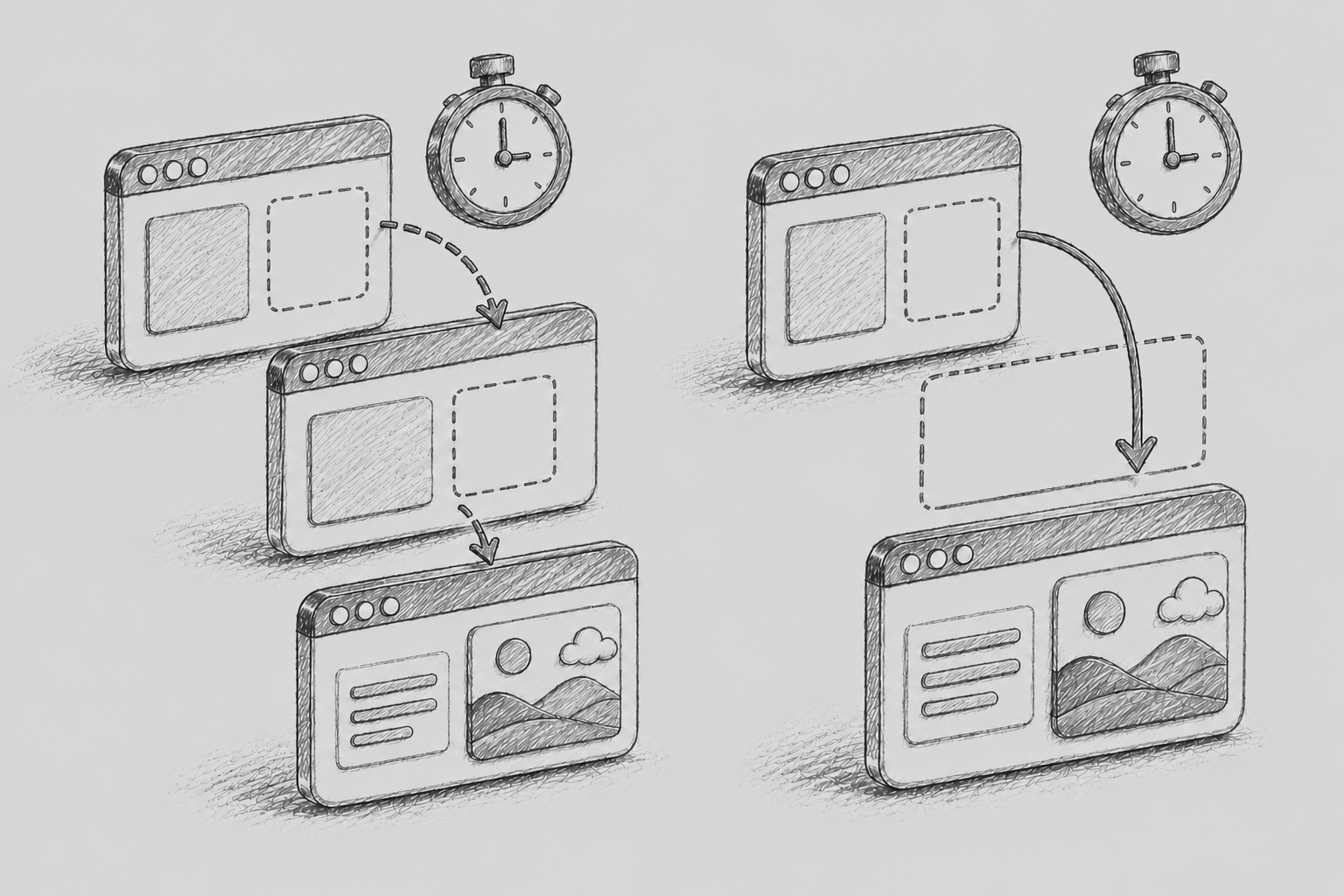
The most noticeable issue was that a specific component flickered unnaturally for a very brief moment when it was first displayed on the screen. Functionally, it operated normally, but as the screen was initially rendered in an incorrect size and then quickly adjusted to the correct size, it appeared to the user as if the layout was jumping. This phenomenon is commonly referred to as Flicker or Layout Shift.
The problematic component had to calculate its width according to the browser width. For example, it was structured to either use half of the browser width as the component width or rearrange internal elements based on the actual size of the parent element. However, in the existing implementation, this calculation was performed inside useEffect, which meant that the browser first rendered the screen and then the width adjustment logic was executed.
As a result, users saw both the incorrect width at the initial rendering point and the width after correction. It was a very short time, but visually felt like a flicker, and it could lead to quality degradation, especially in areas where the screen size changes frequently or where responsive layouts are important.
2. The key differences between useEffect and useLayoutEffect
useEffect and useLayoutEffect in React are both hooks for executing specific side effects after rendering. Since their usage is quite similar, the differences between the two hooks may not be very noticeable at first. However, there is a clear difference in the execution timing, and this difference becomes an important criterion for determining whether the screen flickers or not.
useEffect is executed asynchronously after the browser has actually painted the screen. In other words, it runs after React reflects the changes in the Virtual DOM to the actual DOM and the browser has completed the painting. Therefore, it is suitable for tasks such as data fetching, logging, subscribing, and registering event listeners that do not need to block the first paint of the screen.
In contrast, useLayoutEffect is executed synchronously right after the DOM changes are made, before the browser paints the screen. This means that if you measure the size or position of the DOM inside useLayoutEffect and change the state based on that result, the user will only see the final corrected screen without seeing the screen before correction.
Therefore, useLayoutEffect is more suitable for operations where the layout needs to be accurate before it is displayed on the screen, such as measuring the size of DOM elements, correcting scroll positions, calculating tooltip positions, or laying out modals or dropdowns. Conversely, if these operations are handled in useEffect, the user may briefly see a difference between the initial screen and the corrected screen, potentially creating a flickering effect.
|
Division |
useEffect |
useLayoutEffect |
|---|---|---|
|
Execution timing |
Executed after the browser has painted the screen |
Executed after the DOM has changed, before the screen is painted |
|
Execution method |
Execute asynchronously |
Executed synchronously |
|
Main use |
Data request, event subscription, log processing |
DOM measurement, size calculation, position adjustment |
|
Caution |
The initial screen calibration may have flicker |
Excessive use may cause rendering delays |
3. Issues with existing code
The existing code was designed to reset the state based on the browser width in useEffect after the component was mounted. While it may seem simple and problem-free from just the code itself, it has an inherent structure that can lead to flickering based on the actual rendering order.
During the initial rendering, the screen is drawn once with the initial value of useState. After that, once the browser paint is complete, useEffect runs and setWidth is called. When the state changes, React performs a re-render, and it is only then that the final width is reflected. This means that users will see both the pre-adjustment and post-adjustment screens.
Additionally, the existing code lacked responsiveness to the browser resize event. While the width is calculated at the initial rendering time, if there is no handling to recalculate the component width at the same ratio when the user changes the browser size, it will lack consistency as a responsive UI. Therefore, it was necessary to improve by adding a resize event listener along with the hook changes to respond to changes in screen size.
The existing code example is as follows.
export const ExampleComponent = () => {
  const [width, setWidth] = useState(window.innerWidth / 2);

useEffect(() => {
  setWidth(window.innerWidth / 2);
}, []);

return <div style={{ width: width, height: 100 }} />;
};
Improved code applying useLayoutEffect
The direction for improvement was clear. I had to complete the width calculation before rendering on the screen, so I changed useEffect to useLayoutEffect. useLayoutEffect runs immediately after DOM changes and before the browser actually paints the screen, which helped reduce the issue of the initial screen being displayed at the wrong size.
I also set up a resize event listener so that the component width is recalculated whenever the browser width changes. At this time, the event listener must be removed when the component unmounts; otherwise, unnecessary event handlers may remain, leading to memory leaks or duplicate execution issues.
Therefore, in the improved code, I've used addEventListener and removeEventListener together to clearly handle the registration and removal.
The modified code is as follows.
import { useLayoutEffect, useState } from 'react';

export const ExampleComponent = () => {
  const [width, setWidth] = useState(() => window.innerWidth / 2);

  useLayoutEffect(() => {
    const handleResize = () => {
      setWidth(window.innerWidth / 2);
    };

    handleResize();
    window.addEventListener('resize', handleResize);

    return () => {
      window.removeEventListener('resize', handleResize);
    };
  }, []);

  return l&tdiv style={{ width: width, height: 100 }} />;
;};
In this code, handleResize is executed once right after the component is mounted to adjust the state based on the current browser width. Then, the same calculation is performed again whenever a resize event occurs. The cleanup function removes the registered event listeners to ensure safe handling that matches the component's lifecycle.
Passing the initial value as a function like useState(() => window.innerWidth / 2) is a small improvement. The method of passing a function to useState is called Lazy Initialization, and implementing it this way means it is only calculated once during the initial rendering, which helps reduce unnecessary calculations. However, in a server-side rendering environment, the window object may not exist, so additional defensive logic is necessary.
5. When should useLayoutEffect be used?
useLayoutEffect is effective in reducing screen flickering, but it is not a hook that should be used instead of useEffect in all situations. Overusing useLayoutEffect can actually decrease initial rendering performance since it can delay the browser's paint.
Therefore, it is best to have a clear criterion. If there is no problem with user experience when executed after the screen is drawn, it is appropriate to use useEffect. Conversely, if you need to measure the DOM or correct positions before the screen is drawn, and the uncorrected screen should not be exposed to the user, you may consider using useLayoutEffect.
6. Effects and Reflections After Application
After applying useLayoutEffect, the unnatural flicker during the initial rendering phase disappeared, and the component width synchronized smoothly even when the browser size changed. The change was minor in functionality, but the quality of the screen visible to users has definitely improved.
Through this experience, I felt again that hooks used frequently, like useEffect, should be chosen more carefully. Just because the code is familiar doesn't mean it's always appropriate, and understanding the React rendering flow and browser paint timing can lead to a better UI.
In particular, in operational tasks, it is important not only to create new features but also to identify and improve small inconveniences that users experience in existing code. Even issues that seem trivial, like screen flicker, can become factors that lower the completeness of a service if they are repeatedly exposed.
Ultimately, this improvement was not just about understanding the difference between useEffect and useLayoutEffect in a purely syntactical way, but it became an opportunity to judge based on actual user experience. I felt that in the future, while using hooks, I need to consider 'when they execute', 'what impact they have on the screen', and 'whether the unmodified state can be shown to the user' to make more appropriate choices.
7. Points to consider for practical application
When applying useLayoutEffect, you also need to check if the code is executed only in the client environment. If you directly use browser-specific objects like window, document, or ResizeObserver, errors may occur in a server-side rendering environment.
Additionally, it is often more accurate to calculate based on the size of the parent container where the actual component is placed, rather than simply calculating based on the overall browser width. In this case, a window resize event alone may not be sufficient, and using ResizeObserver can allow for more precise tracking of size changes of specific DOM elements. For example, it can handle situations where the browser size remains the same but only the component area changes, such as when the sidebar opens/closes, tabs switch, or the parent layout changes.
However, if ResizeObserver is indiscriminately applied to too many elements, it can become a performance burden. Therefore, it is advisable to apply it only to the key elements where size measurement is genuinely required and to avoid unnecessary re-rendering by not calling setState if the calculation result is the same as the previous value. Although it may seem like a small difference, these detailed optimizations accumulate and impact the overall user experience in a production environment.
8. Summary: Be clear about the criteria for selecting hooks
In summary, the choice between useEffect and useLayoutEffect depends not on which hook is used more frequently, but on the browser's paint timing for that task. If there are no issues with the values displayed initially on the screen and if it is acceptable to handle them asynchronously later, then useEffect is appropriate. Conversely, if an incorrect layout should not be exposed to the user, useLayoutEffect should be considered. Screen shaking or flickering is not a functional error, but users may perceive it as an unstable screen. Thus, in frontend development, it is important to understand not only the data flow but also the rendering order, browser paint timing, and DOM measurement points together.
Ultimately, this improvement was not simply a matter of changing useEffect to useLayoutEffect, but a re-evaluation of the order in which the React components render in the actual browser and how they appear to the user.
In the future, when using hooks, it is important to make more accurate judgments based on the timing of when the code is executed and its impact on the user interface, rather than simply choosing out of habit.
9. Inspection criteria for preventing recurrence
To ensure similar problems do not recur, I established several criteria to check the components during the subsequent refactoring process.
The first is to verify whether state changes actually alter the size or position of the screen. If it's just storing data or external communication, useEffect is sufficient, but if the result of the state change directly affects the layout, the execution timing needs to be reviewed.
The second is to check whether it is acceptable for the initial rendering value to be exposed to the user. If the pre-correction state appears awkward to the user, such as a Tooltip in the wrong position, an uncollapsed Accordion, or a Dropdown sticking out of the screen, then useLayoutEffect or CSS-based pre-control is necessary.
The third is to determine whether a value needs to be calculated with JavaScript or can be resolved solely with CSS. It is generally more stable to use JavaScript calculations only when necessary and to design the layout itself to be handled by CSS whenever possible.
The fourth is to always write the event listener and cleanup together. Events like resize, scroll, and mousemove occur frequently, so if the listener remains after the component is unmounted, it can lead to performance issues and unexpected state updates. Therefore, if external resources are registered inside the hook, it should be habitual to release them in the cleanup function.
10. Conclusion
useEffect and useLayoutEffect are syntactically very similar, but they are executed at entirely different points in the browser rendering flow. In cases like this, where the screen is first drawn and then corrected, useEffect may seem like a natural choice, but it can create flickering in the actual user experience.
useLayoutEffect is a tool that can solve this problem, but due to its characteristic of blocking rendering, it is better to use it sparingly and only where necessary. Ultimately, what matters is not to have a strict preference for a particular hook, but to determine whether the logic needs to be completed before it is displayed on the screen.
Through this experience, I realized that even a small UI phenomenon is connected to React's rendering order, browser paint timing, and DOM measurement methods.
In the future, I want to improve frontend code not just by writing code that works but by considering the flow of the screen that users actually see.
May