
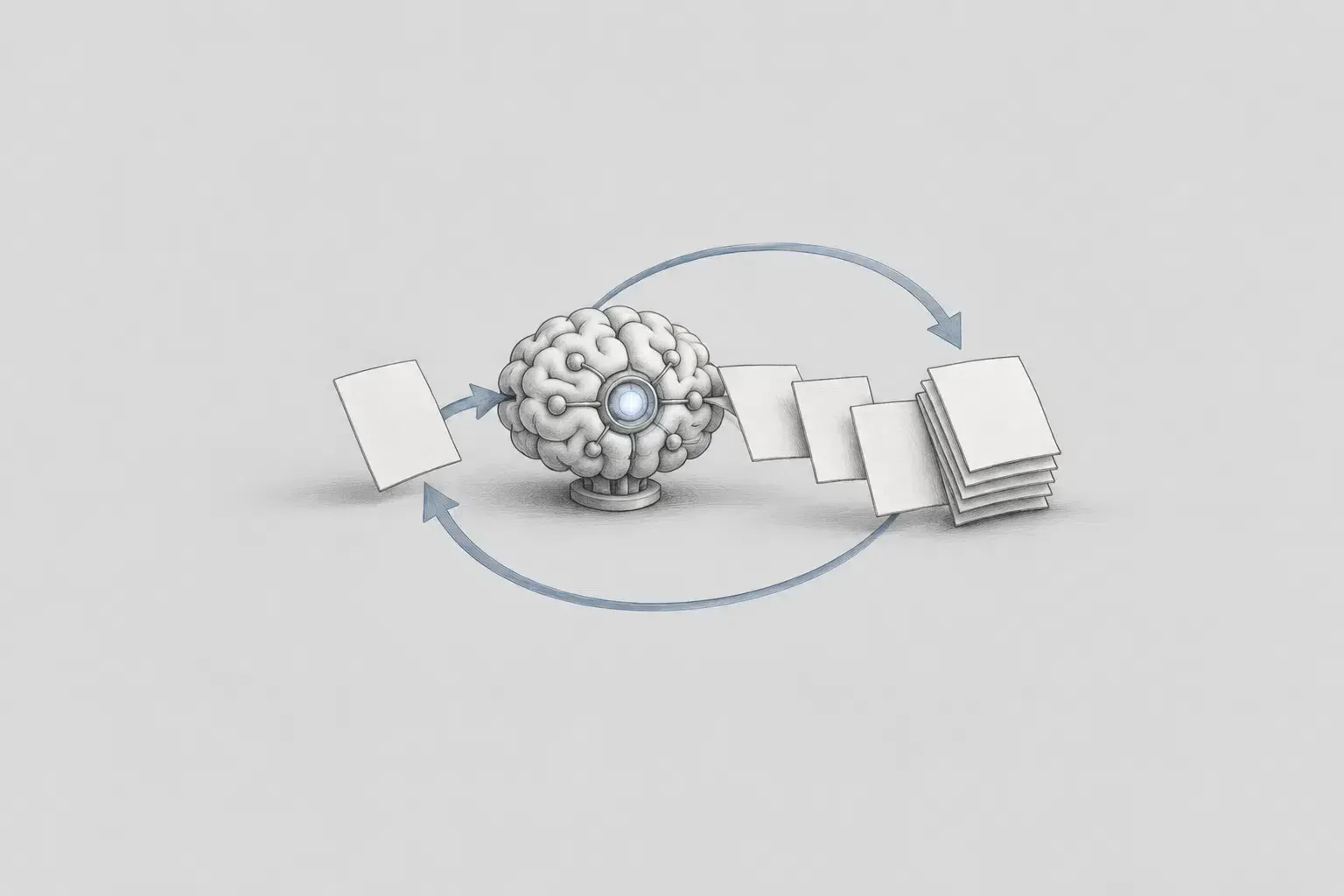
LLM Wiki is a Wiki that organizes how an LLM finds and uses materials in a specific field. It guides the LLM on what to read first depending on the question and tells it which source to prioritize when the contents of the materials differ.
It also keeps a separate record of information that has not yet been verified. Since newly verified information from the work is added back to the Wiki, the next task can start from the criteria already organized and the remaining questions.
Why LLM Wiki Is Needed
Simply gathering many documents in one place does not immediately turn them into knowledge. If the LLM does not know where the necessary materials are, which information is the most recent, or what to follow when different records conflict, it may produce an incorrect answer even after reading many documents.
The reason a library differs from a warehouse where books are merely piled up is that it has classification and catalogs. VUI LLM Wiki organizes materials in the same way. It narrows down which documents to read according to the type of work and indicates the location and priority of each material.
Cases where an answer could not be found are also recorded. Leaving behind temporarily handled content and questions that have not yet been verified prevents the LLM from filling gaps with guesses, allowing the next task to review the work again from that point.
Background of VUI LLM Wiki's Creation
I was assigned the long-term task of creating a VUI Design System. The problem was that I had not been systematically trained in visual design. It was difficult to look at a screen and immediately judge whether it was “VUI-like” or “not VUI-like.”
I thought it would be difficult to create a Design System that could be maintained over the long term using only personal intuition. So I first had to organize what to check when evaluating VUI design and how to reproduce that judgment when encountering the same problem again.
Organizing Principles of VUI LLM Wiki
The materials used to evaluate VUI were Figma designs, VUI source code and themes, generated tokens and component specifications, Storybook, and QA records and were located in several places. The Wiki does not copy these materials; instead, it organizes the path and priorities for reaching the materials relevant to each question.
1. Reference Materials
Figma shows the appearance intended by the designer. packages/vui-ui and packages/vui-theme contain the currently functioning code, while the generated tokens and component specifications organize the available names and functions. Storybook, Figma Sync reports, and QA records are used to compare implementation results.
2. Evaluation Criteria
When materials differ, follow the order organized in authority.md. When transferring a new design, use Figma as the target; when explaining current behavior, check the source code and theme. Components, tokens, and screen patterns are divided into their respective lists, while information that has not yet been finalized is recorded separately in gap-index.md.
3. Reading Path
wiki.md indicates the starting point appropriate for the task. After that, read only the relevant component card, token document, or screen pattern. DESIGN.md is a reading list that narrows down once more the documents needed for frequently repeated tasks; when a decision is required, follow the links back to the original materials.
Directory Structure
In docs/design, these principles are divided into four document groups. Since wiki.md guides you to the documents appropriate for the task, you do not need to memorize every file name.
Entry Points and Rules docs/design/wiki.md, authority.md, validation.md
wiki.md provides task-specific starting points. authority.md determines what to follow when materials differ, and validation.md collects the items to check after updating the Wiki.
Lists docs/design/profiles/company/*-index.md
These lists separately organize components, tokens, screen patterns, and unresolved items. They select only the documents related to the current question.
Detailed Documents components/*.card.md, patterns/*.md, tokens/*.md
They explain component usage, ways to structure screens, and token usage principles at the necessary level of detail.
Task-Specific Reading Lists DESIGN.md, exports/*.DESIGN.md
They collect only the documents needed for repetitive tasks such as CRUD list screens or Forms. The LLM starts here instead of reading the entire Wiki and checks the original materials when a decision is required.
Using and Updating Figma Sync
The process of transferring a designer-approved Figma design to VUI components and Storybook is called Figma Sync. It is not merely a matter of making the screen look similar. Component states must be connected to the existing API, and VUI tokens must be distinguished from Storybook-only decorations.
When I started Figma Sync, I first checked the relevant component card and token document in the Wiki. I reflected newly verified information from the work in the relevant documents and left parts without answers as unresolved items (gaps). I updated the Wiki as well whenever the work was completed.
Tooltip Verification Case
The first version of Tooltip looked nearly complete at a glance. However, the arrow's direction and position differed from Figma, and the dotted frame used for Storybook explanations was also included in the resulting screen.
If I had made corrections based only on the screen, I might have adjusted the arrow's size and position using arbitrary numbers. Following the Wiki, I checked Figma's direction definition, the existing VuiTooltip API, the scope of Storybook decorations, and the available tokens in order.
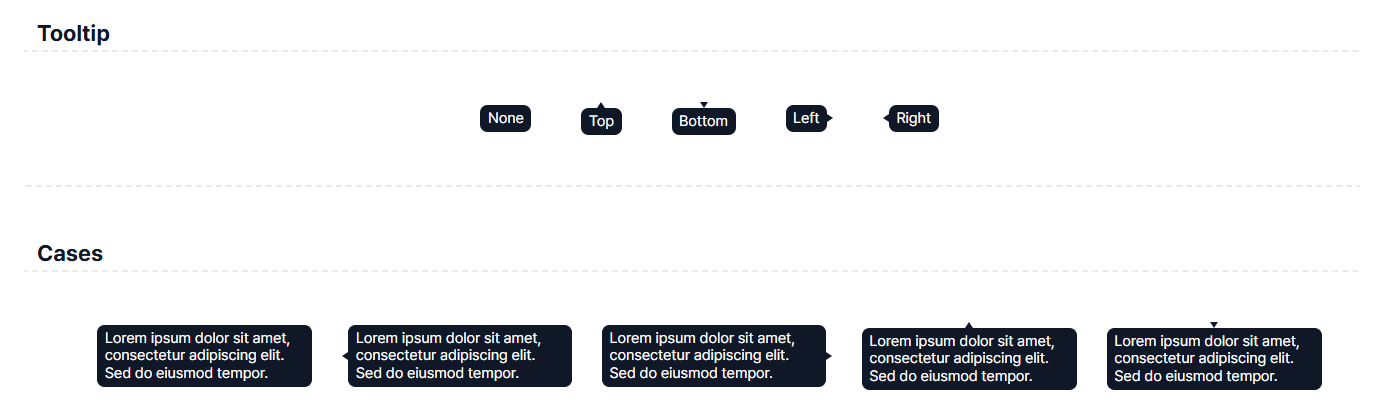
Figure 1. Tooltip before correction. The Storybook decoration and the arrow issues for each direction are mixed together on one screen.
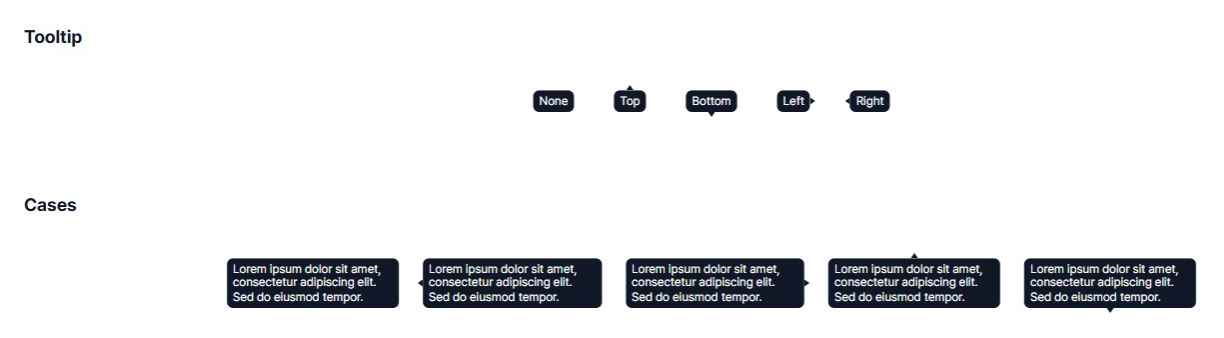
Figure 2. Tooltip after correction. The existing VuiTooltip direction is used, and the Storybook-only decoration has been separated.
Upon review, the direction could be handled using the existing VuiTooltip direction. The Storybook-specific decoration was separated from the implementation. On the other hand, since no verified token existed for the arrow shape, it was left as an unresolved item rather than arbitrarily creating a rule.
MenuItem State Differentiation Case
The problem with MenuItem was treating disabled and disabled + selected as the same state. The initial implementation applied the selected background color to all disabled states, leaving a gray background even on unselected items.
In the Wiki, I reviewed the VuiMenuItem card, the state-specific screens in Figma, and VUI's text and action tokens together. In Figma, disabled items had a transparent background, while the selected background remained only for disabled + selected. Therefore, I applied text.disabled to disabled text while keeping the background transparent, and applied action.selected only when the selected state was also present.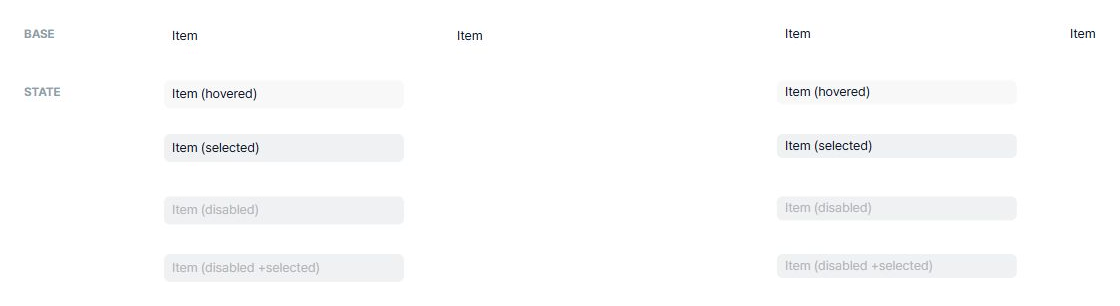
Figure 3. MenuItem before the fix. The selected background was applied even to unselected disabled items.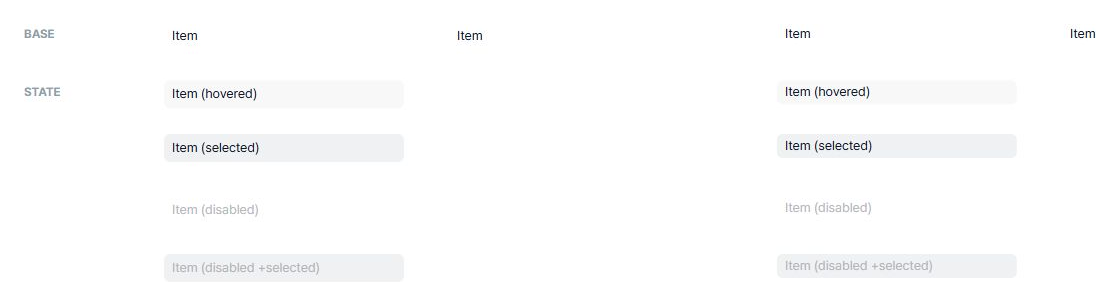
Figure 4. MenuItem after the fix. The background was kept transparent for disabled items, and the selected background was applied only to disabled + selected.
Kanban Design Creation Case
During the last Sprint, we needed a Kanban template that could actually be used within a short period of time. It was a good opportunity to find out whether VUI LLM Wiki could help not only with fixing existing components but also with designing new screens.
First, I reviewed the CRUD/List screens and Dialog flows in the Wiki. I built the board, lanes, cards, and create, edit, and delete actions using existing VUI components, and used semantic tokens for status colors and card surfaces. Although this was my first Kanban, I was able to quickly create a design that fit with other VUI screens.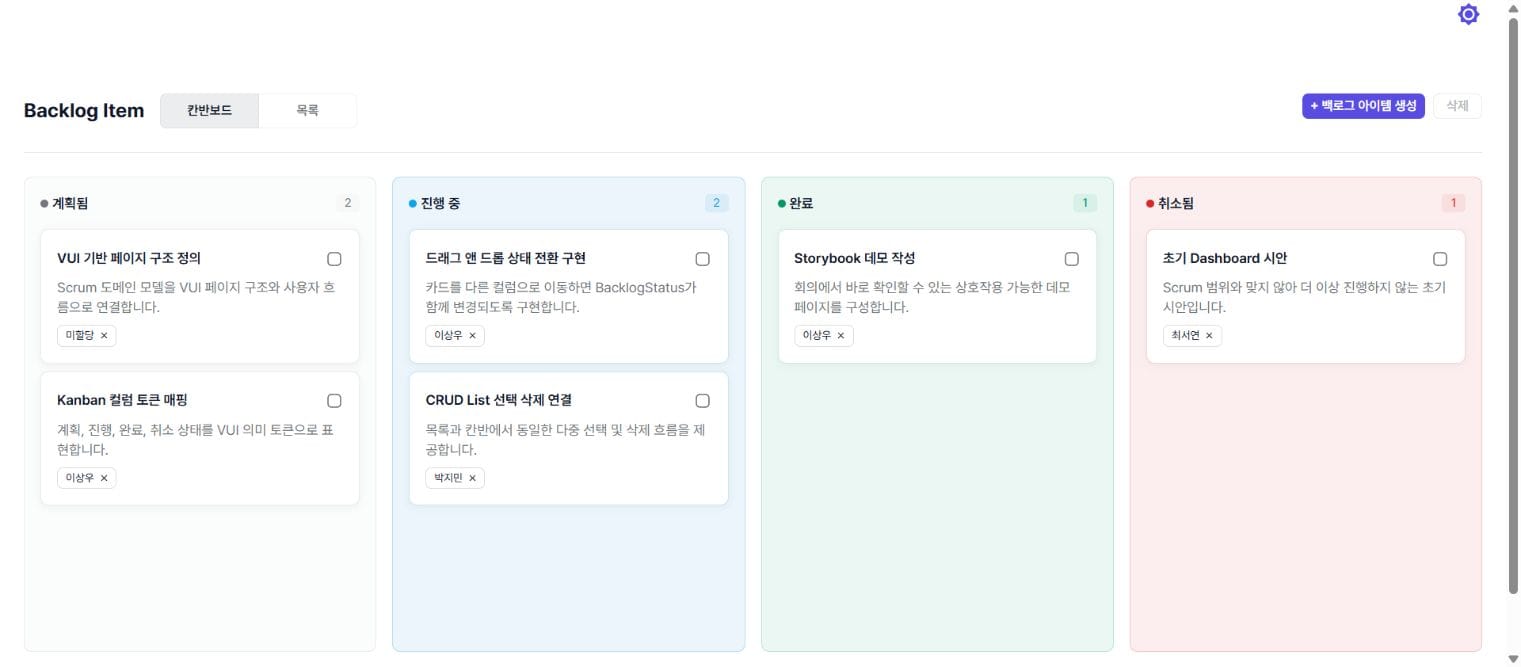
Figure 5. Kanban backlog screen created by following the patterns, components, and token paths in VUI LLM Wiki.
Once VUI LLM Wiki is complete, the same design standards can be found even when the LLM assigned to the task changes. New components and screens can also be expanded in a VUI-like direction by starting from already organized decisions instead of making guesses from scratch each time.
Joseph