
1. Background to Migrating Search to Elasticsearch
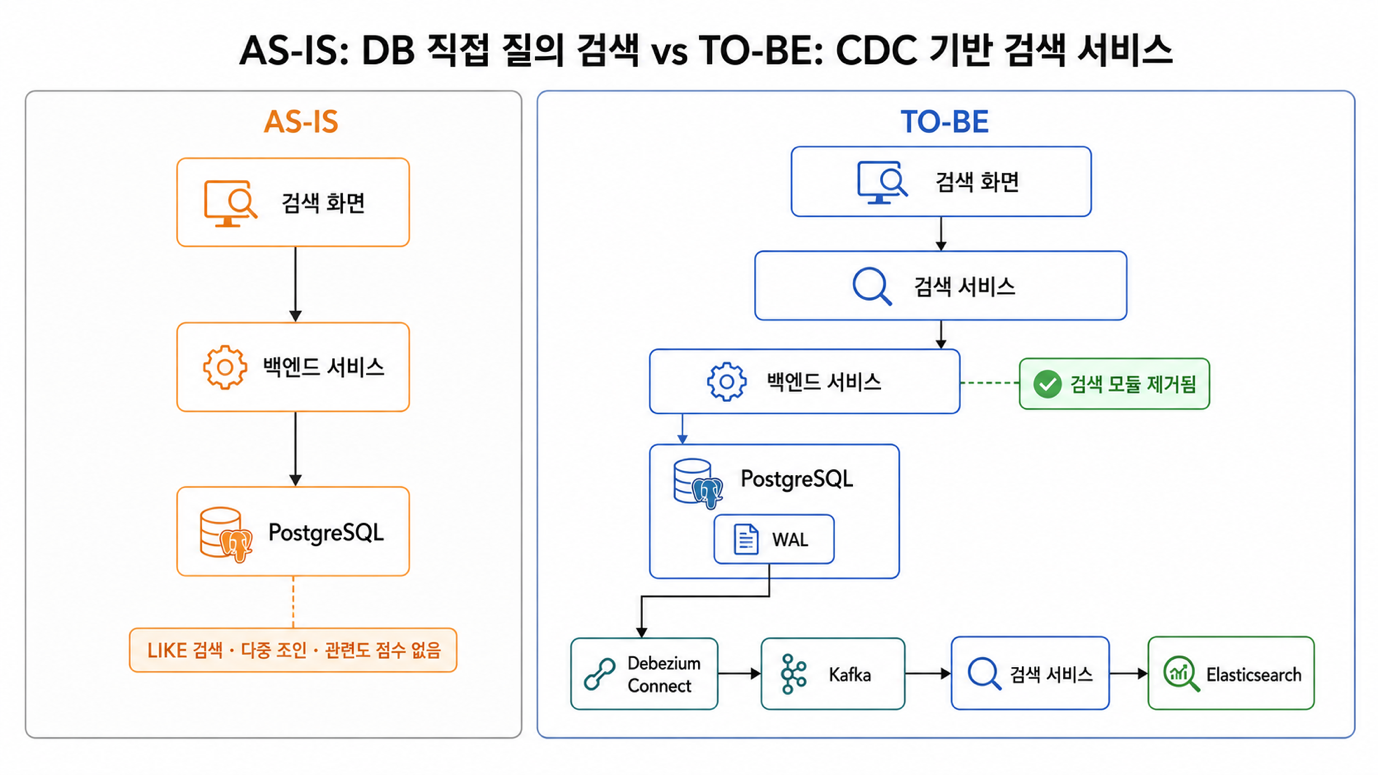
The project I worked on was a platform that provided travel destinations and content associated with those destinations in multiple languages. Since the core function of the service was to find relevant destinations and content when users entered a region or destination name, the quality of search was effectively the quality of the service.
The data structure had one notable characteristic. Destination information was divided into language-independent and language-dependent parts. Values that did not require translation, such as coordinates and visibility status, were stored in the destination table, while values that required translation, such as destination names, addresses, and overviews, were stored one row per language in a multilingual table. Content also included a language code in the same way.
From a normalization perspective, this is a natural design. From a search perspective, however, it also means that at least two tables must be examined to produce a single result. Once category or tag conditions are added, the number of tables that must be checked increases further.
When I joined the project, the search screen had already been built. The search logic queried PostgreSQL directly from the backend service, and my task was to replace this with an Elasticsearch-based implementation. The scope and schedule were not particularly extensive.
There is one question that inevitably follows the decision to introduce a separate search engine: how will the source data in PostgreSQL be loaded into Elasticsearch, and how will subsequent changes be tracked? This article records the process of starting with Logstash and then switching to Debezium-based CDC (Change Data Capture).
2. The Existing Search Method and Its Limitations
The existing search converted the conditions received from the screen into SQL WHERE clauses and queried multiple tables using joins. In simplified form, the structure looked something like this.
SELECT ...
  FROM place p
  JOIN place_lang pl ON p.id = pl.place_id
 WHERE pl.lang_code = :langCode
   AND pl.place_name LIKE '%' || :keyword || '%'
 ORDER BY pl.registered_on DESC
 LIMIT :limit OFFSET :offset
There was no problem with the operation itself. The problems appeared when we tried to make the search behave like a real search.
2.1 There Was No Way to Improve Korean Search Quality
A LIKE search only checks whether the exact string is present. Because it does not consider word forms or meanings, searching for "Jeju Island pension" will not return "Jeju pension." If a particle is attached or the spacing differs, the result will likewise be treated as not found.
It was also difficult to decide how to handle results that matched only some of several input words. Combining them with AND produced almost no results, while combining them with OR returned unrelated results as well. There was no practical way to fine-tune the balance between the two. It was also constantly concerning that LIKE patterns with wildcards at both ends could not use an index.
The fact that this was a multilingual service made the problem even more pronounced. Each language requires different processing, but LIKE only checks whether a string is contained, regardless of the language.
2.2 Queries Become Heavier as Conditions Increase
To produce a destination as a result, we had to join the destination table with the multilingual table, and adding category conditions required two more joins. Content searches faced a similar situation.
Pagination made the burden even greater. We had to return the total count along with the list, which required performing the same joins once more for counting. With OFFSET-based pagination, the number of rows read and discarded increases on later pages. In this structure, adding a single search condition directly increased the load on the database.
2.3 Relevance-Based Sorting Was Impossible
This was the most frustrating part. A WHERE clause only determines whether something matches the conditions; it does not return a score indicating how well it matches. As a result, the sort order was fixed to descending registration date, and there was no way to express the requirement to move the destinations most relevant to the search term to the top.
The feature for finding nearby destinations had the same limitation. Filtering by latitude and longitude ranges effectively queried a rectangular area rather than a circle, and it was not possible to sort by distance. Autocomplete, typo correction, and synonym handling likewise all had to be implemented manually.
At this point, I concluded that it would be better to maintain a separate storage system dedicated to search. However, the moment you add another storage system, the next problem arises immediately. The source data resides in PostgreSQL, while searches are performed in Elasticsearch, so the two storage systems must be kept synchronized continuously.
The simplest method would be for the backend service to call the indexing API immediately after storing data. I ruled this out from the beginning. A single request would write to two different storage systems, but a database transaction would not protect Elasticsearch. If one of the two failed, there would be no way to detect the resulting inconsistency. I also did not like the idea of inserting indexing calls throughout the existing service code just to add search. So we decided to handle synchronization outside the application.
3. The First Choice Was Logstash
While looking for a way to move PostgreSQL data to Elasticsearch outside the application, our first choice was Logstash.
The reason was simple. As a component of the Elastic ecosystem, it was easy to connect to Elasticsearch, and with just one SQL query configured in the JDBC input plugin, the query results could be sent directly to an index. Since we could use join queries as they were, it was also convenient for creating documents that combined multiple tables. Above all, it required the least effort to introduce because we did not need to deploy an additional component such as a message broker.
We configured two inputs so that the two types of data targeted for search would each be sent to an index with the same name. The answer to how to detect changes was a last-modified timestamp column. Logstash would remember the last timestamp it had read and query only rows modified after that time. The polling interval was set to one minute.
jdbc {
  schedule  => "* * * * *"
  statement => "SELECT ... FROM content
                 WHERE modified_on > :sql_last_value ORDER BY modified_on ASC"
  use_column_value => true
  tracking_column  => "modified_on"
}
Because the IDs of the indexed documents were set to the primary keys of the source data, repeated retrieval of the same row resulted in overwrites rather than accumulated duplicates. At this point, it seemed sufficient both for initially loading all the data and for reflecting subsequent modifications in search.
There were no problems while we were checking only registrations and modifications. The problem came next.
4. The Problem of Deletions Not Being Reflected and the Switch to Debezium
4.1 Deleted Data Continued to Appear in Search
While cleaning up test data, I noticed something strange. Destinations deleted from PostgreSQL were still present in the search results. At first, I thought I had made a configuration mistake. I also thought indexing might simply be delayed. Since the polling interval was one minute, I assumed the data would disappear if I waited a little. However, it was still there when I checked again much later. Only after reviewing the configuration several more times did I realize that this was not a configuration mistake but an inherent limitation of the approach itself.
4.2 Polling Can See Only Rows That Remain
The JDBC input plugin periodically executes SELECT and sends the results to Elasticsearch. The important point here is that this method can see only the rows returned by the current query.
A request for rows whose modification timestamp is greater than a specific value is, from the outset, a request to choose from among the rows that remain in the table. When a row is deleted, it simply disappears from the query results, and the fact that it was deleted is not represented anywhere. From Logstash's perspective, there is no basis for distinguishing data that never existed from data that was just deleted.
The reason registrations and modifications were reflected correctly was the same. Registrations and modifications leave rows behind, so they are returned by the query, while deletion is the only change that leaves no trace. That makes it easy to overlook the problem if you verify only registrations and modifications. That is exactly what I did.
Documents left behind do not result in a simple inconsistency for the search service. They appear in the list, but clicking one leads to a detail page for an entity that no longer exists, which looks like an error to the user.
4.3 We Considered Workarounds First
We first looked for a way to solve the problem while keeping Logstash. Two ideas came to mind.
The first was to change the implementation so that it updated a value indicating whether a record had been deleted instead of actually deleting it. Since the deletion would then count as an update, polling could detect it, and the search query could filter it out. However, this would require adding a column to the source table and modifying all of the existing deletion logic in the service.
The second was to periodically compare the ID lists on both sides and delete documents that no longer existed in the source. This would not require changing the structure, but the comparison cost would increase as the data grew, and incorrect documents would remain visible for at least as long as the comparison interval.
Both methods involved changing the source system or cleaning it up later simply to make search work properly.If the method we chose to synchronize data outside the application ultimately required changing the schema and service code, the reason for choosing it in the first place would disappear. What we needed was not a workaround, but a path that reported a deletion as a deletion.
4.4 So We Switched to Debezium
Debezium directly subscribes to the database's transaction logs. In PostgreSQL, it reads WAL (Write-Ahead Log) through logical replication.
This is the decisive difference. Deleted rows are not visible when querying a table, but the transaction log records what was deleted and when. Because it reads change records rather than query results, it delivers INSERT and UPDATE events as well as DELETE events.
A deletion event arrives in the following form. The op field is d, and before contains the values immediately before deletion, so it is clear what disappeared.
{
  "op": "d",
  "before": { "id": "...", "lang_code": "ko", ... },
  "after": null
}
The fact that deletions were resolved was the biggest benefit, but there were other advantages after the switch. We no longer had to depend on whether the modification timestamp column had been updated correctly. Regardless of how the data changed, the change was recorded in the log. The connector's snapshot feature also handled the initial full data load, so there was no need to create a separate query.
|
Category |
Logstash JDBC input |
Debezium CDC |
|---|---|---|
|
What it observes |
Rows currently being queried |
Change records in the transaction log |
|
Change detection |
SELECT polling every minute |
WAL subscription |
|
Deletion detection |
Not possible. It only disappears from the results |
Delivered as a deletion event |
|
Tracking criterion |
Last-modified timestamp column |
LSN (Log Sequence Number) |
|
Changes to the source schema |
Required when introducing a deletion flag |
Unnecessary |
|
Initial loading |
Separate query |
Built-in snapshot functionality |
|
Additional components |
None |
Kafka, Kafka Connect |
|
Operational overhead |
Low |
Replication slots and connector management required |
Of course, this also comes at a cost. The number of operational components increases with Kafka and Kafka Connect, and the database resource called a replication slot must be managed. Even so, we decided to make the move because missed deletions were not something that could be solved with a workaround. No matter how simple the configuration is, a search system that returns incorrect results cannot be used.
5. Configuring the CDC Pipeline
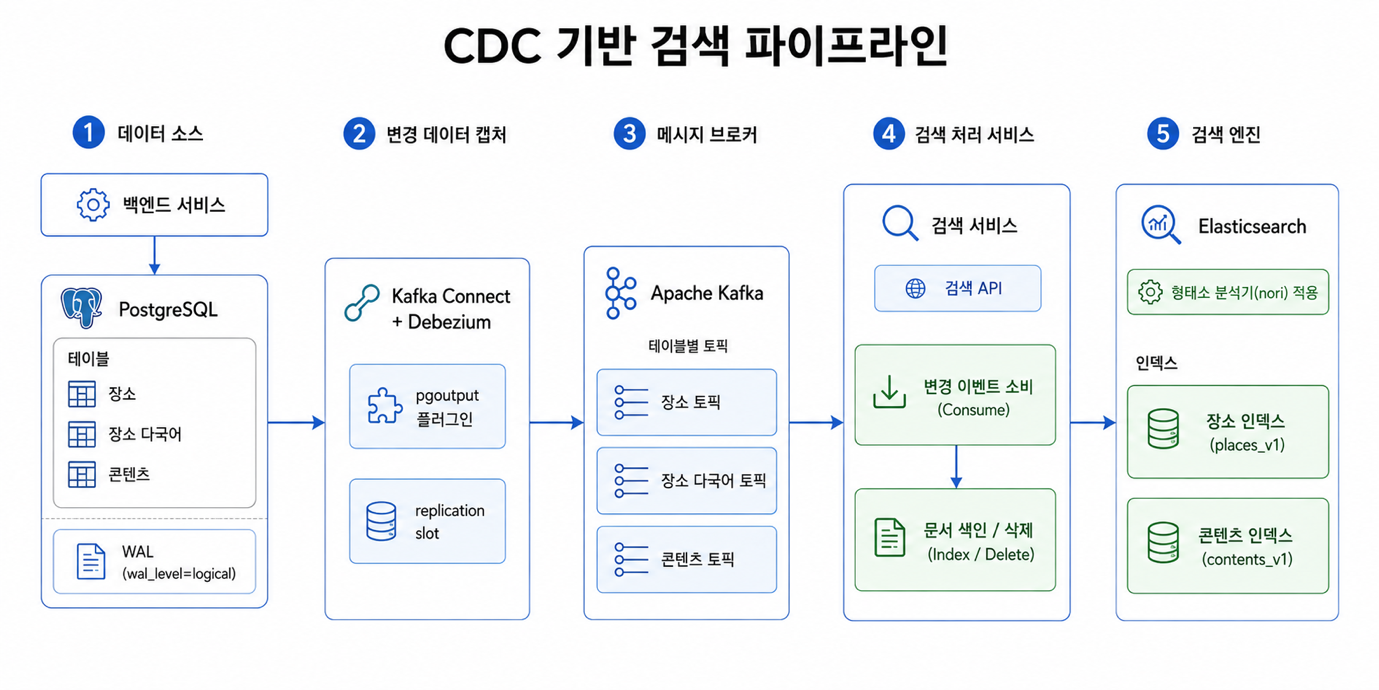
After the transition, Debezium streams changes from PostgreSQL to a Kafka topic, and a separately deployed search service consumes them and indexes them in Elasticsearch.
5.1 Preparing PostgreSQL Logical Replication
For Debezium to read the WAL, the database must allow logical replication. We raised wal_level to logical and secured sufficient replication slots and WAL sender processes. Since these settings require a restart, we separately coordinated when to apply them.
# postgresql.conf
wal_level = logical
max_replication_slots = 10
max_wal_senders = 10
Another item we had to address was REPLICA IDENTITY. With the default setting, UPDATE and DELETE events contain only the primary key, so it must be set to FULL if we need to receive the value immediately before deletion as well. However, FULL increases the amount of WAL recorded, so we applied it only to tables that actually needed the previous values.
5.2 Configuring the Debezium Connector
We deployed Kafka Connect using the Debezium image as is. Because the connector configuration, offsets, and status are stored in Kafka topics, the system does not lose track of how far it has processed even when the container restarts. We registered the connector through the REST API and used pgoutput, the logical decoding plugin built into PostgreSQL. This simplifies the environment because no separate plugin needs to be installed.
{
  "connector.class": "io.debezium.connector.postgresql.PostgresConnector",
  "plugin.name": "pgoutput",
  "topic.prefix": "...",
  "slot.name": "...",
  "table.include.list": "public.place,public.place_lang,public.content",
  "snapshot.mode": "initial",
  "tombstones.on.delete": "false"
}
It was an intentional choice to specify only the tables required for search. If all tables are subscribed to, even changes unrelated to search pass through the pipeline, increasing the load unnecessarily. We set the snapshot mode to initial so that the connector would also handle the initial loading of existing data. In effect, the work previously handled by a separate query in Logstash was consolidated into a single configuration line.
5.3 Separating the Search Service and Applying a Morphological Analyzer
We removed search from the existing backend service and made it a separate microservice. The existing service only stores data in PostgreSQL, while the search service consumes change events arriving through Kafka, indexes documents, and provides the search API.
The reason for separating them was to prevent tasks such as rebuilding the index or changing mappings from becoming entangled with deployments of the existing service. We also needed to ensure that the load generated by bulk indexing would not affect responses from the existing API. As a result, all search-related modules were removed from the existing service, and not even a setting pointing to Elasticsearch remained.
For Korean search, we installed nori, a morphological analysis plugin, in Elasticsearch. Because the default analyzer splits tokens based on whitespace, it cannot properly handle Korean particles or compound nouns. With nori applied, “Jejudo” is indexed after being split into “Jeju” and “do,” so search terms that previously failed to match begin to return results. However, this time we only proceeded as far as adding the plugin and verifying the default behavior; we did not get to refining part-of-speech filters or the synonym dictionary.
5.4 Operational Considerations
Because CDC uses mechanisms inside the database, it also entails operational considerations. The most important one to watch is the replication slot.
A replication slot cleans up WAL only up to the point the consumer has confirmed it has read. Put another way, while the connector is stopped, WAL generated after that point continues to accumulate. If a pod is left down and forgotten, it can consume the database's disk space. Therefore, we added a check of the slot status to the procedure for stopping the connector and configured unused slots to be removed.
SELECT slot_name, active,
       pg_size_pretty(
         pg_wal_lsn_diff(pg_current_wal_lsn(), confirmed_flush_lsn)
       ) AS retained_wal
  FROM pg_replication_slots;
6. Summary
The following summarizes what changed when we changed the search path.
|
Category |
Existing structure |
After implementation |
|---|---|---|
|
Search execution |
PostgreSQL join query |
Elasticsearch index lookup |
|
Korean language processing |
LIKE substring matching |
nori morphological analysis |
|
Relevance sorting |
Fixed to descending registration date |
Score-based sorting available |
|
Synchronization method |
Logstash 1-minute polling |
Debezium CDC (WAL subscription) |
|
Deletion reflected |
Cannot be detected. The document remains |
Reflected through a deletion event |
|
Initial load |
Separate query |
Connector snapshot |
|
Service architecture |
The backend service also handles search |
Separated into a search service |
7. Conclusion
What stayed with me from this work was not Debezium itself, but the process of confirming why the approach I initially chose did not work. Since Logstash was simple to configure and handled the initial load well, it appeared to have no problems on the surface. If I had not checked the one case of deletion, I would have moved on without noticing.
Looking back, the problem was that I focused my validation on registration and updates. In both cases, the data remains in the end, so most synchronization methods work reasonably well. The difference between approaches becomes apparent when data disappears, and I looked at that case too late. If I do something similar next time, I plan to check deletions first. I also learned something about technology selection. If I had known from the beginning what polling fundamentally cannot observe, I could have made the decision before trying to connect Logstash.
Tim