
1. Introduction
The Class Leader Note mobile app uses a hybrid architecture in which React Native handles native functionality and the existing React web application is provided through a WebView. This architecture has the advantage of allowing already-implemented screens and business logic to be reused. Initially, we thought social login could work the same way as on the web by navigating to the OAuth page within the WebView. Since the flow worked normally in a browser, we expected there to be no significant difference on mobile.
However, when we ran Google login in an actual mobile environment, a 403 disallowed_useragent error occurred. The cause was not the OAuth key or redirect URL, but the fact that the authentication screen had opened in an embedded WebView controlled by the app. Google policy and RFC 8252 recommend that native apps not use an embedded user-agent for OAuth authentication. Because the host app may be able to access the content and cookies in a WebView, the authentication provider may block it.
The simplest way to solve the problem was to open the authentication URL in an external browser. However, after login, Class Leader Note still needed to use the existing web logic for member lookup, new-user registration branching, role selection, and session creation. If the entire flow were moved to an external browser, we would also have to newly design deep linking for returning to the app and state restoration. Conversely, if we reimplemented everything from authentication to service session creation in React Native, the same domain rules would be duplicated across the web and app.
Therefore, in this work, we divided the responsibilities into three parts. React Native authenticates users through each Provider's native SDK, the Bridge safely delivers the result to the WebView, and the React web application continues to perform the existing Gate validation and login/registration branching. This article summarizes the background behind choosing this architecture, the problems encountered during implementation, and our experience treating the bridge as a small protocol rather than a simple postMessage.
2. Why We Could Not Continue Using WebView OAuth As Is
In web OAuth, when a user clicks the login button, they are navigated to the Provider's authorization endpoint, and after authentication is complete, they return to the registered redirect URI. This flow is natural in a standard browser, but from the authentication provider's perspective, a native app's WebView is an embedded user-agent. Google in particular explicitly states in its policy that developers must not send OAuth requests through an embedded user-agent they control. Therefore, even if the URLs and Client ID that succeeded on the web are used unchanged, they may be blocked in a mobile WebView.
At first, the error screen made it look as though the Google OAuth configuration or key was incorrect. However, the same configuration succeeded in a desktop browser, and Kakao also worked in a WebView. We had to distinguish the fact that each Provider has a different allowlist policy. Success with one Provider was not evidence that the entire social login architecture was correct.
We considered three options.
-
Keep WebView OAuth: This provides the greatest reuse of web code, but cannot satisfy Google's policy.
-
Use an external system browser and deep links: This is closer to the standard, but requires newly designing app return handling, callback state, and web session integration.
-
Provider native SDK + reuse the existing web callback: Only the authentication UI is moved to native, while the logic after Gate can remain on the web.
Class Leader Note chose the third approach. Google, Kakao, and Apple login policies, the Gate third-party verification API, and the registration branching were already implemented on the web. The key was to pass the credential received from the native SDK in a form that the existing web callback could understand.
3. Dividing Responsibilities with RN-Bridge-React
The design principle was: “Move to React Native only what can be done exclusively on the native side.” RN handles running the Provider SDK, platform-specific configuration, and SecureStore storage. The existing React application handles determining whether a member exists, Gate credential verification, SSO login, and navigation to the new-user registration screen. The Bridge connects the two areas but does not replace the domain logic of either side.
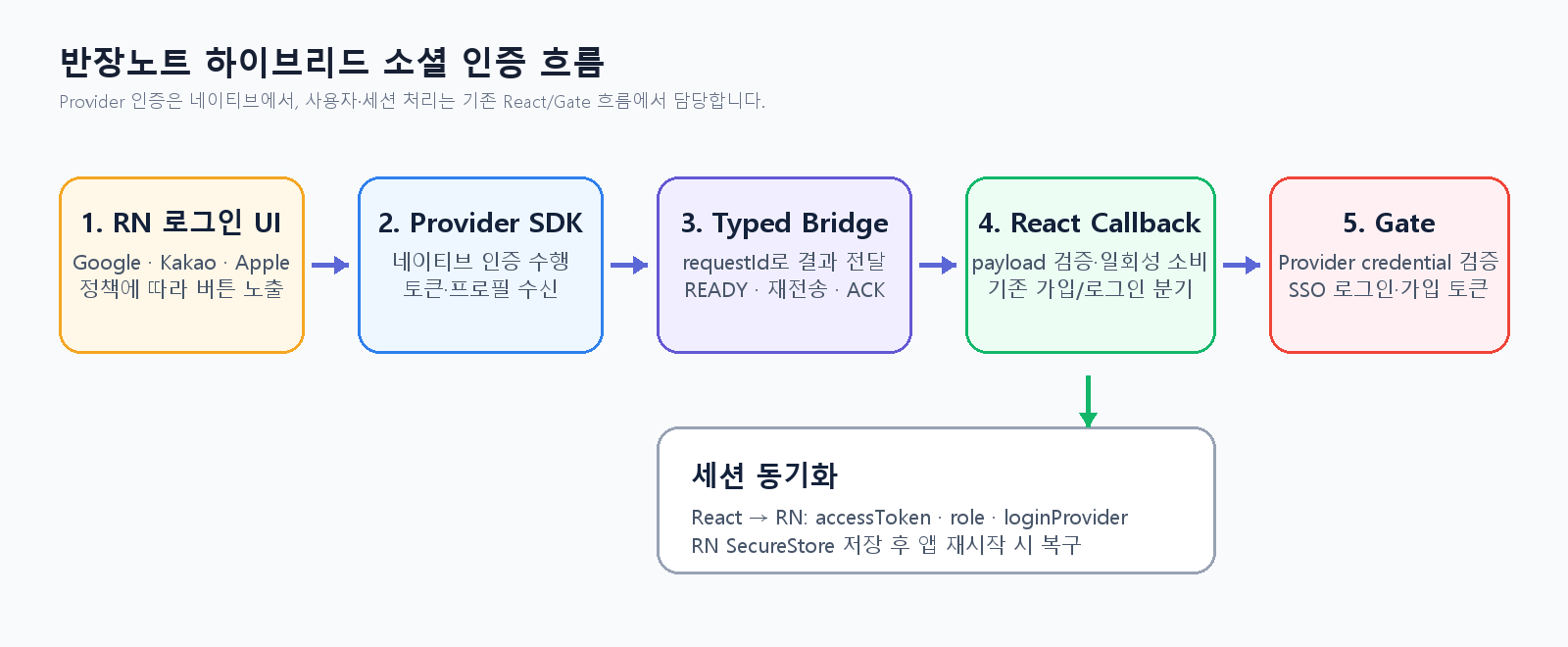
[Figure 1. Social authentication flow through React Native-Bridge-React-Gate]
The RN application operates in three stages: booting, native-login, and web. When the app starts, it checks the access token and selected role in SecureStore. If both are present, it opens the WebView immediately; if either is incomplete, it clears the stored values and displays the native login screen. When authentication succeeds, it stores the result in a pending state and transitions to the WebView stage.
After the web application finishes preparing inside the WebView, it sends WEB_APP_READY. RN delivers the credential only after receiving this signal. React validates the result, temporarily stores it in sessionStorage, and navigates to the existing /oauth/callback/:provider path. From there, it performs Gate policy lookup and user confirmation in the same way as a browser OAuth callback.
An important point in this architecture is that RN does not determine whether a CitizenUser exists or whether registration is required. The native SDK only produces the Provider authentication result. After Gate verifies the credential, it performs SSO login if the account is already registered; otherwise, it sends the user into a registration flow containing a registrationToken. Even when the platform changes, the service rules remain in one place.
4. Focusing React Native on Provider Authentication
When the RN login screen opens, it first retrieves Gate's public login policy. Instead of hardcoding the Client ID and grantType in the app, we configure the buttons based on the active Provider and client policy. Google currently uses the web client profile according to the Gate configuration, while Kakao and Apple prioritize the app client profile. Server-only fields such as clientSecret are not copied into the RN model from the policy response.
SDK responses differ by Provider. Google can provide an access token, ID token, server authorization code, and user profile. Kakao uses an access token or ID token, and even if profile retrieval fails, we do not immediately stop the login because Gate can verify the Provider token again. Apple uses an ID token or authorization code, and we generated and checked state and nonce together with the response.
If these differences are exposed all the way to the calling code, the RN login screen becomes complicated with Provider-specific conditionals. Therefore, each SDK adapter creates a common result object, while the upper-level flow checks only providerCode and the grantType from the Gate policy.
type NativeSocialAuthResultPayload = {
  requestId: string;
  providerCode: 'google' | 'kakao' | 'apple';
  credentials: { accessToken?: string; idToken?: string; authorizationCode?: string };
  profile?: { userId?: string; email?: string; displayName?: string };
  parameters?: Record<string, string>;
  issuedAt: number;
};
We did not treat the SDK's return of a value as immediate proof of success. If the Gate policy requires AccessToken but the SDK result contains only an ID token, the next step is likely to fail. Therefore, RN first verifies that grantType matches the actual credential type. Cancellation is separated from errors, and when the user closes the login window, the original login screen remains instead of displaying a failure Snackbar.
5. Treating the Bridge as a Contract Rather Than postMessage
React Native WebView's communication function is basically postMessage, which sends a single string. Sending and receiving only strings is quick to implement, but typos in actions or payload changes are not exposed until runtime. For a feature involving multiple stages and sensitive information, we needed a contract with clearly defined directions and types rather than simple string communication.
In the shared bridge package, we separated the RN→WebView and WebView→RN event maps. NATIVE_SOCIAL_AUTH_RESULT is the event through which RN delivers the authentication result, while NATIVE_SOCIAL_AUTH_RESULT_RECEIVED is the ACK indicating that the web has received the result. REQUEST_NATIVE_LOGIN is used when the web login screen requests the native screen again. Each action is categorized into a feature such as auth, session, or lifecycle, and contains metadata including messageId, correlationId, and sentAt.
interface AuthReactNativeToWebViewEventMap {
  NATIVE_SOCIAL_AUTH_RESULT: NativeSocialAuthResultPayload;
}

interface AuthWebViewToReactNativeEventMap {
  NATIVE_SOCIAL_AUTH_RESULT_RECEIVED: { requestId: string };
  REQUEST_NATIVE_LOGIN: void;
  WEB_AUTH_LOG: WebAuthLogPayload;
}
Having types alone does not make runtime input safe. We limited the maximum size of strings received from the WebView, parsed them as JSON, and checked whether the action was allowed as well as the type and length of payload fields. Unknown actions and excessively long messages are not processed. We also validate credentials received from the web, including providerCode, issuedAt, credential length, profile length, and the number and size of parameters.
Logs also required a separate boundary. If the entire payload is printed for troubleshooting, access tokens, ID tokens, email addresses, and user IDs could remain in development logs. The bridge logger redacts sensitive values as REDACTED based on key names and records only whether they exist, using fields such as hasAccessToken and hasIdToken instead of the actual values.
6. Reducing Delivery Loss with READY-Retry-ACK
If the WebView is opened immediately after native authentication and the result is sent right away, the message may arrive before the React listener is registered. Even on the same device, this issue may or may not reproduce depending on network speed and web bundle loading time. Initially, it looked as though nothing happened when the button was pressed, and no web Snackbar appeared, making it difficult to determine where the process had stopped.
To solve this, we made WebView readiness and credential delivery an explicit handshake. After React registers the listener, it sends WEB_APP_READY, and RN sends NATIVE_SOCIAL_AUTH_RESULT once it enters the ready state. The web returns NATIVE_SOCIAL_AUTH_RESULT_RECEIVED immediately after successfully storing the result. RN removes the pending result only after receiving the ACK for the same requestId.
WEB_APP_READY
  -> NATIVE_SOCIAL_AUTH_RESULT(requestId)
  -> NATIVE_SOCIAL_AUTH_RESULT_RECEIVED(requestId)
If the ACK does not arrive, RN resends the result up to three times at two-second intervals. The web identifies requests that have already been processed by requestId and prevents duplicate callback navigation. If WebView preparation does not finish within a set period or all three attempts fail to receive an ACK, the app transitions to an explicit error screen. This is not a complete message queue, but it effectively reduces temporary loss caused by differences in the WebView lifecycle and listener registration timing.
When adding retries, we also had to consider idempotency. Because the same credential may arrive multiple times, the web stores it once in sessionStorage based on requestId and removes it immediately after reading it in the callback. RN also marks the process complete only when the current pending requestId matches the ACK's requestId. Retries improve delivery reliability, but without duplicate-processing prevention, they could instead execute the login request multiple times.
7. Reusing the Existing Gate Authentication Flow in React
When React receives NATIVE_SOCIAL_AUTH_RESULT, it does not expose the payload directly and at length in the URL query. It first stores the validated result in requestId-based sessionStorage and passes only native_request_id in the callback URL. The callback screen consumes the value once and converts it with URLSearchParams. Among access_token, id_token, and authorization code, it selects the credential that matches the grantType in the Gate policy.
The subsequent flow is the same as existing web OAuth. It retrieves the Pavilion and Provider policies and requests credential verification from Gate through useThirdPartyOAuth. If the Gate response indicates that a CitizenUser exists, it performs SSO login using the encrypted user identifier. If no such user exists, it stores the registrationToken, email, and name in the registration state and proceeds to the terms agreement and additional information entry steps.
This separation meant more than simply reusing existing functionality. Determining duplicate CitizenUsers, the rules for linking Provider accounts with service accounts, and new-user registration branching already exist in the Gate and React flow. If the same decisions were implemented in RN, the web and app could evolve with different rules. We maintained the boundary so that the native area delivers “who successfully authenticated with the Provider,” while the service area decides “how to handle that user in our service.”
The callback distinguishes clientType and redirectUriType based on whether the request originated natively. In the current implementation, the Google native SDK uses the web client ID, so clientType is passed as web, while Kakao and Apple are passed as app. This cannot be fixed solely by looking at the type of Provider SDK; it must be aligned with the client profile and grantType of the Gate POLISH policy.
8. Session Synchronization and Storage Lifetime
After Provider credential verification and service login succeed, the web synchronizes the access token, selected role, and loginProvider to RN. RN stores them in expo-secure-store according to the automatic login policy. When the app restarts, it restores the WebView stage if both token and role exist; if only one remains, it treats the session as incomplete and clears it.
Here, we distinguished the roles of the Provider SDK token and the service access token. The Provider token is used only during the short handoff in which Gate verifies the user's identity. The app's persistent session is managed based on the service access token issued after Gate login. The refresh token is not passed to the WebView and is not defined in the bridge payload either.
loginProvider is information displayed in the account management screen to show how the user is currently logged in. We aligned the lifetimes of web sessionStorage and RN SecureStore with the current access token policy. On logout, token, role, and loginProvider are removed together, and the user returns to the RN login screen. Rather than consolidating storage into one location, each runtime owns the values it needs, while state transitions are synchronized through SYNC_USER_CONTEXT and CLEAR_USER_CONTEXT.
Apple also has the constraint that the name and email may be provided only at the time of the initial consent. The current registration flow uses both the Provider profile and the Gate response, but if a user attempts to register again with an account that consented in the past, the name or email may be empty. Therefore, in production, we need both a policy for securely retaining the initial response and a fallback flow that asks the user to enter the information directly when it is unavailable.
9. Making Previously Invisible Mobile Errors Observable
In web development, the browser Network tab and Console can be inspected immediately, but the same approach is difficult with an Expo Development Build or a WebView on a physical device. During actual testing, there was also an issue in which clicking the additional information button did not navigate to the next screen and no Snackbar appeared. From the UI alone, it was impossible to distinguish whether the click event had not run, the WebView message had been lost, or the Gate request had failed.
Therefore, we recorded the major points in the authentication flow as stage events. In RN, we record LOGIN_ATTEMPT_STARTED, SDK_RESULT_RECEIVED, CREDENTIAL_VALIDATED, BRIDGE_AUTH_SENT, and BRIDGE_AUTH_RECEIVED. React sends POLICY_LOAD_STARTED, GATE_VERIFY_STARTED, SSO_LOGIN_STARTED, and the success, failure, and timeout events for each to the RN console through WEB_AUTH_LOG. Using requestId as correlationId makes it possible to trace a single attempt from the native SDK call through Gate verification.
We do not record the original credential in logs. Instead, we record only the states needed for root-cause analysis, such as grantType, clientType, redirectUriType, hasRegistrationToken, and citizenUserExists. For example, if the SDK returns an ID token but the Gate policy requires AccessToken, we can confirm that the process failed due to a policy mismatch before CREDENTIAL_VALIDATED without printing the actual token.
Timeouts were also separated by area. Gate policy lookup in RN, waiting for WebView READY, waiting for the Bridge ACK, and Gate policy lookup and credential verification in React are distinct failure points. Combining them into a single “login failed” message may make the user experience look simpler, but it makes the cause difficult to find during development. Internal logs divide the stages finely, while user messages are simplified into retryable forms.
10. Results and Trade-offs of the Implementation
With this architecture, we were able to perform Google authentication without running it inside the WebView while preserving the existing React/Gate login flow. Kakao and Apple were also connected using the same shared payload, reducing provider-specific branching in the higher-level login flow. The greatest benefit was that we did not replicate service rules in RN, such as the branching between new and existing members, role selection, and additional information entry.
-
We centralized the Provider SDKs and platform configuration in RN, while keeping the service domain rules in React/Gate.
-
Using a typed event map and runtime guards, we made it possible to detect message typos and format errors early.
-
READY retransmission, ACK, and requestId-based one-time consumption reduced uncertainty during WebView loading.
-
Sensitive-data masking and step-by-step correlation logs improved diagnosability during Expo testing on physical devices.
On the other hand, the bridge is now a protocol, so version compatibility must be managed. If the app and web are deployed at different times, one side may not recognize a new action. When adding fields to the payload, we must decide whether to make them optional or raise the app's minimum version. Retransmission and ACK handling should also be adjusted based on measured loading times and failure rates rather than by arbitrarily increasing the timeout value.
In addition, not all native SDKs and configurations can be verified using Expo Go alone. Features that require native project configuration, such as GoogleService-Info.plist, URL schemes, and iOS entitlements, must be checked in a development build. If successful web tests, Expo Go tests, and actual development build tests are treated as equivalent, missing configuration may be discovered too late.
11. Conclusion
The initial problem appeared to be a single error: “Google Sign-In is blocked in the WebView.” However, solving it required designing several aspects together: where to run the authentication UI, under what contract to pass the Provider token, how to reuse the existing service login flow, how to handle message loss while the WebView was loading, and how to trace errors on physical devices.
This experience showed us that, in a hybrid app, a Bridge is not merely a convenience tool for invoking native functionality; it is an API between two runtimes. As an API, it must have clear directions and payloads, validate inputs, handle duplicates and timeouts, and prevent sensitive information from being recorded in logs. Communication that starts as a simple postMessage takes on characteristics similar to a small distributed system as soon as it handles authentication.
Moving every screen and piece of domain logic to React Native is not always the right answer. In Banjangnote, the approach was to keep only the parts that require native capabilities, such as Provider authentication, in RN while reusing the already-validated membership and session logic from React and Gate, thereby reducing the scope of changes and duplication. Even as authentication features expand to include account linking, deep-link return flows, and additional consent for each Provider, it is important to maintain the same boundary.
Going forward, we plan to specify bridge schema versions for the app and web and automate E2E tests based on Development Build for Provider-specific success, cancellation, duplicate-account, and session-expiration scenarios. We also need to address Apple's restriction on providing the profile during the initial authorization and the flow for returning from outside the app in accordance with operational scenarios. This work was an experience in adjusting the responsibility boundaries between RN, Bridge, and React within actual service flows to satisfy native authentication policies while preserving the web assets.
References
Google for Developers, OAuth 2.0 Policies
https://developers.google.com/identity/protocols/oauth2/policies
IETF, RFC 8252: OAuth 2.0 for Native Apps
https://www.rfc-editor.org/rfc/rfc8252.html
React Native WebView, Communicating between JS and Native
https://github.com/react-native-webview/react-native-webview/blob/master/docs/Guide.md
Expo Documentation, AppleAuthentication
https://docs.expo.dev/versions/latest/sdk/apple-authentication/
Kakao Developers, Kakao Login for Android
https://developers.kakao.com/docs/latest/ko/kakaologin/android
Kakao Developers, Kakao Login for iOS
https://developers.kakao.com/docs/latest/ko/kakaologin/ios
jyyou