
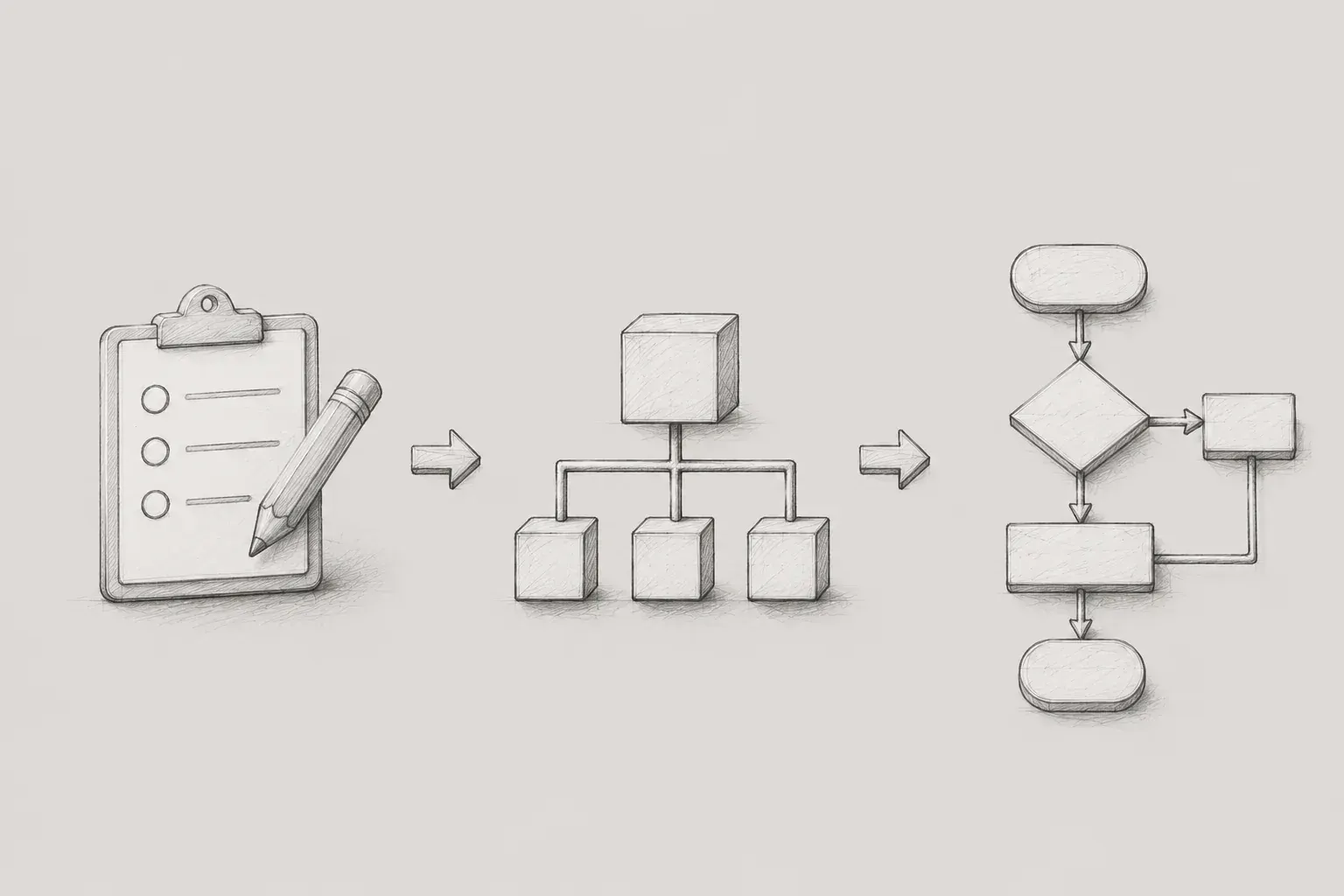
1. Introduction: The planner designs 'processes' rather than 'screens'.
In the IT industry, the role of a service planner is often misunderstood as that of someone who "sketches and draws screens". This is because tasks involving design tools to place buttons and create wireframes are the most visible.
However, the visual screens are merely the 'outcome' of numerous logics and policies defined by the planner. The true role of the planner is to translate ambiguous business requirements into a 'structured language' that can be developed and designed, and to meticulously manage the entire product life cycle from the start of the service to QA just before launch.
I will share practical stories of how I built a new service managing shipping reference information, solved problems, and grew through the three main pillars of planning: requirements, IA, and flowcharts.
2. Requirement Analysis and Definition: The Core of SRS Discovered in the Days When Filling Screens Was Urgent
During project execution, I often receive numerous requests from field personnel or clients like "Please make this screen show this information" and "Please add that feature". In the early days of planning, I was also eager to fill these requests on the screen without much thought. I was solely focused on visualizing the requirements by creating buttons and placing input boxes. However, leading new projects and reflecting deeply on the planning process, I realized that this process was precisely the core of requirements definition.
2.1 Four-Step Procedure for Requirement Analysis
In practice, to transform this ambiguity into clarity, I went through a four-step process of feasibility study, requirement elicitation and analysis, requirement definition, and requirement validation and management, thus establishing the framework.
[1. Feasibility Study] ➔ [2. Requirement Elicitation/Analysis] ➔ [3. Requirement Definition] ➔ [4. Requirement Validation/Management]
-
Feasibility Study
-
Examines the necessity of project promotion and the technical/business feasibility against resources.
-
Requirement Elicitation and Analysis
-
Listens to and organizes functional aspects of the system to be developed from actual users. The planner should actively query needed information rather than passively taking notes, and define use cases in the form of scenarios from the user's perspective.
-
Requirement Definition
-
Based on the analyzed scenarios, it distinguishes and clearly documents functional items describing system behavior and non-functional items indicating system properties, constraints, and performance.
-
Requirements Validation and Management
-
We verify various perspectives (development/design/business) such as "Is it what the customer wants?", "Is it feasible for development?", and "Can it be validated through testing?" and incorporate feedback. We continuously track change history (date of change, change items, etc.).
Cautions in Requirements Analysis
There are practical cautions I felt during the requirements analysis process.
-
Analyze the content as detailed as possible:We need to dive into 'not just the need for a login function,' but 'what means will be used, and what kind of exception handling will be included.'
-
Record the terms as they are used by the actual person in charge:To reduce communication misses, initially archive the terms used by domain experts or on-site staff as is.
-
Written Sharing and Confirmation:The organized content must be shared with stakeholders via email or official collaboration tools and final confirmation obtained. This serves as a defense line to prevent potential disputes over scope later on.
2.2 Components of the Software Requirement Specification (SRS) and Writing Examples
The Software Requirement Specification (SRS) is a document that describes "what the system will do (What) rather than how (How) it will be performed."
-
Key Components:Requirement ID, Classification/Item, Detailed Description, Requester/Request Date, Importance (Priority), Difficulty, Acceptance Status, Responsible Person, Responsible Opinion, Remarks
Example of a Practical Guide for Software Requirement Specification
|
Requirement ID |
Category |
Requirement Detailed Description |
Importance |
Difficulty |
Acceptance Status |
Reviewer Comments |
|---|---|---|---|---|---|---|
|
REQ-001 |
Sign Up |
Users must be able to register using their email address as an ID. |
High |
Medium |
Accepted |
Email duplication check and certification process is mandatory |
|
REQ-002 |
Payment |
Users must be able to pay for products through KakaoPay and credit cards. |
High |
High |
Accept |
Integration with external PG company is required; payment timeout handling should be reflected considering non-functional elements |
Requirements specification review checklist
You can check if the requirements are organized correctly through the checklist below.
-
[ ] Are all requirements unambiguous, clear, and specific?
-
[ ] Are exceptions and error handling explicitly included in addition to the normal flow?
-
[ ] Is it technically feasible with the current infrastructure and resources?
-
[ ] Are there testable criteria presented that can clearly distinguish between true/false test results?
-
[ ] Does one requirement not conflict with the logic of other requirements?
-
[ ] Are the security and regulatory compliance matters such as the Personal Information Protection Act adequately reflected without omission?
-
[ ] Are the priorities (high/medium/low) properly set according to the milestones?
3. Service Structure Design (IA, Flowchart)
3.1 Information Architecture (IA)
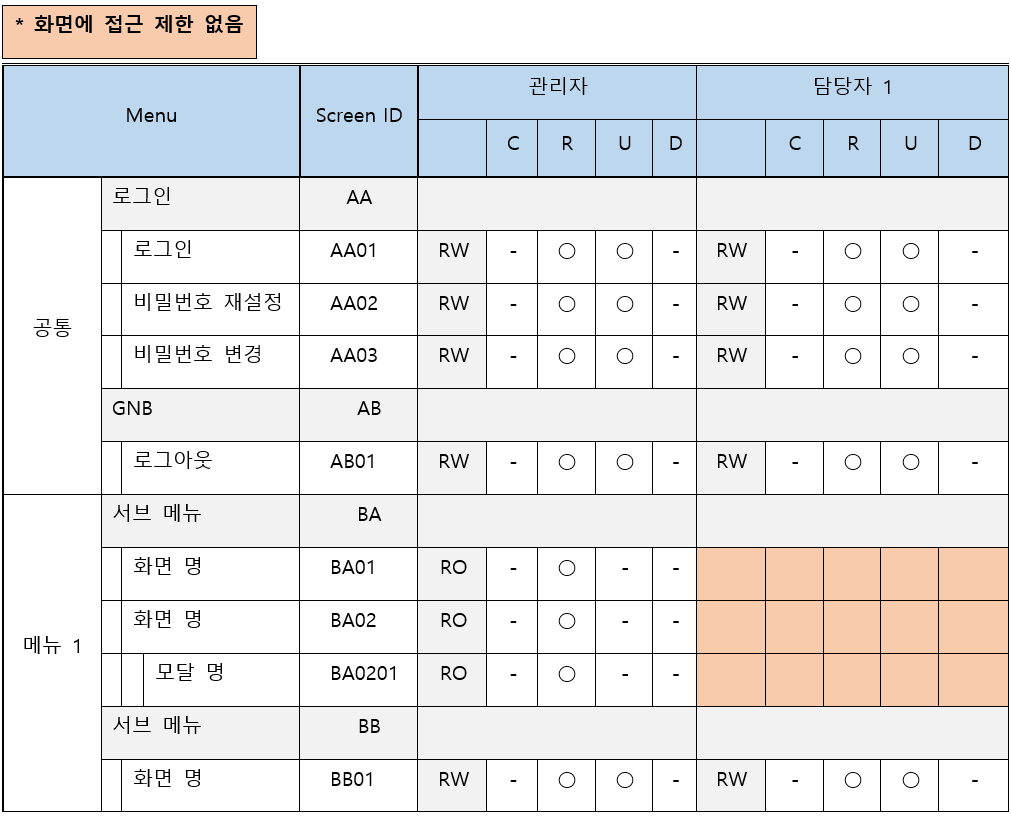
Now we are going to systematically design the overall screen and menu structure of the service.Information Architecture (IA)We move on to the establishment phase. When faced with a vast amount of maritime data from a blank state, it was necessary to classify and group the main and submenus to create a dense depth structure so that users do not lose their way within the system.
-
Depth Design Rules:To reduce the complexity for users and lower fatigue, it is principle that all menus are designed to bebelow 3 Depth.Of course, in complex structures like a ship management system, there may be many screens that need to be exposed step by step, but efforts to minimize depth must precede this under a clear logical basis.
-
Screen ID Guide Rules:All pages registered in the IA have a unique screen ID.
-
Abbreviation for 1~2 Depth Menu Names:The English name of the main menu is abbreviated to 2 uppercase letters. (e.g., Member Management ➔ MB)
-
Depth Classification Code: Apply rules for distinguishing based on depth numerically on the screen. (e.g., MB_01, MB_01_01)
-
Abbreviation for Screen Type: It is also possible to distinguish by attaching a suffix based on details of the form (List, Detail, Popup, etc.).
-
Absolute Rule: IDs must never be duplicated, and even if a specific ID is modified or deleted due to planning changes, it is a strict principle of history management not to reuse that ID on other screens.
-
Core Components of IA: Classification, Service Depth (1/2/3), Service Screen Number, Screen ID, Page Definition and Requirements, Details, Progress Stage (Pending/Planning/Completed)
3.2 Flowchart
A flowchart is a document that visualizes the user's movement path and the system's processing process at a unit of screens and functions. It helps to understand at a glance how users utilize the service in a certain process and how the system operates internally.
In particular, the ship management service I was working on had numerous screens intricately linked and complex data exceptions occurring incessantly during planning. Initially, no matter how long and detailed I wrote the exception cases in text next to the wireframe of the storyboard (screen design document) in the usual way, it was extremely difficult to convey my planning intentions 100%.
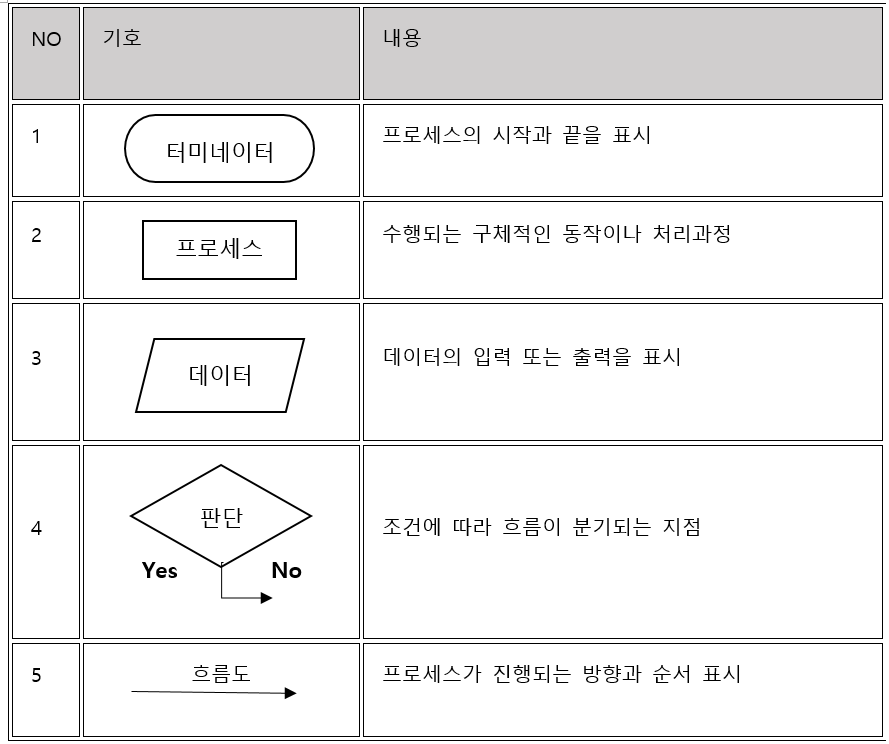
To solve this problem, I drew a flowchart adhering to international standard symbols (start, process, decision branches, etc.) and shared it with the developers. I focused on clearly linearizing the flow according to conditional branches (diamonds) to prevent user's movement paths from getting tangled.
International Standard Rules to Follow When Creating Flowcharts
-
Use of Standard Symbols: Strictly adhere to international standard symbols such as Start/End (rounded rectangle), Process (rectangle), Comparison/Decision (diamond), etc.
Representative international flowchart symbols (ISO 5807 international standard)
-
Flow of attention: The overall user flow is designed to naturally move from left to right or from top to bottom.
-
Decision branching: When using the diamond (comparison/decision) symbol, the output is typically represented with a downward arrow for Yes and side arrows for No.
-
Principles of input and output: Input and output lines for comparison and judgment must be logically clear and should be streamlined to avoid complexity in the process flow.
-
Recommended tools: In practice, Draw.io, Visio, Axure, and the recently popular Figma and Miro are primarily used.
4. Conclusion: A solid framework creates a flawless service
What I learned while planning the ship reference information service is that a planner is not simply someone who 'draws screens', but rather someone who builds a tight 'logic' and an organic 'process'.System architectis closer to this role.
If I had focused solely on screen design initially, I would never have launched this vast data service. It was made possible by refining the requirements at the front end, establishing a framework through IA, and organizing the flow with flowcharts.
In this article, if I have solidified the higher concepts and structures of the service, in the next post, I plan to share my experience of creating the final design document, or 'final screen design (storyboard)', based on the structures written like this. Additionally, I will return to share real-world stories about conducting testing (QA) to elevate the product quality to the highest level just before launching the service.
Ryu