
Publishing the IA List & UI Guide System Implementation


Publishing the IA List & UI Guide System Implementation
After joining NexTree and being assigned to a corporate project, the first thought that came to mind while taking over the publishing work was, “There are so many components already built—why isn’t the development team able to utilize them effectively?” Having worked on multiple projects at an agency, I was well aware of the importance of intuitive UI asset management, which made the existing working environment feel quite lacking.
Although the project had a repository, viewing actual implemented screens required manually navigating to individual page URLs. A more critical issue was the absence of a guide page where shared components (such as SCSS) could be easily referenced. As a result, even I, who was taking over the work, had to reanalyze the code from scratch. Developers, despite having access to pre-built components, frequently had to ask publishers for class names or usage instructions, or ended up writing redundant code—leading to unnecessary resource waste.
I concluded that this situation was not just an inconvenience but a fundamental issue that reduced the overall productivity of the project.
To reduce communication overhead and create an environment where the development team could independently build UI, I carried out two major initiatives.
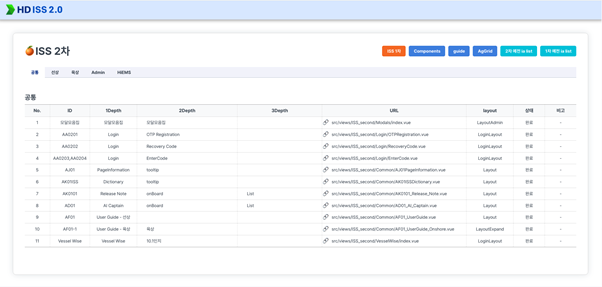
1. Building an 'IA (Information Architecture) List Page' to Improve Work Visibility
First, I structured a list based on the 1st and 2nd depth menu tree and mapped it to actual screen links. Categories (such as Common, Onboard, Onshore, etc.) were separated using top tabs, allowing developers responsible for each part to quickly find the screens they needed.
The most effective improvement was adding a publishing status column (Completed / In Progress) on the right side of the list. This enabled transparent sharing of work progress, significantly reducing unnecessary communication such as, “Is this page’s publishing finished?”
Additionally, before development began, stakeholders could review screens directly through the IA list. This allowed the development team to clearly confirm requirements in advance and focus solely on implementation.
2. Designing an SCSS Architecture Based on Design Tokens and Building a Style Guide
Next, I visualized the design tokens—which had previously been implemented programmatically using SCSS maps and @each loops—and built an intuitive style guide system.
Previously, utility classes such as colors ($colors) and font sizes ($fontSize) only existed at the code level, making it difficult for developers to immediately understand and apply them. To address this, I exposed the automatically generated class outputs from SCSS logic onto a dedicated design guide page for visualization.
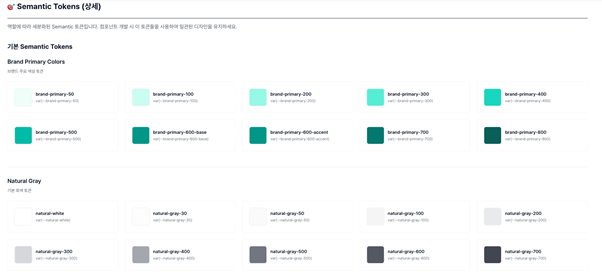
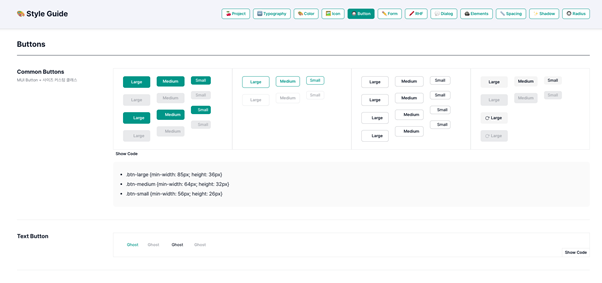
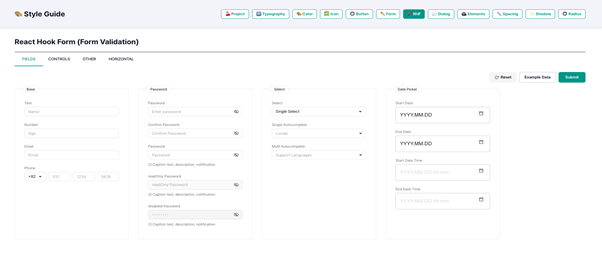
In addition to visualizing design tokens, I also included essential UI components used in actual service screens within the guide system. Components such as buttons, form elements (Input, Select, DatePicker), checkboxes, and radio buttons were visualized across various states (Default, Hover, Disabled, Error, etc.), with clearly defined combinable class names and markup structures.
As a result, developers no longer needed to analyze complex CSS source files. Instead, they could quickly implement UI by referencing intuitive class names and component structures from the visualized guide system.
Impact of IA List and Style Guide Implementation
The positive impact of building the IA list and style guide extended beyond improving collaboration efficiency with the development team. This systematic approach to screen management and componentization, proven effective in this corporate project, was later adopted across other large-scale projects within the company.
Furthermore, the UI component guide system was actively integrated into the workflow and handover process among fellow publishers. Moving away from the previously unstructured handover approach, work could now be transferred based on systematic documentation and guides. This significantly reduced the learning curve and adaptation time for new publishers joining the project.
Conclusion
Ultimately, this effort went beyond organizing deliverables for individual convenience. It established a strong foundation for standardizing fragmented code styles among publishers and elevating the overall efficiency of the team.
Through this experience, I realized that the role of a publisher is not merely about creating visually appealing screens, but about building and standardizing a UI ecosystem that everyone can easily and efficiently use.
Moving forward, I aim to continuously transform fragmented assets into structured systems, ensuring that individual growth directly contributes to the productivity of projects and the organization as a whole.
IOT Publishing Design Guide URL
https://edgewise-dev.vizend.io/publishing/publishing-guide
sangsooni