

1. Introduction
A situation arose in which CPU usage remained at 100% on an operating PostgreSQL database. When I investigated the cause, autovacuum was at the center of the issue. I had thought of it as merely a background process that rarely required attention, but through this incident I came to understand, at least to some extent, how autovacuum works and why it can even cause lock contention. I will first summarize the problem we experienced, then organize what I learned about autovacuum and locks during the process of analyzing and resolving it.
2. What Happened
During periods of heavy traffic, background cleanup jobs were delayed, and the xid age of a particular table was gradually accumulating. Eventually, it exceeded the threshold, prompting PostgreSQL to forcibly run an autovacuum on its own. Coincidentally, this process ended up handling a table that had problems with some of its data at that moment, leading to a situation in which it failed to finish for a long time while continuously consuming CPU.
At first, I thought the cause was simply a traffic spike or inefficient queries, but upon investigation, the root cause turned out to be much more fundamental. When I checked the running queries, I found that the process consuming CPU was not a typical application query but an autovacuum in the form of 'autovacuum: VACUUM ... (to prevent wraparound)'. I learned that PostgreSQL had forcibly started it to prevent transaction ID wraparound, and that it could not be stopped using ordinary methods such as terminating the process or disabling autovacuum.
The changes in the system state during this process can be summarized as follows.
|
Phase |
State |
|---|---|
|
Normal operation |
Normal operation, xid_age within the normal range |
|
Problem accumulation phase |
Delayed background cleanup jobs → xid_age approaching the threshold |
|
Time of incident occurrence |
Forced execution of wraparound-prevention autovacuum, stalled while processing the problematic table → CPU remaining at 100% |
|
After remediation |
Threshold restored, CPU usage and service returned to normal |
The response proceeded in three main stages. First, after confirming that the process consuming CPU was a wraparound-prevention autovacuum, and as noted earlier, that this mode could not be stopped by ordinary means, we temporarily raised the threshold setting instead of terminating the process directly. This encouraged the problematic table to be excluded from the targets of forced execution. After confirming that CPU usage had fallen to a normal level, we backed up and initialized the problematic table to resolve the underlying corruption. Finally, we restored the temporarily increased setting to its original value, rechecked the CPU and service status, and completed the response.
-- 1) 원인 진단: CPU를 점유 중인 프로세스 확인
SELECT pid, query FROM pg_stat_activity WHERE state = 'active';

-- 2) 긴급 조치: wraparound 방지 대상에서 제외되도록 임계값 임시 상향
ALTER SYSTEM SET autovacuum_freeze_max_age = 500000000;

-- 3) 문제 테이블 정리 후 임시 설정 원복
TRUNCATE TABLE target_table;
ALTER SYSTEM SET autovacuum_freeze_max_age = 200000000;
The key criterion in the results of query 1 is whether the query value contains the phrase 'autovacuum: VACUUM ... (to prevent wraparound)'. If this phrase is present, it indicates that this is not a regular autovacuum but a forcibly executed wraparound-prevention mode. As explained earlier, directly terminating the process is ineffective. Conversely, if you see only 'autovacuum: VACUUM ...' without this phrase, it is a normal cleanup operation and there is generally no need for concern.
3. What Is Autovacuum?
3.1 Autovacuum: What Does This Process Do?
Even when an UPDATE or DELETE occurs, PostgreSQL does not immediately remove the existing rows; instead, it leaves them behind as dead tuples (MVCC). Autovacuum is a background process that cleans up these accumulated dead tuples and freezes transaction IDs so that they can be reused. Although this may seem like a DBA concern at first glance, the query patterns and transaction usage created by applications directly affect autovacuum load and lock contention. Therefore, it is useful for developers to understand at least the basic operating principles.
|
Term |
Description |
|---|---|
|
dead tuple |
A row that is no longer valid due to an UPDATE/DELETE but remains because it has not yet been physically deleted. |
|
MVCC |
PostgreSQL's concurrency control method, which allows multiple transactions to simultaneously view data from different points in time. |
|
autovacuum |
PostgreSQL's background automatic cleanup process that removes dead tuples and freezes transaction IDs. |
|
xid / wraparound |
PostgreSQL uses 32-bit transaction IDs (xid). If old xids are not cleaned up, the IDs can cycle (wraparound), potentially compromising data consistency. |
|
lock |
A lock applied to preserve consistency when multiple sessions access the same object simultaneously. Different lock levels are used depending on the type of request. |
3.2 Why and How Does xid_age Accumulate? — Wraparound-Prevention Autovacuum
xid_age continues to increase whenever a transaction occurs, and the only way to reduce it is for autovacuum to complete the freeze operation on the table. However, if xid_age accumulates quickly due to heavy write traffic while autovacuum fails to complete in time because of I/O contention or processing delays, the gap between the accumulation rate and the cleanup rate continues to widen. If this gap is not narrowed and the age of the transaction ID (xid) eventually exceeds the threshold, PostgreSQL forcibly runs autovacuum on the table to prevent wraparound. Because this mode is the last line of defense for preserving data consistency, it cannot be stopped using ordinary methods such as terminating the process or disabling autovacuum. In this incident as well, its interaction with the problematic table led to a situation in which resources were consumed for a long time, affecting the service.
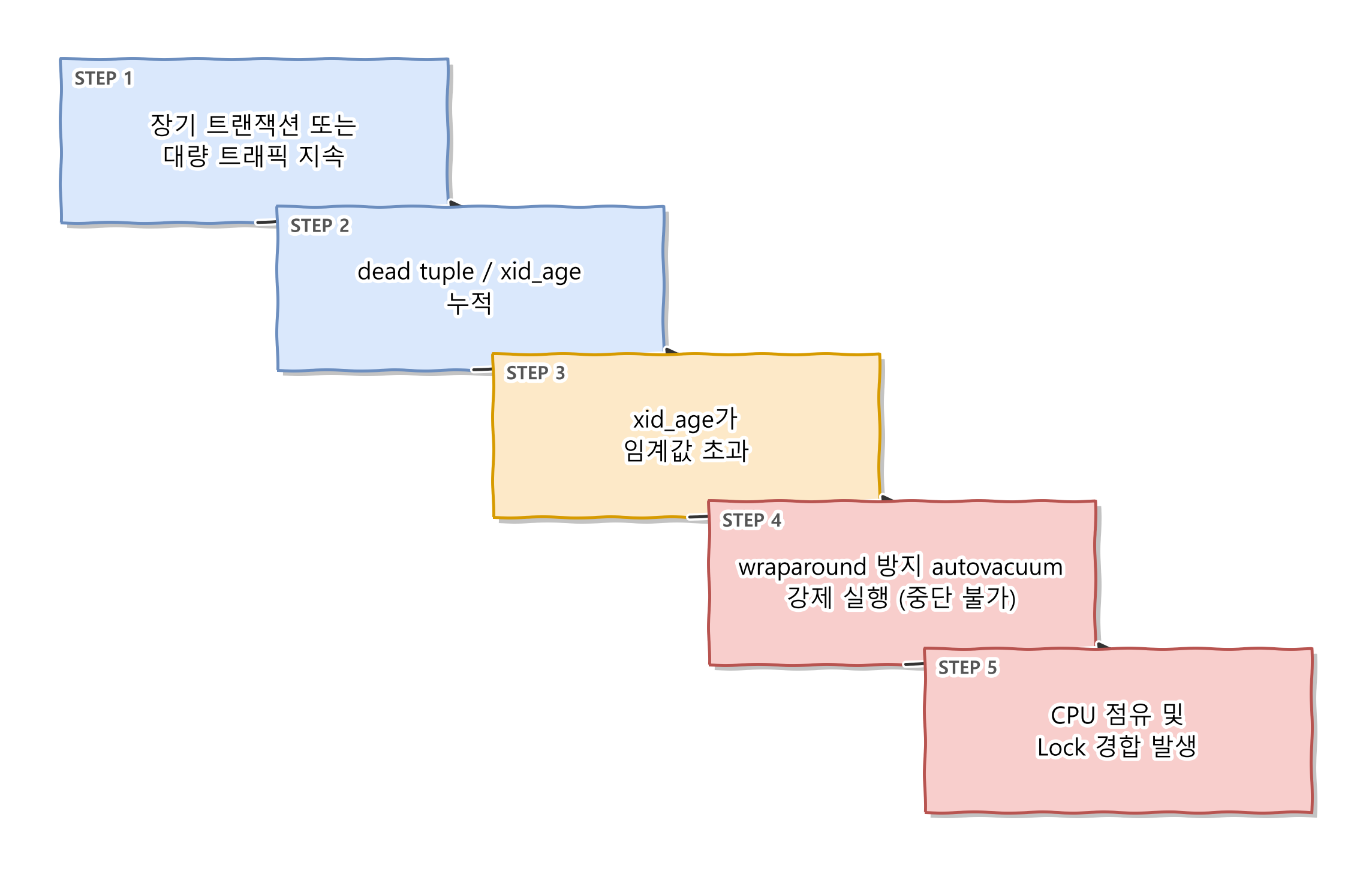
Figure 1. Steps Leading to Wraparound-Prevention Autovacuum
4. Another Lock Contention Scenario Caused by Autovacuum
Although this was not the direct cause of the incident, I used the opportunity to organize other situations in which autovacuum can cause lock contention.
4.1 Conflict Between Regular Autovacuum and DDL
Because regular autovacuum uses only the relatively lightweight SHARE UPDATE EXCLUSIVE lock, it generally coexists without problems with queries such as SELECT / INSERT / UPDATE. The problem occurs when executing DDL that requires an ACCESS EXCLUSIVE lock, such as ALTER TABLE during a deployment. If autovacuum is already processing the table, the DDL must wait until autovacuum finishes, and the regular queries that arrive afterward can also end up waiting in a long queue. This is one of the common causes of the phenomenon in which "the service suddenly stopped during a deployment."
|
Lock mode |
Typical use case |
Relationship with autovacuum |
|---|---|---|
|
ACCESS SHARE |
SELECT |
No conflict |
|
ROW EXCLUSIVE |
INSERT / UPDATE / DELETE |
No conflict |
|
SHARE UPDATE EXCLUSIVE |
autovacuum, CREATE INDEX CONCURRENTLY |
Conflict between identical modes (cannot run concurrently) |
|
ACCESS EXCLUSIVE |
ALTER TABLE, DROP TABLE, TRUNCATE |
Conflict (waits until autovacuum finishes) |
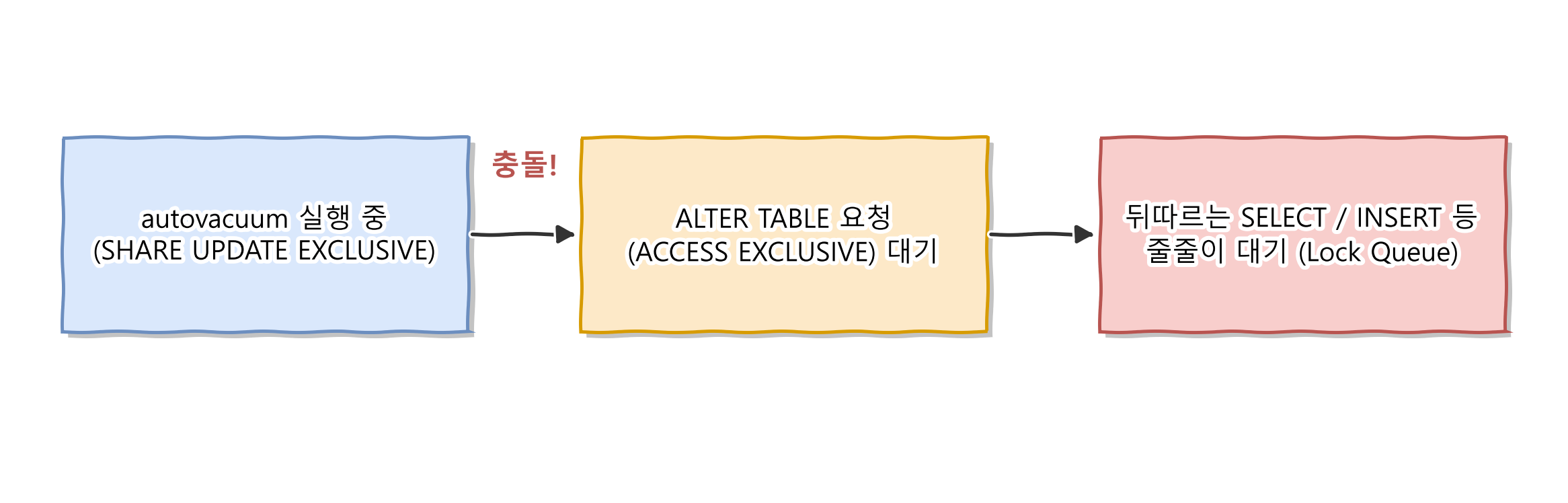
Figure 2. Lock conflict between Autovacuum and DDL
4.2 Problems Caused by Long-Running Transactions
If an application's connection leak or a transaction left open during debugging remains unattended for too long, autovacuum cannot clean up dead tuples created before that transaction began. As a result, the tables and indexes may grow larger than necessary, causing bloat and potentially degrading query performance.
5. Conclusion
If you leave autovacuum unattended, assuming that it is a background process that runs well on its own, it may have no issues under normal circumstances but affect the entire service when conditions such as increased traffic, long-running transactions, and inadequate settings overlap. Because metrics such as xid_age and the dead tuple ratio are not monitored regularly, you may not notice the problem until it reaches a critical level. Monitoring these metrics as well should allow you to respond with more leeway before the conditions for forced execution are reached.
Sean