

1. Background
Devlime operates across three environments—development, staging, and production—and there are two GitOps repositories that manage them. Regardless of which environment is being updated, the same checks are performed before and after deployment. These include checking what is being deployed this time, whether there are any database changes and whether they were written according to the guidelines, whether the library versions referenced between services are out of sync, and whether there are any uncommitted or unpushed changes.
Once the checks are complete, we organize the deployment details. Immediately after deploying to staging, we share them internally with the team along with the items the team needs to verify. After testing and making corrections, we deploy to production and announce the accumulated details to users. Production deployment is still in transition, so there is one additional step: transferring the staging settings while checking them against the production settings.
These checks and organizational tasks are not difficult. However, there are many items, missing one can immediately cause an incident, and they are repeated every time we deploy. As deployments became daily in order to respond quickly to VoC, this repetition became a daily task. The team already uses Claude Code and Cowork for development, and the platform team also has a team harness called Vizend agent hub. However, the hub is intended to retain development context, so a different setup was needed for operational procedures such as deployment checks that need to run without a person. Since this procedure itself is transitional, we decided not to build something extensive and to make only as much as necessaryThis article covers that initial setup, the signal that it was time to improve it, and the improvements that followed.
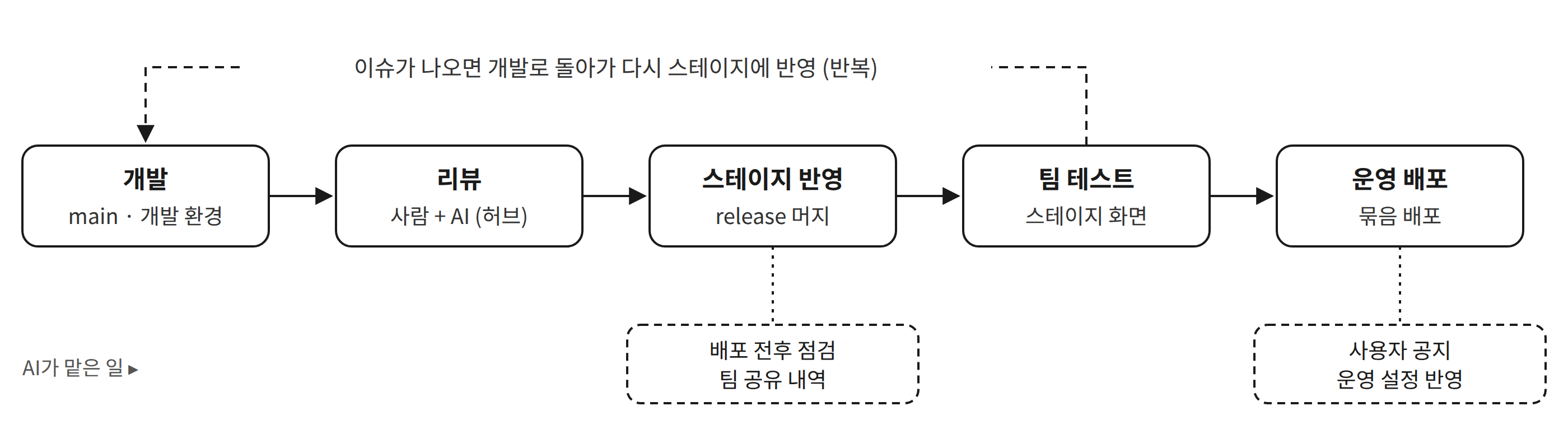
Figure 1. The Devlime deployment loop. The dotted box below shows the tasks assigned to AI.
2. Background to the Technology Choices
|
Layer |
Function |
What it does |
When the official documentation says to introduce it |
|---|---|---|---|
|
L1 |
CLAUDE.md · rules · memory |
Rules and context that are automatically read at the start of a session |
When the same rule has been violated more than twice |
|
L2 |
Skills · MCP · LSP |
Fix procedures in files and connect external systems as tools |
When you are entering the same prompt for the third time |
|
L3 |
Subagents · workflows |
Move auxiliary tasks into separate contexts and run them in parallel |
When auxiliary tasks begin to fill the conversation with output |
|
L4 |
Hooks |
Enforce and inspect actions with shell commands before and after tool calls |
When something needs to happen every time without asking |
|
L5 |
Schedules (/loop · Desktop tasks · Cloud Routines) |
Run without a person present |
When recurring checks have become scheduled tasks |
|
L6 |
Plugins · marketplaces · managed settings |
Bundle components for deployment and version management |
When a second repository needs the same configuration |
|
L7 |
validate · eval |
Measure whether a skill is triggered and whether the result has improved |
Before deploying a plugin |
This table reorganizes the items from the Claude Code official documentation, "Extend Claude Code" and "Run prompts on a schedule," into layers. The wording for the introduction timing follows the documentation, while I assigned the L1–L7 numbers for convenience in explaining them.
Of the seven layers, the ones we initially used were the L2 skills and L5 scheduled tasks. There were three criteria for this decision.
First, we followed the introduction timing stated in the documentation.The actual triggers we encountered were "explaining the same procedure for the third time" and "checks being repeated with every deployment." The hook trigger, "a rule that must be enforced every time," was something we could identify only after running the procedure several times.
Second, people handle actions that cannot be undone.Merges, commits, pushes, tags, and changes to the production environment are handled by people according to the team’s principles, so the scope of "what can run on its own" was defined naturally. That scope includes verification, documentation, and file modifications up to just before the commit.
Third, we matched the scale.At present, I am the only person running these checks, and the procedure is transitional. Introducing plugin version management and evaluation first into a transitional procedure used by one person would not be the right order. Instead, we wrote the procedure completely in a skill file so it could be moved later, and structured the scheduled prompt to call the skill.
We selected the scheduling method according to the same criteria. The Claude Code documentation describes three methods, and we chose Desktop scheduled tasks (Cowork).
|
Method |
Execution location and start conditions |
Whether it fits the checks in this article |
|---|---|---|
|
Cloud Routines |
Clone a repository afresh in the cloud and run it. Start with cron (at least 1 hour), an API call, or a GitHub event. No permission prompt |
The repository is on our internal GitLab, so the cloud session would need credentials. We decided not to do that at this stage |
|
Desktop scheduled task |
Mount a folder connected to my PC in a new session and run it. Set permissions for each task. Set a time or have a person run it |
Selected. The repository is already on my PC, and a person updates it before execution |
|
/loop |
Repeat within the open session. Dependent on the session |
Does not fit a check where you “leave it running and do something else” |
Cloud Routines is the smoothest option, but our repository is on our internal GitLab, so we would have to keep credentials in the cloud session, and we decided not to set up that configuration at this stage. Desktop tasks mount a folder connected to my PC in a new session and run it, and I perform the repository update (fetch) before execution.
Another reason we did not set a time for execution is that deployments are not regular. For now, they are closer to daily, and after stabilization, scheduled deployments will be mixed with hotfixes. In either case, the start condition is not a time but the event that “the update has been completed.” Therefore, both tasks leave cron empty, and a person presses the run button.
3. Initial configuration
The initial configuration consists of two skills and two scheduled tasks.
|
Configuration |
Details |
|---|---|
|
2 skills |
One for checking before staging deployment and organizing the deployment details, and one for comparing and deploying staging and production gitops. One Markdown file each |
|
2 scheduled tasks |
One-to-one with the skills. No time is set; a person presses the run button. Runs with automatic approval in a new session and sends a notification when finished |
|
Rules |
“Commits, pushes, and tags are done by people,” and “If it could not be verified, say that it could not be verified.” Sentences in the skills and prompts |
|
Memory |
Project documentation. The next execution reads the previous announcement document, assigns a number, and reuses the display text |
What I wrote in the skill files was more about judgment than procedure. The order of checks is common everywhere, but which values must not be moved, what should not be translated and where it should be found, and how to report when there is a discrepancy are matters that apply only to our environment. For example, the directory name in staging gitops is also prd, so it must be distinguished as a repository rather than a directory; or screen names are not in the repository but come from lingo labels, so they should not be translated and should instead be found in the labels. Writing these decisions into files lets a new session perform checks using the same criteria every time.
The operation is simple. Update the repository and press the run button; the new session reads the skills, checks the change scope, DB changes, and version consistency, and leaves a report and an announcement draft. I read the report and select only the items that require a decision. Not building a large configuration from the start was intentional. After running it several times, however, it began to become clear how far this configuration could hold up and where it needed to be fixed.
4. Signs that it was time to fix things
There were five signs. Three of them were exactly the introduction points specified in the official documentation.
The body is filled with shell snippets rather than procedures
The two skill files had grown to around 400 lines, and half of them were code blocks. The structure had AI look at shell snippets in the body and retype and execute them every time for deterministic tasks such as taking a repository snapshot, comparing image tags, checking DB migration filenames, checking the version matrix, and extracting screen paths. The results varied slightly with every execution, and once it even produced a false mismatch by reading a file left behind by a previous execution. To borrow the official documentation’s wording, “running the sorting algorithm is cheaper than sorting by tokens.” The body of SKILL.md is loaded into the context in full when triggered, while scripts are only executed and use tokens for their output.
Copies of the same rules exist in multiple places
The git rules existed in four places: the two skills and the two scheduled prompts. This was because the full procedure had been duplicated in the prompts with “If the skill is unavailable, follow the procedure below.” The intent to provide redundancy was good, but it meant touching four places to change a rule once, and one copy had diverged.
The execution environment caused an incident
In the environment where the scheduled tasks ran, file deletion was blocked in connected folders. However, git creates and deletes lock files even for commands that appear to only read, so empty lock files that could not be deleted were left in each repository. The rule stating that “read-only commands are safe” was incorrect in this environment. There were two lessons from this incident, beyond the lock files themselves. The nature of the execution environment is part of the design, and rules written as sentences are, as the official documentation says, “requests, not guarantees.” Rules that must be followed every time should be enforced by hooks.
The procedure became fixed
The section structure of the two skills became the same: principles → targets → snapshot and freshness → scope → blocking conditions → deliverables. This meant it had become possible to separate which steps could be established by scripts from which required AI judgment, and it was time to move to the recommended structure (the body contains the procedure, rules are in reference files, and code is in scripts). If we had started with that structure, we would have divided things incorrectly because we would not have known what was deterministic and what required judgment.
It is not shaped for the next user
The skills were synchronized to my account, the known deviations and display glossary were prose lists, and the body contained sentences with dates embedded in them. This was not a problem while I was the only user. But to incorporate this into a harness I write separately or use it for AI adoption by a team or organization, it needs to be organized as a plugin, configuration needs to be data, and rules need to exist in one place. If we leave it in a form that will be discarded as a transitional procedure, we will have to rebuild it at the next stage.
5. Improvements
The direction of the improvements can be stated in one sentence. Scripts perform checks with defined rules, AI makes judgments by following the skills, rules are kept in only one place, and hooks enforce rules that must be followed. I divided the two skills again according to this standard and combined them into one plugin.
devlime-release-ops/
├── skills/        release-check · release-notes · prd-gitops-sync
│                  (각 50줄 안팎, 체크리스트 + 판단)
├── references/    repos · git-rules · flyway-check · configmap-compare
│                  notice-style · known-deviations · history · ledger
├── config/        저장소 표 · gitops 대조 규칙 · 기준값 · 버전 상호 참조
│                  알려진 편차 · ledger  (JSON)
├── scripts/       snapshot · freshness · changes · flyway_lint · version_matrix
│                  cm_pair · routes · locate · ledger · notice_lint · image_tags
│                  configmap_diff · plan_validate · plan_apply · plan_verify
├── hooks/         hooks.json + guard.py  (명령 실행 전 규칙 검사)
├── evals/         스킬별 평가 + 트리거 질의
└── tests/         합성 저장소 생성 + 검사
Scripts perform the checks and communicate through exit codes. Checks with defined rules—such as whether the repository is up to date, the change scope, the format of DB changes, library version consistency, and image tag comparisons—are handled by Python scripts. The results are saved to files, and the exit code reports “pass / blocked / needs verification / error.” If blocked, the skill puts it at the top of the report and stops; items needing verification are passed on for judgment. The skill body now contains only a checklist that calls these scripts in order and explanations of how to examine items requiring judgment.
Release check:
- [ ] 1. 스냅샷        snapshot.py
- [ ] 2. 신선도        freshness.py     (낡았으면 멈추고 최신화 명령을 사용자에게)
- [ ] 3. 변경 범위     changes.py
- [ ] 4. DB 반영 사항  flyway_lint.py   (판단이 필요한 항목만 가이드 문서를 읽고 판정)
- [ ] 5. 버전 정합     version_matrix.py
- [ ] 6. 보고서 조립 → 문서 저장
Irreversible changes are divided into four stages: plan, validate, apply, and verify. The process for changing operational settings changed from immediately editing files based on comparison results to having AI first create a plan file (which value in which file should be changed to what, and why), then having a validation script compare that plan against the rules and current files before applying it. If even one item in the plan has a deferred decision, execution does not proceed; if a value approved by the user changes in the meantime, it stops. This directly adopts the internal blog’s “decision gate” and “snapshot-based approval.” After applying the changes, it checks again that the actual changes exactly match the plan.
Rules are kept in one place and enforced by hooks. The rules scattered across four places now have a single reference file as their source of truth, and the skills and scheduled prompts only point to that file. Hooks check the same rules at the tool-call stage and reject commands that diverge, along with the reason. Rules written as sentences are things we expect AI to follow, while hooks make it impossible not to follow them. The scheduled task prompts no longer duplicate the procedure; they are now just two lines: “run the skill; if it is unavailable, stop.” The dated history was moved to a separate file, leaving only the rules in the body.
Before-and-after comparison
|
Item |
Initial setup |
Plugin |
|---|---|---|
|
Skill body |
Around 400 lines × 2, half of which are code blocks |
Around 50 lines × 3, containing only checklists and decisions |
|
Rule-based checks |
AI retypes and executes the shell snippets in the body |
13 scripts, with exit codes distinguishing pass, block, and manual review required |
|
Rules |
Copies in four places, embedded in prose |
One reference file + hooks |
|
Configuration and dictionaries |
Prose in the body |
Configuration file (JSON). The scripts and the skill read the same file |
|
Operational configuration changes |
Compare and modify immediately |
Plan → verify → apply → confirm |
|
Basis for approval |
Last-updated time |
Last-updated time + commit hash for each repository |
|
Schedule prompt |
Skill invocation + full procedure duplicated |
Two-line invocation; stop if not installed |
|
Validation |
None |
Per-skill evaluation sets, synthetic repository tests |
6. Conclusion
This setup consists of a skill set, thirteen scripts, one hook, and one plugin that ties them together. Viewed through the seven layers of extension functionality provided by Claude Code, it is still only a subset, and there is only one user. However, this scope was the result of setting an order, not of being insufficient. Because the official documentation specifies when each feature should be introduced, I can say which triggers I have reached and which I have not yet reached, and I know in advance when the next feature will become necessary.
The biggest change from the initial setup to the plugin was where the inspection items were located. What had been in my head and message history was moved into files, and half of those files became rules for people to read while the other half became checks for scripts to execute. As a result, we looked at the same things in the same order, items for which decisions had been deferred remained in the same place each time, and the process stopped when an approved value changed in the meantime. Working with AI on deployment checks yielded more of this benefit than saved time.
Next comes validating this setup in an actual repository. How to manage this setup and when to bring it to the team will be covered in the next article, "Criteria for Promoting a Personal AI Setup to a Team Asset."
Juno