

1. ag-Grid data update issue
Data tables used in practical projects rarely offer only simple query functions. Particularly in admin systems or work platforms, it is very common for users to directly modify data or change states within the table.
For example, there is a requirement that when a button in a specific cell is clicked, the calculation result of another row is immediately reflected, or the UI of a specific cell changes in real-time according to the global state based on Pinia/Vuex.
In the project, ag-Grid was used to implement such functionalities. ag-Grid was very suitable for processing large-scale data because it provides a Virtual Scroll-based structure and a high-performance rendering engine. However, unexpected rendering issues occurred while using it with Vue 3.
- Issue 1:There is a problem where modifying one cell causes the entire table grid to rerender.
When directly modifying rowData based on Vue's ref or reactive, Vue detects changes to the entire array. As a result, the entire row rendering may occur again inside ag-Grid. This was particularly noticeable when there were thousands of records, causing the screen to stutter momentarily.
- Issue 2:Issue of not reflecting the latest value when referencing external state within cellRenderer
When referencing internal variables or Pinia state in setup, ag-Grid sometimes retains the values at the time of the initial rendering. This is due to the different ways in which Vue's reactive system and ag-Grid's component reuse logic operate.
- Issue 3:The phenomenon of unnecessary API calls repeating with every rendering
Using a structure that calls external functions or getters every time a specific cell is rendered led to repeated API requests and operations even with just scrolling or state changes. Ultimately, performance issues and structural problems arose that could not be solved by simple functional implementation.
2. Reasons for Data Issues
Vue 3 uses a Proxy-based reactive system. It has a very efficient structure in typical Vue applications, but issues can arise when used with libraries like ag-Grid that have their own rendering engines. ag-Grid internally manages the following states on its own.
-
Row Node / Cell State / Scroll State / Selection State / Transaction State
In other words, both Vue and ag-Grid will have a structure that aims to track states and control rendering. Especially when deeply tracking rowData reactively, Vue will manage thousands of data objects all wrapped in Proxies. During this process, the following issues have arisen.
-
Increased memory usage
-
Unnecessary rendering
-
Proxy creation overhead
-
Increased cost of state tracking
Additionally, ag-Grid uses a Virtual Scroll-based structure, so rendering optimization is very important, and excessive reactive tracking in Vue has been found to interfere with this. Ultimately, the key issue was 'which state should Vue manage and which state should be delegated to ag-Grid.'
3. Solution
① Optimization based on shallowRef
The first solution was to declare rowData as a shallowRef. Previously, rowData was declared using ref or reactive, but in this case, Vue would track all internal objects. In contrast, shallowRef does not track changes to the internal properties of an object. This means that Vue could manage only the reference to the rowData array, separating the responsibility for the actual internal state to ag-Grid.
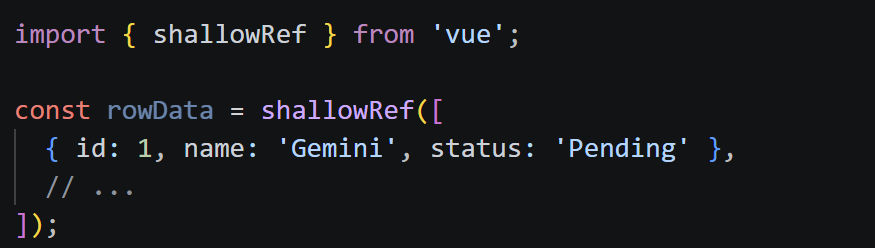
This allowed us to achieve the following effects.
-
Eliminated unnecessary responsive tracking
-
Reduced overall Grid re-rendering
-
Reduced memory usage
-
Improvement in rendering performance
The performance improvement effect is particularly significant in a Grid environment with thousands of data entries. Additionally, the Virtual Scroll structure has also operated much more reliably. Through this experience, I realized that entrusting all states to the Vue reactive system is not necessarily the correct answer. Sometimes, delegating state management responsibility to a library can be a much more efficient structure.
② Custom Cell Renderer and Transaction API
The second solution was to utilize the Custom Cell Renderer and Transaction API. ag-Grid has a structure that reuses Cell Components. In other words, rather than creating all components anew when scrolling, it recycles existing components.
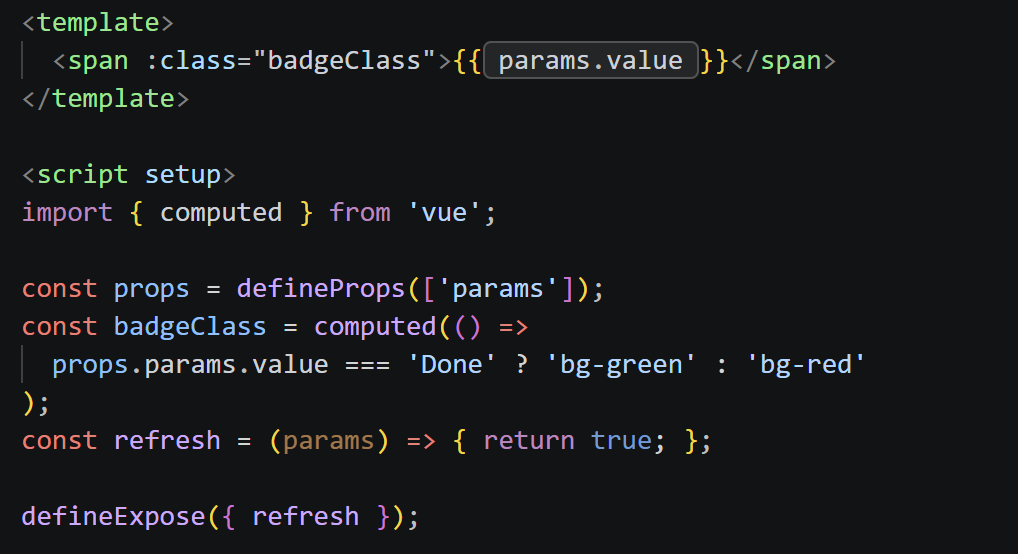
The issue is that there were cases in this process where the reference to external states was not updated to the latest value. To address this, the project explicitly implemented the refresh method.
It is configured to partially re-render only the specific Cell when certain data changes. Additionally, the method of data refresh has also been changed. Previously, the data was modified in the following way:
-
rowData.value[0].status = 'Done'
However, this approach was an inefficient structure for both Vue and ag-Grid. Ultimately, the project was restructured to directly use the ag-Grid's applyTransaction API.
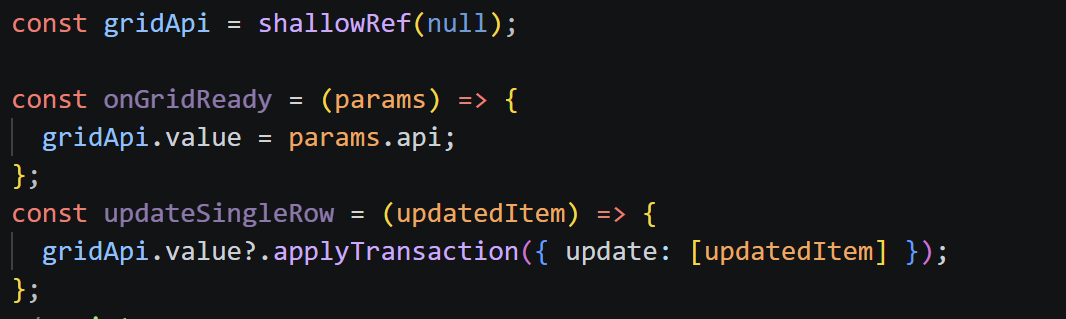
The Transaction API can explicitly convey the following operations:
-
add / update / remove
The biggest advantage of this structure was that it allowed for 'partial updates'. This meant that only the actual changed rows could be refreshed without re-rendering the entire grid. As a result, we were able to achieve effects like the following.
-
Minimizing rendering scope
-
Performance improvement
-
Increased scroll stability
-
Decrease in API calls
-
Partial status control available
These differences are especially pronounced in large-scale data environments.
4. Performance optimization and design perspective
The biggest takeaway from this troubleshooting process was that frontend performance optimization is not just about code changes, but rather a matter of design.
However, when combined with libraries that have their own rendering engines like ag-Grid, the responsibility of state management can overlap, leading to performance issues. Ultimately, the important question was the following.
-
Which state will Vue manage?
-
Which state will be delegated to ag-Grid?
-
How far should we track reactively?
-
Which changes should be handled as Transactions?
In other words, the separation of roles between frameworks and libraries was key. Additionally, through this experience, I realized that understanding the underlying principles is much more important than simply implementing features.
5. Conclusion
This experience of optimizing ag-Grid performance was more than just a simple bug fix. At first, it seemed like a straightforward rendering issue, but it was actually a structural conflict between the Vue reactive system and the ag-Grid rendering engine. In particular, I was able to experience the following elements deeply.
-
Large-scale data rendering structure
-
Advantages and Disadvantages of Reactive Systems
-
Transaction-based State Management
-
Separation of Roles between Libraries and Frameworks
-
Virtual Scroll Optimization
Above all, I felt the significance of design in determining what to delegate to the framework and what to entrust to the library. In conclusion, this experience was a highly meaningful one that allowed me to deeply understand performance design and state management structures in a large-scale frontend environment, beyond just simple experience with Vue or ag-Grid.
<References>
- ag-Grid official documentation (https://www.ag-grid.com/vue-data-grid/getting-started/)
- Vue official documentation (https://ko.vuejs.org/api/reactivity-advanced)
lucy