
Modbus-RTU is a communication method that has been used in factories and industrial facilities for a long time, so there is plenty of documentation and it is frequently encountered in practice. However, to connect the lines directly and observe the communication, you need an RS-485 converter or actual equipment, so it often remains difficult to grasp hands-on.
In this post, I will first briefly summarize the concept of Modbus, then cover how to create and test the communication entirely within a PC, without actual equipment, using com0com (virtual serial ports) and the two test programs Modbus Poll/Modbus Slave.
1. What is Modbus?
Modbus was first created in 1979 and remains one of the most widely used communication protocols in industrial settings. Even when devices such as PLCs, sensors, measuring instruments, and inverters are made by different manufacturers, they can communicate as long as they conform to this standard, so it continues to be adopted for new equipment.
The communication structure of Modbus is always divided into a 'Master' and a 'Slave.' The Slave responds only after the Master sends a request first, so the Slave never sends data on its own initiative. Multiple Slaves can be connected under one Master, and each Slave is identified by a unique Slave ID (1–247).
Depending on the physical line over which this Master–Slave conversation takes place, Modbus is broadly divided into two types.
|
Category |
Modbus TCP |
Modbus RTU |
|---|---|---|
|
Physical layer |
Ethernet (LAN cable) |
RS-232 / RS-485 serial |
|
Addressing |
IP address + port |
Slave ID (1–247) |
|
Frame structure |
MBAP header + PDU |
Slave ID + PDU + CRC16 |
|
Characteristics |
Easy and fast network configuration |
Wiring is inexpensive and can cover long distances (RS-485: 1.2 km, up to 32 devices), so it is still widely used for field instruments and legacy equipment. |
An RTU frame has a very simple structure, as shown below.
|
Slave ID (1 byte) |
Function Code (1 byte) |
Data (variable length) |
CRC16 (2 bytes) |
|---|---|---|---|
|
Number of the device that should receive the request |
What to do (read/write, etc.) |
Register address, quantity, value, etc. |
Checksum for error detection |
Knowing just a few commonly used Function Codes is enough to understand most of the exercises.
-
03 (Read Holding Registers) — Reads register values. Used most frequently in the exercises.
-
06 (Write Single Register) — Writes a value to a single register.
-
01 (Read Coils) — Reads On/Off values (bits).
-
16 (Write Multiple Registers) — Writes values to multiple registers at once.
For RTU communication to work, the Master and Slave must match the following four communication parameters exactly: Baud Rate (transmission speed, e.g., 9600), Parity (usually None), Data Bits (usually 8), and Stop Bits (usually 1). If even one of these differs, there may be no response at all, or the received values may be corrupted.
Summary: RTU is a simple protocol that expresses 'who (Slave ID) exchanges what (function code), where (address), and how many (quantity)' as a very short sequence of bytes, and verifies errors with a CRC at the end.
2. Why Test with Virtual Serial Ports?
To observe RTU communication directly, you would normally need an RS-485 converter, cables, and an actual Slave device that can respond. However, if you only want to confirm that the 'communication itself is working correctly,' you can reproduce it inside a PC without this hardware. com0com is a free, open-source virtual null-modem driver for Windows. Once installed, it creates a pair of internally connected COM ports. Because bytes written to one port arrive unchanged in the receive buffer of the other port, it creates the same situation as connecting two devices with a real cable.
By attaching one program to each end of this virtual port pair, you can assign the Master and Slave roles respectively.
-
Modbus Slave — Acts as a simulated field device. It stores values at specific addresses and responds when a request arrives.
-
Modbus Poll — Acts as the Master. It periodically reads or writes values to the Slave.
Both programs are paired Windows utilities distributed by Witte Software (modbustools.com), and even the free trial version is sufficient for basic testing.
3. Setting Up com0com
-
Download com0com and install it with administrator privileges.
-
By default, installation creates one port pair named CNCA0 ↔ CNCB0. You can change the names to the COM numbers you want in the settings screen — in this article, we will assume they have been changed to COM7 (Slave side) and COM8 (Master side).
-
It is recommended to enable 'Baudrate Emulation' in the port options. When it is disabled, data is delivered immediately regardless of the transmission speed, unlike on a real serial line. Some programs determine whether a frame has ended based on the 'idle time between characters,' so allowing the timing to behave more like that of actual equipment is safer for testing.
-
After saving the settings, check whether COM7 and COM8 appear in the 'Ports (COM & LPT)' list in Windows Device Manager.
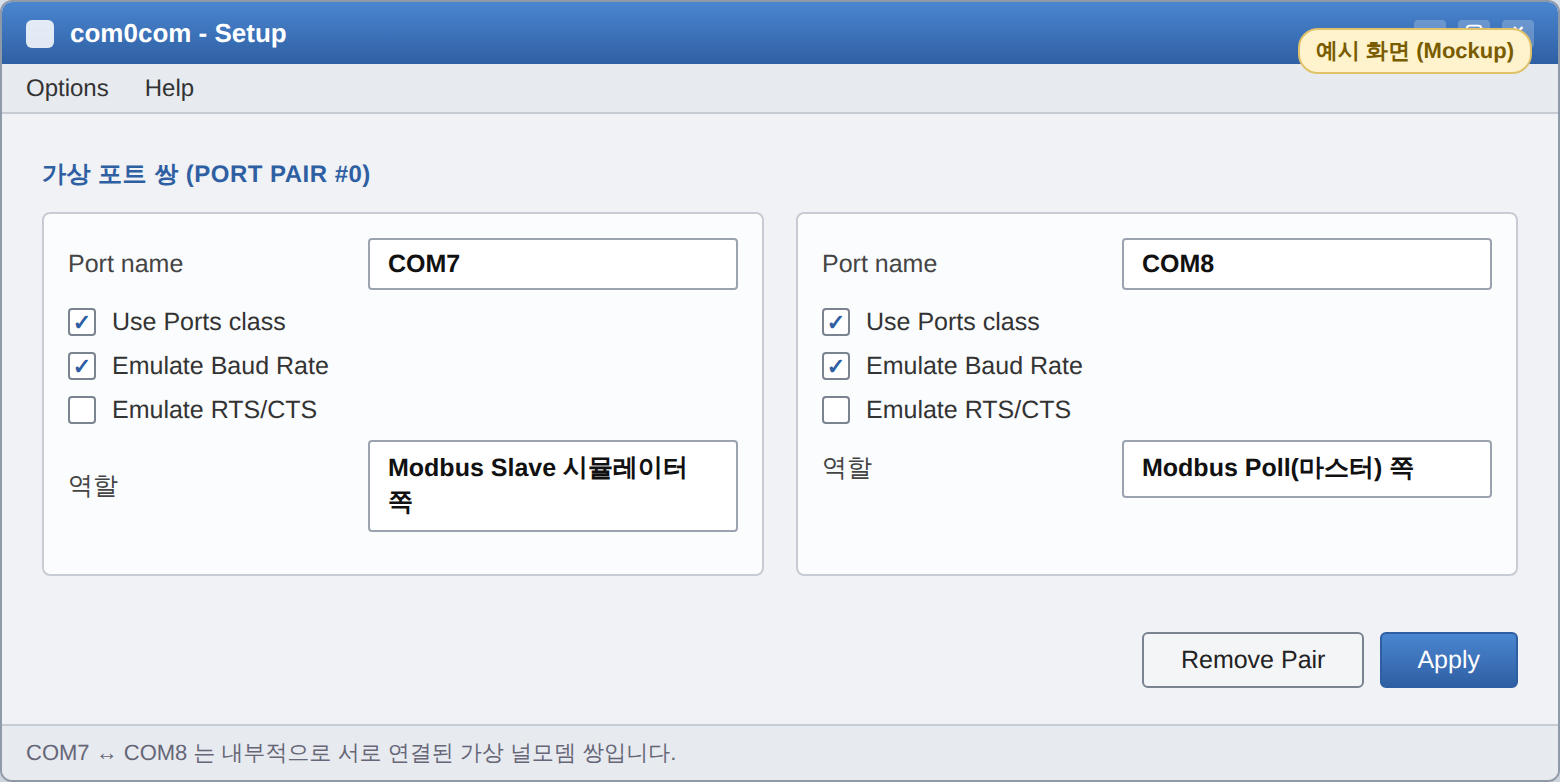
Example of the com0com settings screen — COM7 ↔ COM8 port pair and options (the actual screen may vary depending on the version)
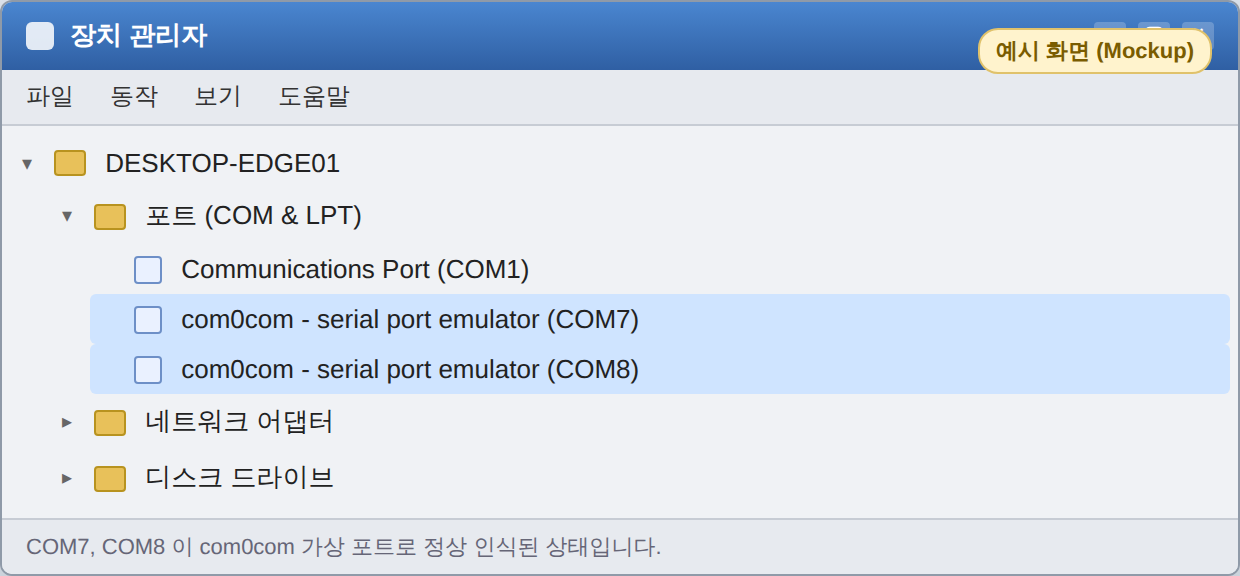
Example of the Device Manager screen — verifying the COM7 and COM8 ports
4. Creating a Fake Device with Modbus Slave
Run Modbus Slave, connect it to COM7, and set the communication parameters to the specified values.
-
Port: COM7
-
Baud Rate / Parity / Data Bits / Stop Bits: 9600 / None / 8 / 1
-
Slave ID: 1
Once connected, a table for editing register values also appears. In the Setup menu, set Function to 03 Holding Registers, set the starting address to 40001, specify a suitable number of registers, and then double-click a value in the table to enter an arbitrary test value (for example, enter 1234 at address 40001).
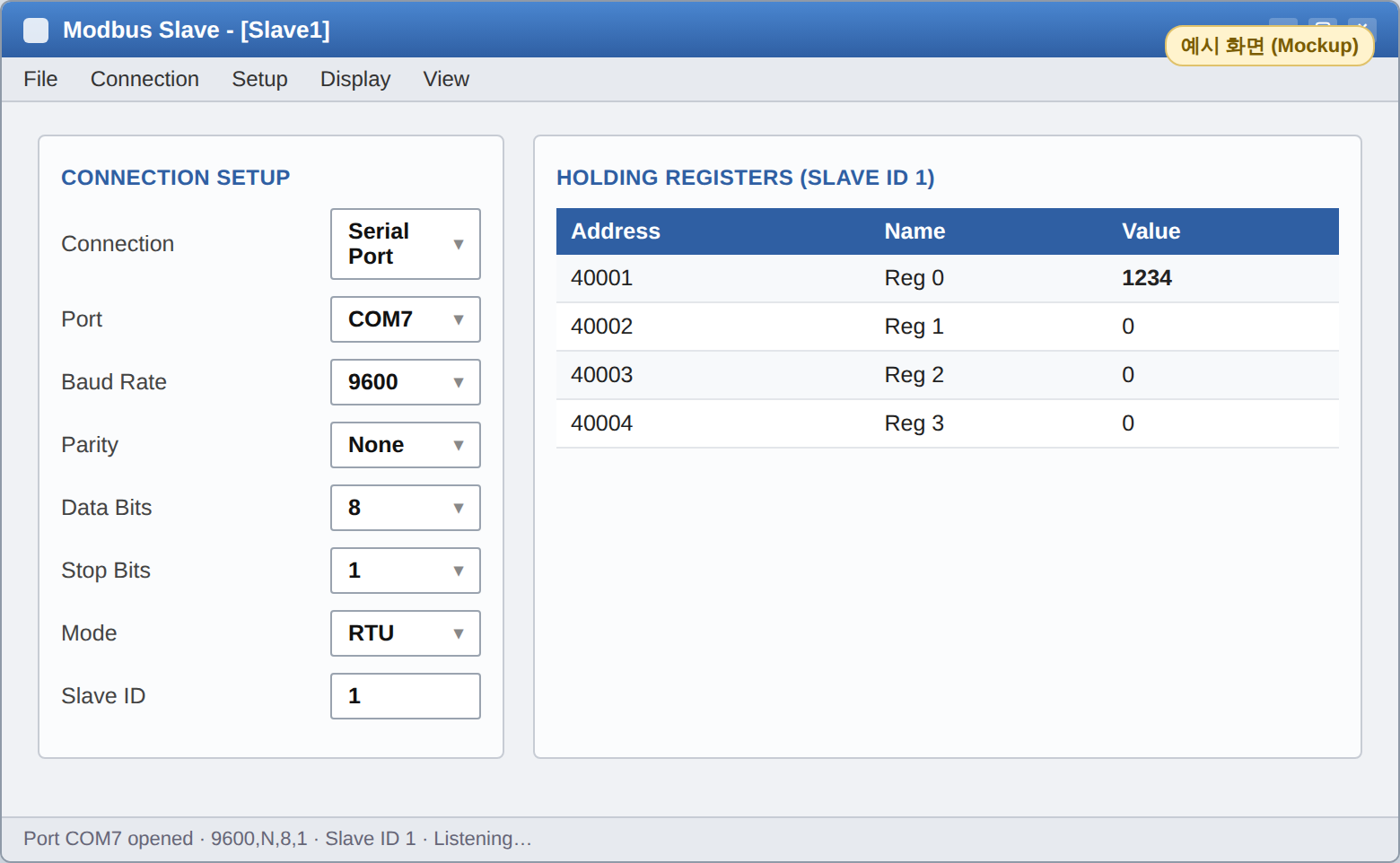
Example Modbus Slave screen — left: Connection settings (COM7, 9600-N-8-1, Slave ID 1) / right: Register value (40001=1234)
5. Reading Values with Modbus Poll
This time, run Modbus Poll and connect it to the opposite port, COM8. Set the communication parameters to exactly the same values as those used by Modbus Slave.
-
Port: COM8
-
Baud Rate / Parity / Data Bits / Stop Bits: 9600 / None / 8 / 1 (same as Slave)
-
Slave ID: 1 (same as Slave)
Open Read/Write Definition from the Setup menu, set Function to 03 Holding Registers, set the starting address to 40001, and set the number of registers to match Modbus Slave. Modbus Poll will then periodically send requests in the sequence COM8 → (com0com) → COM7 → Modbus Slave, receive the response, and display it on the screen. If the value entered earlier on the Slave side (1234) appears unchanged, communication is working properly.
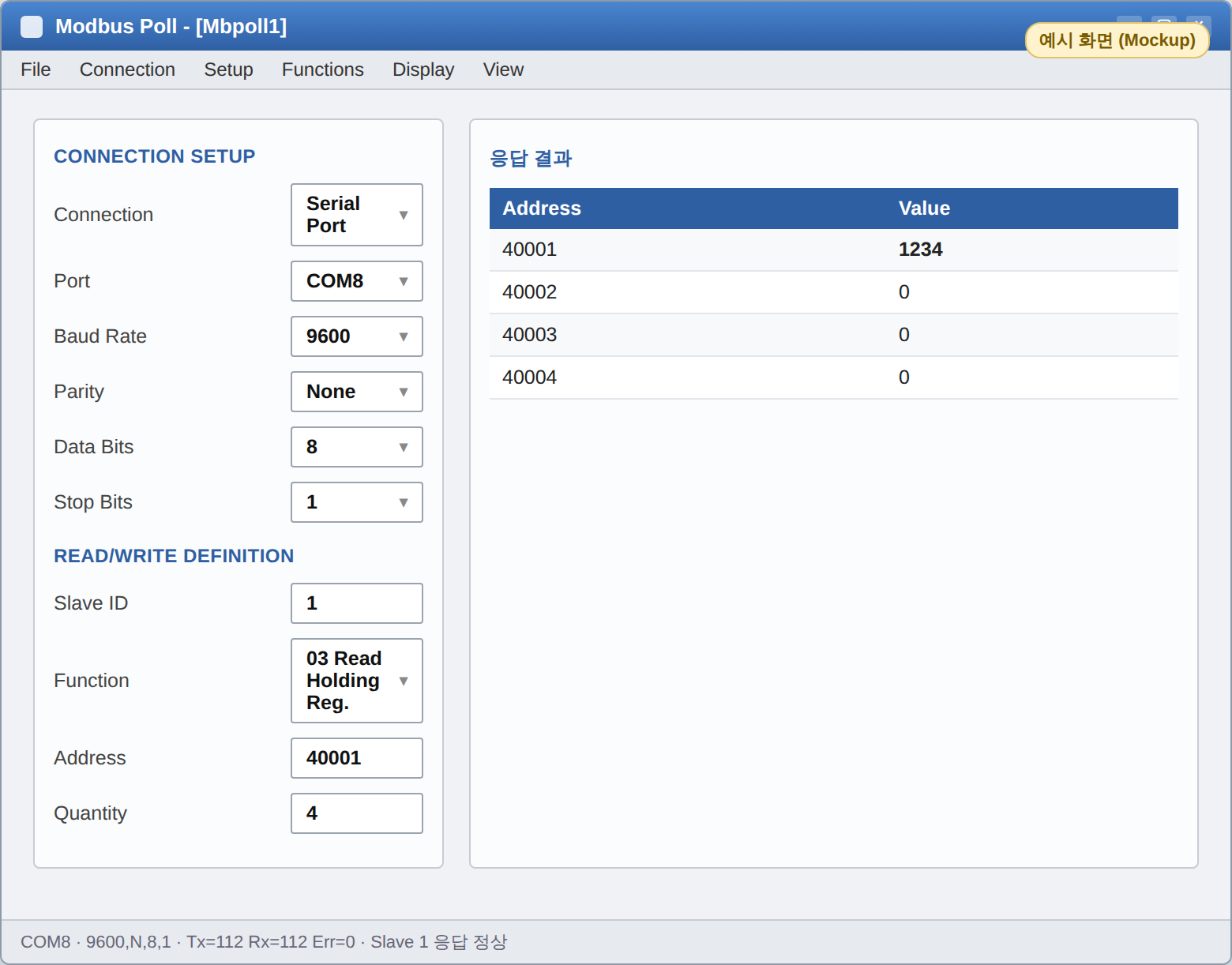
Example Modbus Poll screen — left: Connection/Read settings (COM8) / right: Response result (40001=1234, matching the Slave)
If you change the value again on the Modbus Slave screen, you can see the value on the Modbus Poll screen update during the next polling cycle. Once you have confirmed that the two sides exchange values without discrepancies, you have essentially completed the verification—from RTU frame transmission and reception to matching the communication parameters—without any actual equipment.
6. Things to Check When There Is a Problem
-
When there is no response (timeout): Check that the Baud Rate, Parity, Data Bits, and Stop Bits settings in Modbus Poll and Modbus Slave are exactly the same, and verify that the Slave ID matches.
-
When the port cannot be opened: Check whether another program is already occupying the same COM port. (A port can be opened by only one program at a time.)
-
When the values appear incorrect (such as a CRC error): Check the baud rate emulation option in com0com, and verify that the starting address and number-of-registers settings on both sides point to the same registers.
7. Conclusion
In summary, RTU is ultimately just the exchange of a short sequence of bytes—“Slave ID + function code + data + CRC”—using predefined communication parameters. Even without physical wiring, you can create a pair of virtual COM ports with com0com and connect Modbus Slave (the fake device) to one end and Modbus Poll (the master) to the other. This allows you to visually verify the entire Modbus-RTU communication flow—request frame generation, serial transmission, response, CRC verification, and value display—without RS-485 wiring or actual field equipment. If you have directly observed the entire process, from the creation and serial transmission of the request frame to the arrival of the response and the display of the value on the screen, you have already verified all the core aspects of RTU communication.
So far, you have practiced testing through virtual ports using a Modbus driver. Once actual RS-485 equipment is ready, there is not much left to do. Simply replace com0com with a real RS-485 converter connected to the COM port, replace Modbus Poll with the actual master device or software you will use, and readjust communication parameters such as the Baud Rate, Parity, and Slave ID to match the equipment's specifications.
References
-
Modbus Organization — https://www.modbus.org/modbus-specifications
-
Modbus Application Protocol — https://www.modbus.org/file/secure/modbusprotocolspecification.pdf
-
com0com – Null-modem emulator — https://sourceforge.net/projects/com0com/
Luna