

Recently, more and more projects have been adopting SpreadJS to implement the Excel environment as-is within web applications. The system I am responsible for also uses SpreadJS. One of the issues encountered while using SpreadJS was that “a specific file would not open on the screen at all.”
During the initial development phase, the system was updated from an older version to a newer version, and as users uploaded various files, we had to deal with unexplained parsing errors and runtime errors. The cause was that the older version used only “open()” to open files, while “import()” and “fromJSON()” were introduced in the newer version, resulting in a mixture of the two approaches.
Based on this experience, I organized the correct API matching methods and proper example code for the three formats (.xlsx, .ssjson, and .sjs) so that we would never repeat the same mistake.
Cause of the Error: Mismatch Between the File Type and the method
The fundamental reason SpreadJS fails to open a file is that the “physical form of the file data I have (whether it is binary data or a JSON object)” was incorrectly paired with the “API engine used to read it.” The representative failure cases we experienced were as follows.
* Failure Case 1: The original .xlsx binary file selected by the user in the browser was mistakenly treated as string data and passed directly to the legacy fromJSON() method -> The SpreadJS engine could not parse the internal structure, causing the screen to become unresponsive.
* Failure Case 2: .ssjson text data downloaded through server API communication was passed directly as a file object to the import() method -> A load error occurred because the binary stream format header was missing.
* Failure Case 3: An attempt was made to open the latest large compressed format, .sjs, using the legacy ExcelIO.open() module approach -> The legacy IO library could not decode the new compressed structure and returned an error.
After going through these trials and errors, I realized that the key to safely opening files without causing a browser crash is to accurately match each file extension with its designated method and options.
Three-Format Matching Matrix
If an error occurs when opening a file, the first thing to check is whether the matrix rules below were followed.
-
If the extension is .xlsx,
* Actual data format: Standard Microsoft Excel binary file
* Correct processing method: workbook.import()
* Required extension plugin: gc.spread.sheets.io
-
If the extension is .ssjson,
* Actual data format: Text-based JavaScript JSON object
* Correct processing method: workbook.fromJSON()
* Required extension plugin: Built into the default Core module
-
If the extension is .sjs,
* Actual data format: SpreadJS-specific large compressed binary (Zip)
* Correct processing method: workbook.import()
* Required extension plugin: gc.spread.sheets.io
Older documentation and outdated blog posts may instruct you to create a GC.Spread.Excel.IO instance and then call excelIo.open(), but in the latest SpreadJS architecture, using the integrated workbook.import()on the workbook object is the official standard and the safest approach.
Implementation Guide for Opening Files by Format
This is the standard implementation source code for each format. The way browser File/Blob objects are handled differs according to the characteristics of each file.
-
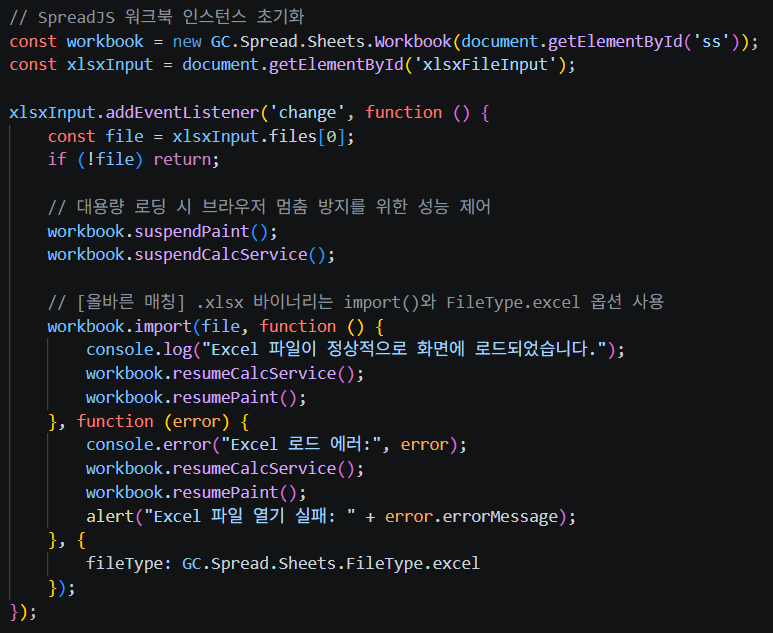
Opening a Standard Excel (.xlsx) File
An .xlsx file is a typical binary file. Therefore, pass the file object obtained from the browser input tag directly to workbook.import()and be sure to specify FileType.excelin the options.
-
Opening a Legacy JSON (.ssjson) File
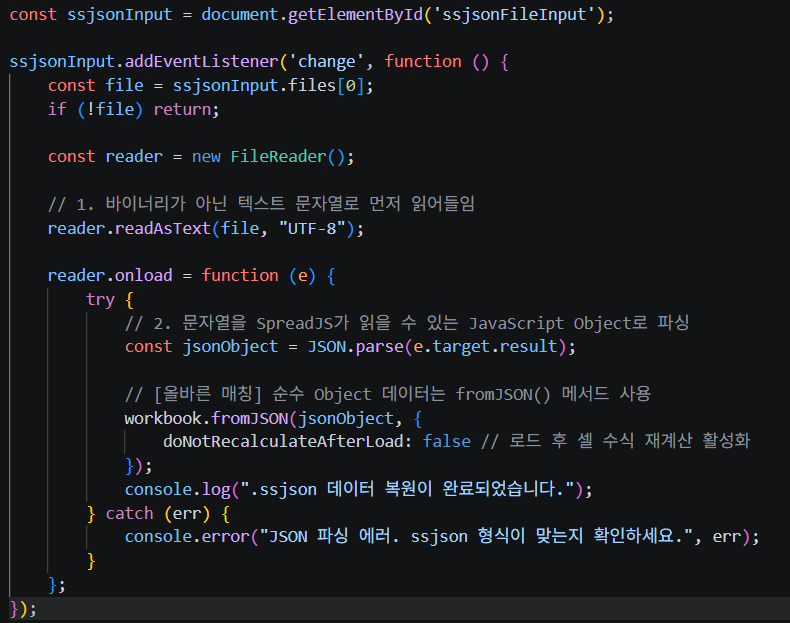
.ssjsonmay look like a file format, but it is actually a javaScript object that represents SpreadJS state exported as text. Passing it to the method as a file object will always cause an error. You must first read it as text using FileReader, then convert it into a plain object with JSON.parse()and load it using fromJSON().
-
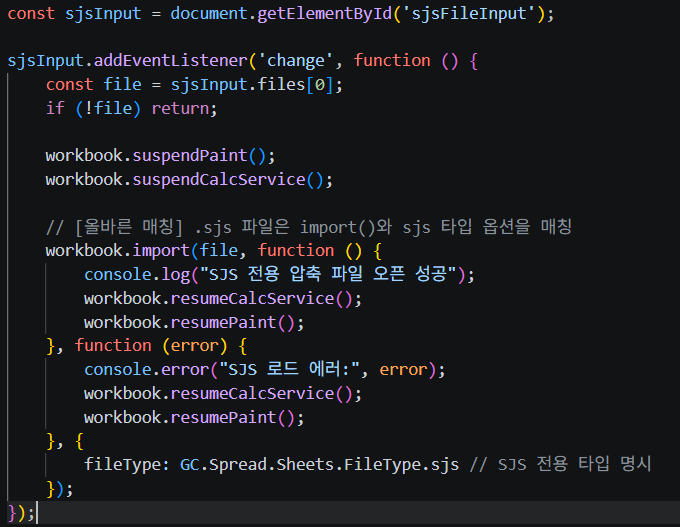
Opening the Latest Dedicated Compressed Format (.sjs) File
.sjs is a dedicated compressed format introduced to address the slow loading speeds and file size issues of large Excel files. Structurally, it is a binary compressed file like .xlsx, so it shares the import() method, but because the internal processing of the parsing engine must differ, the fileType option must be explicitly set to FileType.sjs.
Conclusion
After standardizing and clearly distinguishing the correct file-opening method for each format, we were surprised to find that runtime errors and parsing failures caused by format mismatches during file loading had noticeably decreased compared to before. As the error rate dropped dramatically, we were able to reduce the resources spent on related debugging and save a considerable amount of development time, ultimately achieving the valuable result of significantly improving system stability.
kina.j