
The code and names in this article are simplified and modified examples intended to make things easier to understand.
Introduction
I was assigned to add an AI chatbot feature to a project I was working on. When a user entered a question, the AI had to generate an answer and display the result on screen like a chatbot. The server was designed to return the result once AI processing was complete.
The backend already had an endpoint that returned Flux<ServerSentEvent<...>>. This was my first time encountering SSE, and I was seeing the code for the first time too, so I started by learning what it was before wiring it up to the frontend. But when I tested it, the completion message never arrived.
We found the cause sooner than expected. I was responsible for the frontend, so I had already connected the screen to SSE. The backend developer and I looked at the symptoms together and narrowed down the possibilities. The backend developer made the server-side changes, while I listened to the explanations of what had changed and why, and documented them. This article describes, from a frontend perspective, how SSE actually works and how we narrowed down the cause, starting from the symptoms we could observe.
1. What is SSE?
SSE is a method where the server keeps a single connection open and streams data to the client whenever it becomes available. Browsers have a built-in API for receiving this called EventSource.
A typical request and response ends like this.
클라이언트: GET /api/data
서버: [응답 완성] → 200 OK + 본문 전체 → 연결 종료
An SSE response does not end.
클라이언트: GET /api/tasks/{taskId}/stream
서버: 200 OK, Content-Type: text/event-stream
서버: data: {"status":"GENERATING"}\n\n
서버: data: {"status":"GENERATING"}\n\n
서버: data: {"status":"SUCCESS"}\n\n
서버: (연결 종료)
The specification defines a message as ending when two line breaks follow data:. The browser parses this format and fires a message event whenever a chunk arrives.
So the frontend only needs to register a listener once.
eventSource.addEventListener("message", handleEventMessage);Once registered this way, if the server sends 100 chunks, handleEventMessageis called 100 times as well.
This corresponds directly to the backend’s Flux. Fluxis a type that streams multiple values sequentially over time, and Spring WebFlux encodes each value from Fluxas data: {...}and writes it to the response stream. The number of times Fluxemits a value is the same as the number of times the message
event listener is called.
2. What if we had used a different approach?
In fact, there was only one option. The backend already had an SSE endpoint, and I just needed to connect to it. Still, as I was wiring it up, I wondered whether it really had to be SSE and what it would have been like to use a different approach, so I compared it with the alternatives.
Polling repeatedly calls a query API at short intervals. It is the easiest to implement and works in any server environment, but it generates many unnecessary requests, and its responsiveness is limited by the polling interval.
Long polling sends a request and the server delays its response until the state changes. It offers better responsiveness than polling, but the server has to hold connections open for a long time. Its advantages over SSE are unclear, while it adds implementation complexity.
|
Polling |
Long polling |
SSE |
WebSocket |
|
|---|---|---|---|---|
|
Direction |
Unidirectional |
Unidirectional |
Unidirectional |
Bidirectional |
|
Implementation difficulty |
Very easy |
Moderate |
Easy |
Relatively complex |
|
Responsiveness |
Low |
Medium |
High |
Very high |
|
Automatic reconnection |
N/A |
Implemented directly |
Built-in browser support |
Implemented directly |
Our situation was unidirectional: we only needed to send the results generated by the server down to the client. After the user sent a question, the client had nothing else to send to the server, and the server only needed to send the result once processing was complete.
Looking only at this requirement, polling would have been sufficient. However, polling requires sending requests at regular intervals without knowing when the result will be ready, and the time you receive it is tied to that interval. With SSE, the client can wait on a single connection and receive the result as soon as it is available, which suited a chatbot UI that needed to show a waiting state and then immediately switch to the result. In retrospect, I think it was also a reasonable decision to use SSE, which was already available.
3. JWT Authentication Issues and Choosing a Library
Our chatbot first called an API to submit a question and receive a task ID, then opened an SSE connection using that ID.
Frontend implementation did not seem difficult. EventSource instance and attach a listener, and you're done.
const eventSource = new EventSource(url);

eventSource.onmessage = (event) => {
  const data = JSON.parse(event.data);
  console.log(data);
};
However, when I tried it, I immediately got an authentication error.
The browser's built-in EventSource does not support custom headers. The only things you can pass to the constructor are the URL and withCredentialsBoth. Our project used JWT tokens in request headers for authentication, but there was simply no way to add that header.
I found two libraries that worked around this issue.
event-source-polyfill uses XHR internally to mimic the EventSource API while supporting custom headers. Its API is almost identical to the browser's built-in EventSource , so existing code structures using addEventListener or close() and other methods can be used as-is.
@microsoft/fetch-event-source is a library that reimplements SSE on top of fetch() rather than being a polyfill. You can use everything fetch provides, so POST requests are possible, you can access the response object directly for validation, and you have full control over the retry strategy. It also closes the connection when the tab goes into the background and reconnects when it becomes visible again.
In terms of features alone, the latter is more flexible. However, our backend used GET, and we were already using event-source-polyfill on another screen in the project. There was no reason to bring in two libraries for the same purpose, and the fact that we could keep the existing code structure almost unchanged was a major factor. So we chose the former.
import { EventSourcePolyfill } from "event-source-polyfill";

const eventSource = new EventSourcePolyfill(url, {
  headers: {
    Authorization: `Bearer ${token}`,
  },
  heartbeatTimeout: 5 * 60 * 1000,
});

eventSource.addEventListener("message", handleEventMessage);
eventSource.addEventListener("error", handleEventError);
4. Symptom: No Response After the First Message
When I tested it, the first message came through just fine.
eventMessage { status: "GENERATING", message: "Generating response...", ... }But that was it. Even long after the AI should have finished generating its answer, no completion message arrived. After waiting five minutes, this was the error I got.
EventSource failed.
Error: No activity within 300000 milliseconds. 277 chars received. Reconnecting.
No data arrived during the five minutes configured as heartbeatTimeout, so the library disconnected and attempted to reconnect. 277 chars, meaning that the single first message was all that came through.
5. Root Cause Analysis
5-1. Ruling Out the Frontend and the Repeated Message
First, I needed to eliminate any possibility of frontend involvement. After running the chatbot once in the browser, I copied the task ID and token directly from the developer tools and sent a request to the same endpoint using an API testing tool.
The result was the same. Only one first message came through, then it stopped. Since the same symptom occurred in a request where React, the library, and listener registration were not involved, the frontend was ruled out as a suspect. The response header's Content-Type was also text/event-stream, so it wasn't a format issue either.
When I sent the same request multiple times, each time I sent it GENERATING The message came in immediately, and its content was always the same. Looking at the backend code, I found the reason.
public Flux<ServerSentEvent<TaskMessage>> subscribe(AiTask task) {
    String taskId = task.getId();

    Sinks.Many<TaskMessage> channel = this.channelMap.computeIfAbsent(taskId,
            id -> Sinks.many().replay().all());

    channel.tryEmitNext(TaskMessage.of(task, GENERATING));

    return channel.asFlux().map(m -> ServerSentEvent.builder(m).build());
}
tryEmitNext is executed unconditionally in the method body, even before it returns a Flux. The message wasn't created because the server detected progress and sent it; it was created right there simply because a request had come in. In other words, my request wasn't receiving an event—it was creating one. The status was also fixed at GENERATING, so no matter how many times I called it, the content was bound to be the same.
5-2. Why the Completion Message Was Discarded
The remaining question was why the completion message never arrived. The completion handling code looked like this.
private void completeTask(TaskMessage message) {
    String taskId = message.getTaskId();

    Sinks.Many<TaskMessage> channel = this.channelMap.remove(taskId);

    if (channel != null) {
        channel.tryEmitNext(message);
        channel.tryEmitComplete();
    }
}
The channel was added to channelMap only once: in the computeIfAbsent we saw earlier. But that code only runs when the frontend attempts to establish an SSE connection.
The problem occurred when the AI call failed immediately with an error and finished much faster than usual. Completion handling ran before the frontend's SSE connection was established. Here's what the overall flow looked like.
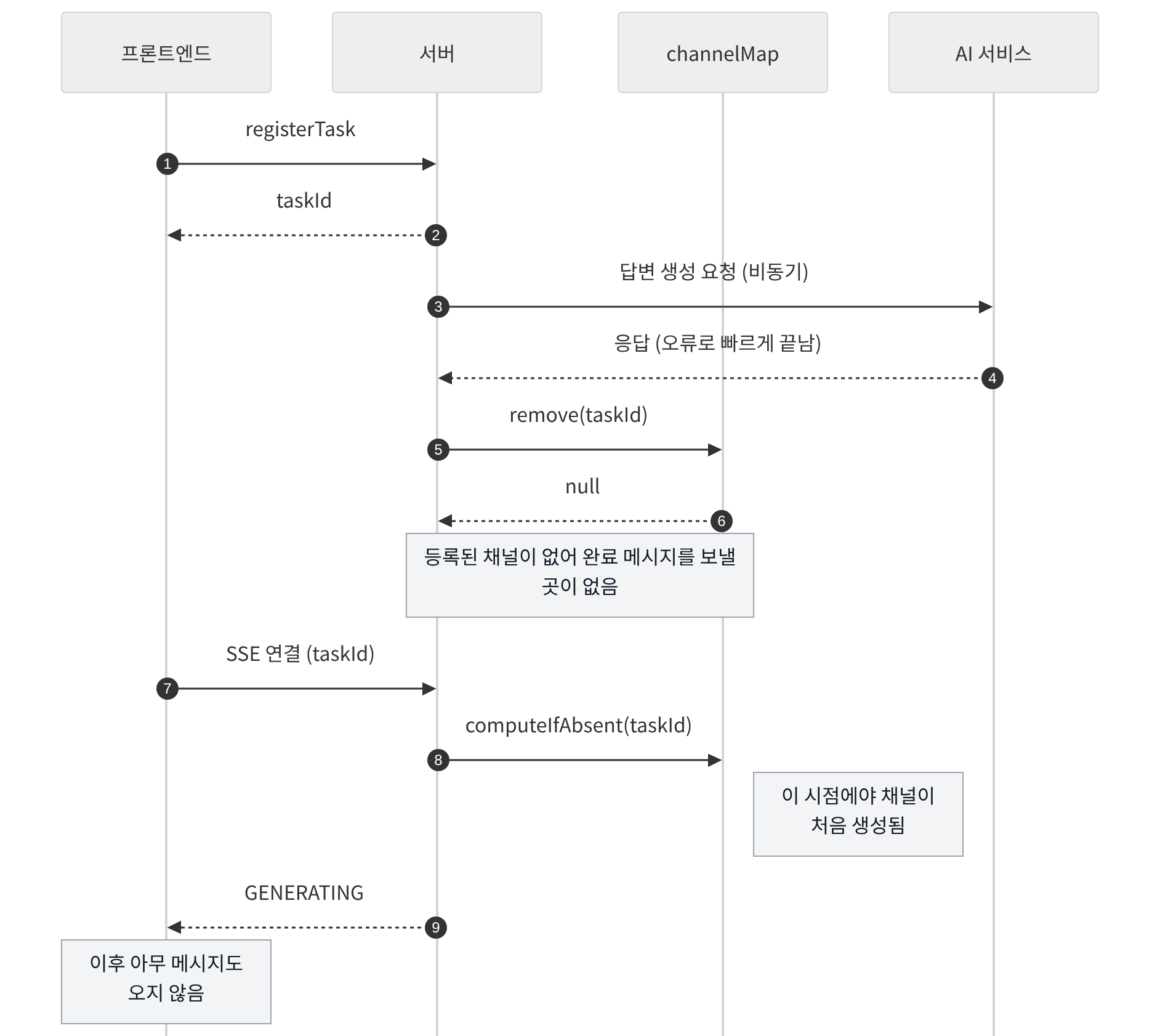
Because it was trying to retrieve a channel that had never been registered, remove returned null. Since it couldn't enter the conditional, there was no recipient for the completion message, and it was discarded without leaving a single line in the logs. Moreover, the completion handler was structured to remove the channel from the map as soon as it retrieved it, so even if the channel had been there, a client that connected late would not have been able to find it.
6. The Fix — Registering Channels and Changing How They Are Retrieved
There were two causes. The channel for each task should have been added to the map when the task was registered, but that step was missing. And during completion handling, the channel was removed from the map as soon as it was retrieved. The backend engineer handled the fix and made changes in three places.
First, we added the channel to the map when registering a task. The AI call event is emitted separately and asynchronously after this method finishes.
public String registerTask(String prompt) {
    AiTask task = taskRepository.save(AiTask.create(prompt));

    this.channelMap.put(task.getId(), Sinks.many().replay().all());

    return task.getId();
}
Next, in the completion handler, we changed the channel retrieval from remove to get.
private void completeTask(TaskMessage message) {
    Sinks.Many<TaskMessage> channel = this.channelMap.get(message.getTaskId());

    if (channel != null) {
        channel.tryEmitNext(message);
        channel.tryEmitComplete();
    }
}
Finally, we moved channel removal to the SSE connection side. Once a subscriber receives the completion signal, the channel is removed from the map. We also added a condition to prevent the pending message from being sent again when a subscriber is already connected.
public Flux<ServerSentEvent<TaskMessage>> subscribe(AiTask task) {
    String taskId = task.getId();

    Sinks.Many<TaskMessage> channel = this.channelMap.computeIfAbsent(taskId,
            id -> Sinks.many().replay().all());

    if (channel.currentSubscriberCount() == 0) {
        channel.tryEmitNext(TaskMessage.of(task, GENERATING));
    }

    return channel.asFlux()
            .doOnComplete(() -> this.channelMap.remove(taskId))
            .map(m -> ServerSentEvent.builder(m).build());
}
Now, even if the AI finishes before the SSE connection is established, the completion message is stored in the channel that remains in the map. If the frontend connects late, it subscribes to the same channel, and replay().all()resends all the messages that have accumulated in the meantime from the beginning, so the frontend can receive the completion message too. Since the channel is already closed at that point, the pending message that would have been sent when the connection was established is not delivered and is ignored. After the result is received, the channel is also removed from the map.
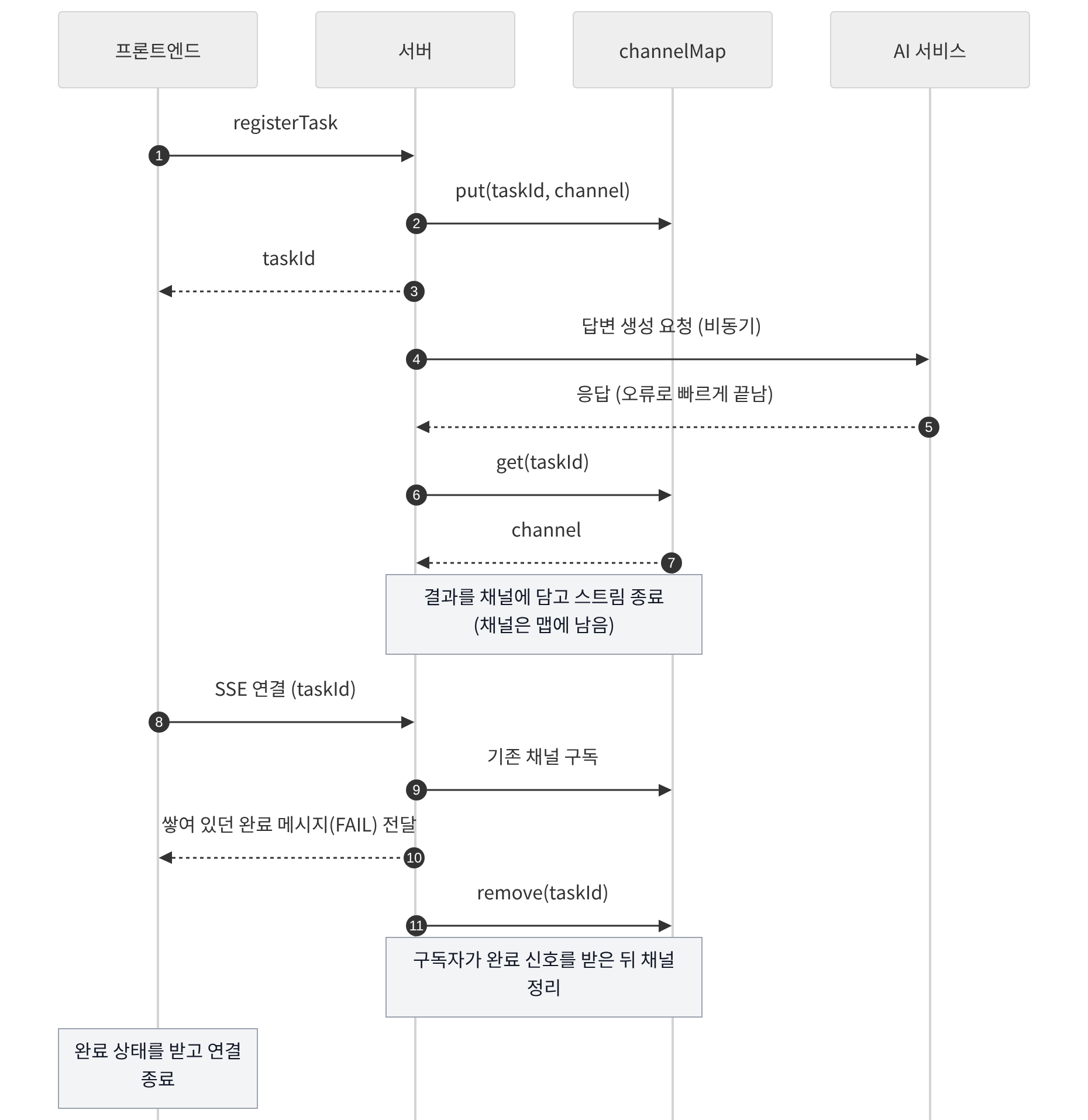
Whether the connection was established first or the AI finished first, the result received by the frontend was now the same.
Conclusion
What stayed with me more than SSE itself was the process of narrowing down the scope of a problem. At first, I suspected my own code, such as the headers or library configuration. But when I sent the same request using an API testing tool, it immediately became clear that the issue wasn't with the frontend. Confirming that first also made it clear where to look when talking with the backend engineer.
Following the server code together also taught me how important execution order is in an asynchronous structure. The sending and receiving code each seemed fine on its own, but the order determined when the receiving channel was created and when it was removed. I learned that even if your role on the frontend is just to handle the connection, you need to understand when and where the server puts messages before sending them to quickly pinpoint issues like this.
Pong