
▶ How do you separate tenant data in a single application? Using Spring Boot and JPA examples, we’ll explore the principles behind row-, schema-, and database-level separation, as well as the tenant-specific query flow.
When you manage data for multiple customers (tenants) in a single table, tenant conditions appear repeatedly in Repository methods.
interface OrderRepository extends JpaRepository<Order, Long> {
    Optional<Order> findByOrderIdAndTenantId(String orderId, String tenantId);
    List<Order> findAllByStatusAndTenantId(String status, String tenantId);
    long countByStatusAndTenantId(String status, String tenantId);
}
The problem is not just duplication. If you omit a tenant condition, you may retrieve another customer's data. In an update or delete query, you could also modify or delete another customer's data.
In this article, we’ll look at simple examples of how to automatically apply tenant conditions using Hibernate, a JPA implementation, and how to select the connection target by separating schemas or databases.
|
Example environment Java 25 · Spring Boot 4.1.1 · Hibernate ORM 7.4.5.Final · PostgreSQL 17 Dependencies such as Spring Data JPA use the versions managed by Spring Boot. The article includes only the code needed to explain the flow of tenant-specific queries for synchronous requests. |
|---|
Tenants and three data separation approaches
Multitenancy is an architecture in which multiple customers share a single system. A customer unit, such as a company or organization, that is managed as an independently distinguishable entity within the service is called a tenant.
The common approaches to separating tenant data in a relational database are row separation, schema separation, and database separation. Here, a schema refers to a namespace within a database that groups objects such as tables.
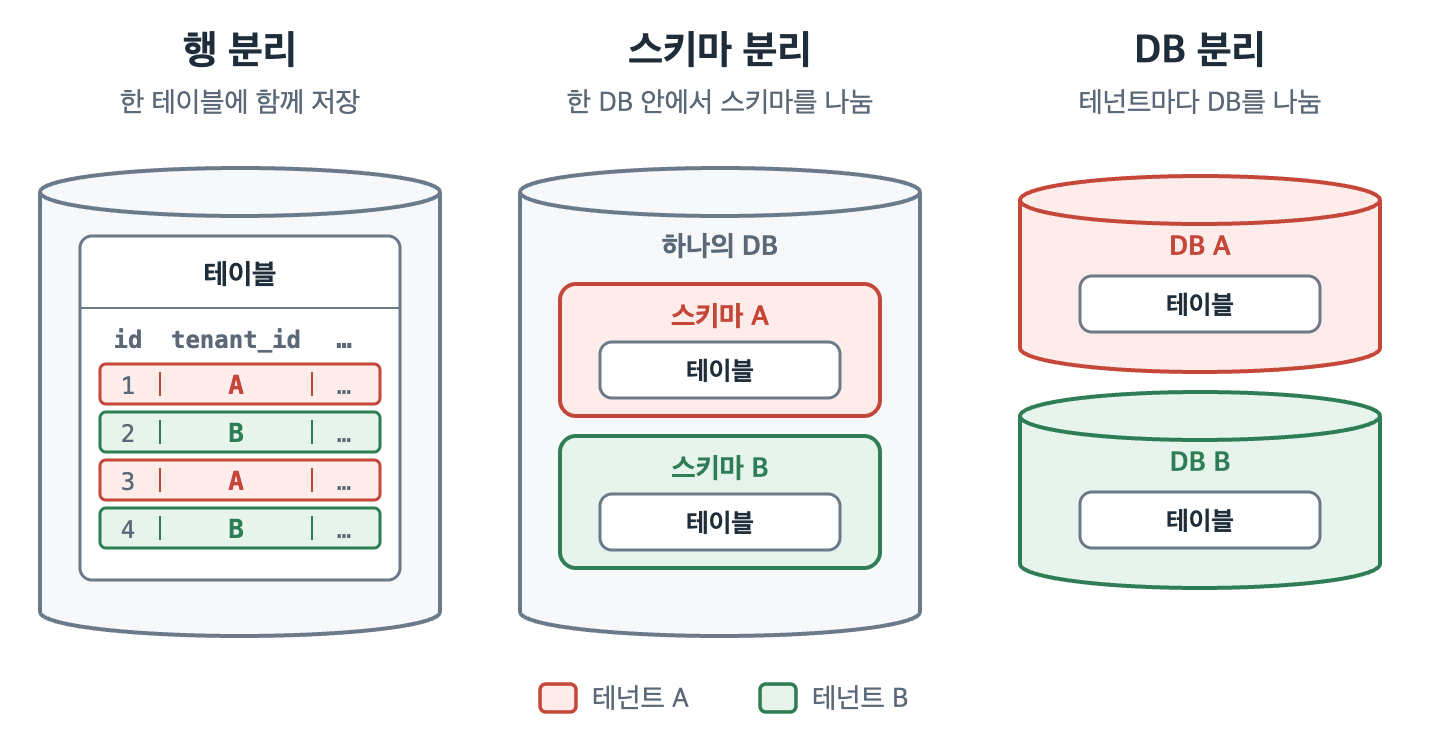
Figure 1. Tenant data separated by row, schema, and database
|
Approach |
Data layout |
Where the query scope is determined |
|---|---|---|
|
Row separation (Discriminator column) |
Store data for multiple tenants in the same table |
Tenant condition in SQL (tenant_id) |
|
Schema separation (Schema per tenant) |
Create tables in a schema for each tenant within the same database |
Schema to use for the connection |
|
Database separation (Database per tenant) |
Create tables in a database for each tenant |
DataSource from which to obtain a connection |
Row separation: reduce repetitive conditions with @TenantId
For row separation, tenant conditions can be applied automatically using Hibernate's @TenantId or database row-level security (RLS) policies.
This article uses Hibernate's @TenantId. This annotation marks an entity field that holds the tenant identifier; we add it to the tenantId field of the Order entity.
@Entity
@Table(name = "orders", uniqueConstraints =
        @UniqueConstraint(columnNames = {"tenant_id", "order_id"}))
public class Order {
    @Id
    @GeneratedValue(strategy = GenerationType.IDENTITY)
    private Long id; // 테이블의 기본 키

    @TenantId
    @Column(name = "tenant_id", nullable = false, updatable = false)
    private String tenantId;

    @Column(name = "order_id", nullable = false)
    private String orderId; // 서로 다른 테넌트에서 같은 값 사용 가능

    @Column(name = "status", nullable = false)
    private String status;
}
Hibernate uses the session's tenant ID in query conditions and also populates the tenantId field with this ID when saving a new entity.
Therefore, you don't need to pass the tenant ID directly as an argument to Repository methods.
interface OrderRepository extends JpaRepository<Order, Long> {
    Optional<Order> findByOrderId(String orderId);
    List<Order> findAllByStatus(String status);
    long countByStatus(String status);
}
When you call findByOrderId(), the SQL generated by Hibernate includes both the order_id and tenant_id conditions.
select ...
from orders
where tenant_id = ? and order_id = ?|
Tenant conditions in native SQL Tenant conditions from @TenantId are not applied automatically to native SQL executed with, for example, @Query(nativeQuery = true). |
|---|
Passing the request's tenant to the Hibernate session
Hibernate processes operations through JPA's EntityManager using a Session. When opening a session, it receives a tenant ID and uses it to retrieve or save that tenant's data.
For all three separation approaches, the process of passing the tenant ID to the session is the same.
요청에서 테넌트 ID 식별 → 요청 처리 범위에 바인딩
→ 세션에서 테넌트 ID 확인 → 테넌트 데이터 조회
When the session is opened
Spring Boot enables the OSIV option by default, keeping the EntityManager open for the entire request. In this example, we turn this option off and align the session lifecycle with the service transaction. If an @Transactional method is called without an existing transaction, a new session is opened, so the tenant ID must be bound before the call.
# application.yaml
spring:
  jpa:
    open-in-view: false  # 요청 전체에 세션을 유지하지 않음
Binding the tenant ID for the duration of request processing
If you bind the tenant ID read from the request, Service or Repository code called within that scope can read the same value, so there is no need to pass the tenant ID as an argument.
Such values are often stored in ThreadLocal, but this example uses ScopedValue, which became a permanent feature in Java 25. A bound value in ScopedValue cannot be changed within its scope, and the binding is automatically removed when the scope ends. This makes it a good fit for this example, where code reads the tenant ID set by the filter but does not modify it. The differences between the two APIs are summarized separately in the appendix.
public final class TenantContext {
    private static final ScopedValue<String> CURRENT = ScopedValue.newInstance();

    public static <T> T call(String tenant, Supplier<T> work) {
        return ScopedValue.where(CURRENT, tenant).call(work::get);
    }

    public static <T, X extends Throwable> T callChecked(
        String tenant, ScopedValue.CallableOp<T, X> work
    ) throws X {
        return ScopedValue.where(CURRENT, tenant).call(work);
    }

    public static String required() {
        return CURRENT.orElseThrow(() -> new IllegalStateException("No tenant is bound"));
    }
}
call() and callChecked() execute work within a scope where the tenant ID is bound, and required() reads the tenant ID from that scope.
TenantFilter binds the tenant ID read from the header and runs the filter chain within that scope.
public class TenantFilter extends OncePerRequestFilter {
    @Override
    protected void doFilterInternal(
            HttpServletRequest request,
            HttpServletResponse response,
            FilterChain chain) throws IOException, ServletException {
        // 헤더 검증과 필터 체인의 예외 처리는 생략
        String tenant = request.getHeader("X-Tenant-Id");

        TenantContext.callChecked(tenant, () -> {
            chain.doFilter(request, response);
            return null;
        });
    }
}|
Tenant identification in the example To make it easy to follow the query flow, the example reads the tenant ID directly from the X-Tenant-Id header. Designing the tenant identification method is outside the scope of this article. |
|---|
Providing a tenant ID with TenantResolver
Hibernate obtains the tenant ID to use for a session through CurrentTenantIdentifierResolver. The example's TenantResolver reads the ID from TenantContext, checks that it is a tenant registered in the configuration, and then returns it.
public class TenantResolver implements CurrentTenantIdentifierResolver<String> {
    private final TenantProperties tenants;  // 등록된 테넌트 설정

    @Override
    public String resolveCurrentTenantIdentifier() {
        String tenant = TenantContext.required();
        if (!tenants.knows(tenant)) {
            throw new IllegalArgumentException("Unknown tenant: " + tenant);
        }
        return tenant;
    }
}
Register TenantResolver with Hibernate using Spring Boot's HibernatePropertiesCustomizer.
@Configuration
public class TenantConfiguration {
    @Bean
    HibernatePropertiesCustomizer tenantIdentity(TenantResolver resolver) {
        return properties -> properties.put(
                MultiTenancySettings.MULTI_TENANT_IDENTIFIER_RESOLVER,
                resolver
        );
    }
}
The session retains the tenant ID returned by TenantResolver. For row separation, this ID is used in SQL conditions; for schema and database separation, it is used to select the schema or DataSource for the connection.
Verifying row-level query results
In the previous order example, we used the bookstore (bookshop) and record store (recordshop) as separate tenants, and prepared orders with the same order ID but different statuses. We query the same order by changing only the X-Tenant-Id header.
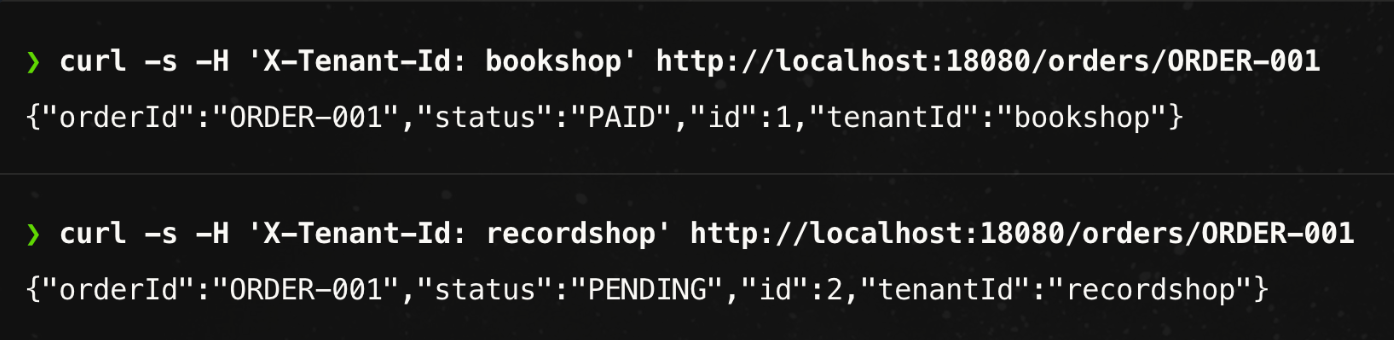
Figure 2. Order query results by tenant
Even when querying with the same order ID, only the order belonging to the tenant specified in the header is returned.
A shared example for schema and database separation
Even with @TenantId, data from multiple tenants is stored in the same table. This time, we’ll compare schema separation, where each tenant has its own tables, with database separation.
Same actor, different roles
Ryan Reynolds’s roles are Deadpool in Marvel and Green Lantern in DC. In this example, Marvel and DC are the tenants, and we store one role per actor for each tenant. We use the actor ID, actorSlug, as the table’s primary key.
|
Universe (tenant) |
Actor ID (actorSlug) |
Role (characterName) |
|---|---|---|
|
Marvel (marvel) |
ryan-reynolds |
Deadpool |
|
DC (dc) |
ryan-reynolds |
Green Lantern |
Schema separation and database separation use the same entity, Repository, and service code.
// Casting.java
@Entity
@Table(name = "casting")
public class Casting {
    @Id
    @Column(name = "actor_slug")
    private String actorSlug;
    @Column(name = "character_name")
    private String characterName;
}

// CastingRepository.java
public interface CastingRepository extends JpaRepository<Casting, String> {}
@Service
public class CastingService {
    private final CastingRepository castingRepository;

    @Transactional(readOnly = true)
    public Casting findByActor(String actorSlug) {
        return castingRepository.findById(actorSlug)
                .orElseThrow(() -> new ResponseStatusException(HttpStatus.NOT_FOUND));
    }
}
The query code does not pass a tenant ID or specify a tenant condition. The difference between the two approaches is not in the business code, but in how the appropriate schema or DataSource is selected for each tenant.
In the example, the schema and database profiles load their respective configuration files, and the demo.strategy value specified in each file selects the implementation to use.
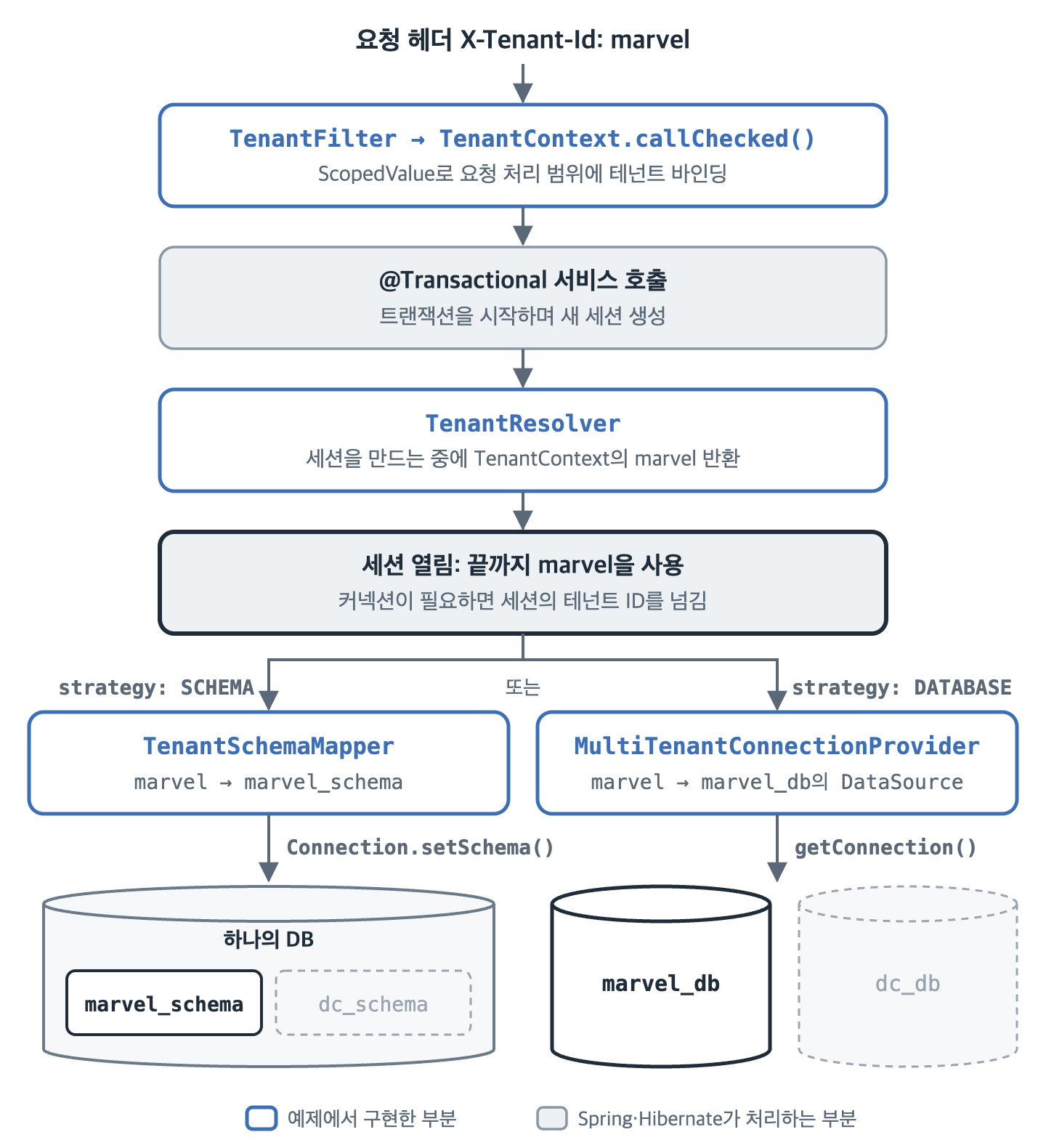
Figure 3. Request processing flow from tenant identification to schema or database selection
Schema separation: selecting a schema in the same database
With schema separation, a single DataSource connects to the shared DB, and the schema in use is switched based on the tenant.
Specify the schema name to use for each tenant ID in the configuration file.
# application-schema.yaml
demo:
  strategy: SCHEMA
  schema:
    url: jdbc:postgresql://localhost:55432/shared
    tenants:  # 테넌트 ID → 스키마 이름
      marvel: marvel_schema
      dc: dc_schema
TenantSchemaMapper returns the schema name corresponding to the session’s tenant ID. In the example, it looks up the schema name in demo.schema.tenants.
@Configuration
public class TenantConfiguration {
    @Configuration
    @ConditionalOnProperty(
            prefix = "demo", name = "strategy", havingValue = "SCHEMA")
    static class Schema {
        @Bean
        TenantSchemaMapper<String> schemaMapper(TenantProperties properties) {
            return tenant -> {
                String schema = properties.schema().tenants().get(tenant);
                if (schema == null) {
                    throw new IllegalArgumentException("Unknown tenant: " + tenant);
                }
                return schema;
            };
        }

        @Bean
        HibernatePropertiesCustomizer schemaRouting(TenantSchemaMapper<String> mapper) {
            return properties -> properties.put(
                    MultiTenancySettings.MULTI_TENANT_SCHEMA_MAPPER, mapper);
        }
    }
}|
TenantSchemaMapper supported versions The TenantSchemaMapper API was introduced in Hibernate 7.1 and is marked @Incubating, so it may change in the future. |
|---|
When obtaining a connection, Hibernate passes the session’s tenant ID to the mapper and calls Connection.setSchema() with the returned schema name.
Therefore, even when the same query code is executed, a Marvel session reads marvel_schema.casting, while a DC session reads dc_schema.casting.
Database separation: selecting a DataSource for each tenant
With database separation, a DataSource is selected to connect to each tenant’s database. In the example, when the application starts, it creates a connection pool for each tenant using the connection details in demo.database.datasources.
# application-database.yaml
demo:
  strategy: DATABASE
  database:
    metadata-url: jdbc:postgresql://localhost:55432/metadata_db
    datasources:
      marvel:
        url: jdbc:postgresql://localhost:55432/marvel_db
      dc:
        url: jdbc:postgresql://localhost:55432/dc_db
When a connection is needed, Hibernate passes the session’s tenant ID to MultiTenantConnectionProvider. In the example, Connections.Provider, which implements this interface, selects the DataSource corresponding to the ID.
// 커넥션 획득·반납은 Hibernate의 기본 구현에 맡긴다.
public static final class Provider
        extends AbstractDataSourceBasedMultiTenantConnectionProviderImpl<String>
        implements AutoCloseable {
    private final Map<String, HikariDataSource> dataSources;
    private final DataSource metadata;  // 메타데이터 조회용 DB의 DataSource

    @Override
    protected DataSource selectDataSource(String tenant) {
        DataSource source = dataSources.get(tenant);
        if (source == null) {
            throw new IllegalArgumentException("Unknown tenant: " + tenant);
        }
        return source;
    }

    @Override
    protected DataSource selectAnyDataSource() {
        return metadata;
    }

    @Override
    public void close() {
        dataSources.values().forEach(HikariDataSource::close);
    }
}

@Configuration
public class TenantConfiguration {
    @Configuration
    @ConditionalOnProperty(
            prefix = "demo", name = "strategy", havingValue = "DATABASE")
    static class Database {
        @Bean
        Connections.Provider connectionProvider(
                TenantProperties properties, DataSource metadata) {
            return new Connections.Provider(properties, metadata);
        }

        @Bean
        HibernatePropertiesCustomizer databaseRouting(
                MultiTenantConnectionProvider<String> provider) {
            return properties -> properties.put(
                    MultiTenancySettings.MULTI_TENANT_CONNECTION_PROVIDER, provider);
        }
    }
}
selectDataSource() selects a DataSource using the ID passed by the session, without reading the tenant context again. Even when calling the same findById("ryan-reynolds"), a Marvel session reads the role from marvel_db, while a DC session reads it from dc_db.
When querying JDBC metadata without a tenant ID, the DataSource returned by selectAnyDataSource() is used. In the example, metadata_db, which contains no tenant data tables, is used for this purpose.
Verifying query results with schema and database separation
Specify the tenant in the request header
Change the X-Tenant-Id header between marvel and dc to query the same actor’s role.
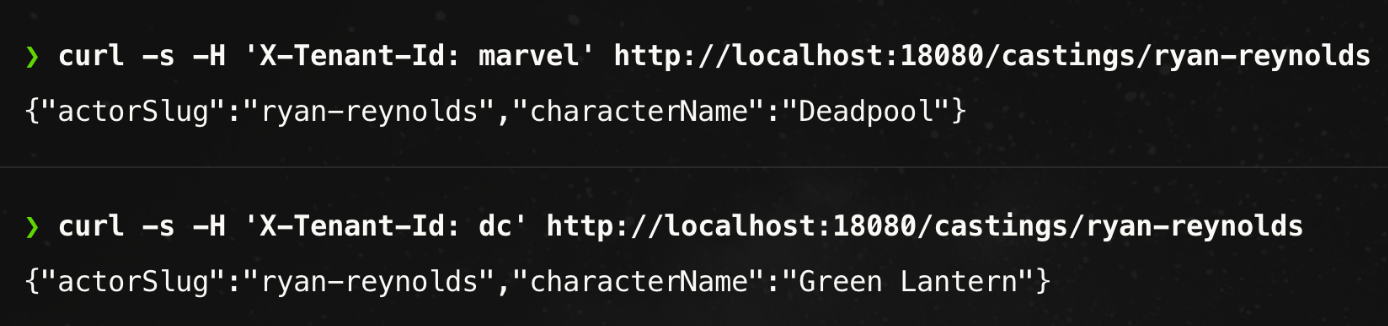
Figure 4. Querying roles by tenant with the schema profile
Testing queries with both approaches
Tests verify that schema separation and database separation return the role for the appropriate tenant. Common parts, such as preparing data, querying, and checking results, are placed in an abstract class, while the two subclasses differ only in the profile they specify.
Since the entire test is not wrapped in a transaction, each service call runs in a separate session.
@SpringBootTest
abstract class TenantApiTest {
    @Autowired CastingService castingService;
    @Autowired CastingRepository castingRepository;

    @Test
    void sameActorReturnsDifferentCharacters() {
        // Given
        TenantContext.call("marvel", () ->
                castingRepository.save(new Casting("ryan-reynolds", "Deadpool")));
        TenantContext.call("dc", () ->
                castingRepository.save(new Casting("ryan-reynolds", "Green Lantern")));

        // When
        var marvelCasting = TenantContext.call("marvel", () ->
                castingService.findByActor("ryan-reynolds"));
        var dcCasting = TenantContext.call("dc", () ->
                castingService.findByActor("ryan-reynolds"));

        // Then
        assertThat(marvelCasting.getCharacterName()).isEqualTo("Deadpool");
        assertThat(dcCasting.getCharacterName()).isEqualTo("Green Lantern");
    }
}

@ActiveProfiles("schema")
class SchemaModeTest extends TenantApiTest {}

@ActiveProfiles("database")
class DatabaseModeTest extends TenantApiTest {}
Figure 5. Common query test run with both profiles
Switch tenants in a new session
This time, we query the Marvel and DC roles for the same actor together in one method.
// CastingComparison.java
@Transactional(readOnly = true)
public Map<String, String> charactersByTenant(String actorSlug) {
    var result = new LinkedHashMap<String, String>();

    for (var tenant : List.of("marvel", "dc")) {
        String character = TenantContext.call(tenant, () ->
                castingService.findCharacterName(actorSlug));
        result.put(tenant, character);
    }

    return result;
}
Call this method within a scope where marvel is bound.
var characters = TenantContext.call("marvel", () ->
        castingComparison.charactersByTenant("ryan-reynolds"));

// 기대 결과: {marvel=Deadpool, dc=Green Lantern}
// 실제 결과: {marvel=Deadpool, dc=Deadpool}
Even though the loop binds the tenant ID to dc, Deadpool is returned. When the outer method’s transaction starts, the session’s tenant is set to marvel. The inner service call also joins the existing transaction because the default propagation setting is REQUIRED, so it uses the same session.
To query data from another tenant, bind the desired tenant ID and then open a new session. In this example, with OSIV disabled, remove @Transactional from the outer method and call it without an external transaction. Each time the inner service is called, a new transaction and session are opened, so the query for dc returns Green Lantern.
When OSIV is enabled, the same session is maintained for the duration of the request, so removing @Transactional from the outer method alone does not change which data is queried.
Scope and limitations of the example
The example omits the step of checking whether the user is authorized to access the requested tenant. The scope of schemas and tables accessible to the DB account should also be determined to suit the actual service.
With a connection pool per tenant, you need to manage when pools are created and shut down, as well as the total number of connections. Consider the number of tenants, application instances, and pool size. If tenants share the same DB instance, also consider how the load from one tenant affects others.
With schema or database separation, you need a process for preparing a database or schema for a new tenant and registering it with the application. You also need to decide the order for applying table-structure changes for each tenant, how to recover from failures, and the unit for backups and restores.
Conclusion
In the Order example, @TenantId eliminates the need to repeatedly pass tenant arguments to the Repository. In the Casting example, we implemented both approaches using the same entity, Repository, and service by changing only the code that selects the schema or DataSource.
Which separation approach to choose should be decided by considering service requirements together, such as tenant-specific access permissions, the number of connections, and the unit for backups and restores.
Appendix: ThreadLocal and ScopedValue
|
Category |
ThreadLocal |
ScopedValue |
|---|---|---|
|
Value lifetime |
Remains until explicitly removed or until the thread ends |
Remains until the specified execution scope ends |
|
Cleanup on exit |
Usually remove() in finally |
Binding is automatically removed on normal or exceptional exit |
|
Handling nested scopes |
Manually save and restore the previous value |
Restores the previous binding after the inner scope ends |
The process of changing the context implementation from ThreadLocal to ScopedValue and applying it to a servlet filter is covered in Nextree’s video course on context propagation refactoring.
References
1. Hibernate ORM, A Short Guide to Hibernate 7: Multi-tenancy.
2. PostgreSQL 17, Row Security Policies, Schemas.
3. Hibernate ORM, TenantId.
4. Spring Boot, SQL Databases; Spring Framework, Transaction Propagation.
5. Oracle, Java 25 ScopedValue; OpenJDK, JEP 506: Scoped Values.
6. Microsoft Learn, Multi-tenant SaaS database tenancy patterns.
7. Hibernate ORM, TenantSchemaMapper, MultiTenancySettings.
Taez