

1. Project Background
The Maro moti plugin was developed as a productivity tool that automatically generates screen-based components called Beat in the IntelliJ environment.
The plugin aimed to automate the screen structure and field layout that need to be created repeatedly, thereby enhancing the developer's productivity.
After executing CreateBeatAction, the user defines the screen structure through a dialog, arranges the necessary fields in each section, and finally performs code generation.
In the initial version, this process was handled by splitting it into two Java Swing-based dialogs.
The first dialog defined the screen section structure, while the second dialog was responsible for the actual field placement and mapping.
At first, it didn't seem like a big problem because the structure was simple, but as the actual usage frequency increased, various UX issues began to emerge.
In particular, users had to repeatedly navigate between two dialogs to remember their status, and there were many instances of going back to the previous step to recheck their previous settings.
Additionally, the Swing-based wireframe UI had significant differences from the actual screen, making it difficult for users to intuitively predict the final result.
As the project expanded, the requirements for drag-and-drop, complex layout structures, and real-time preview features also increased.
However, in a Swing-based architecture, a lot of event code and state management logic were required to implement such functionality, and the maintenance costs began to rise rapidly.
Ultimately, we reached the conclusion that we needed to redesign the architecture itself, rather than just a simple UI improvement, and thus we decided to push for a transition to a web-based structure using JCEF (Java Chromium Embedded Framework) provided by IntelliJ.
2. Issues with the Existing Structure
The biggest problem with the existing structure was that the user flow was divided into multiple steps.
[Existing screen]
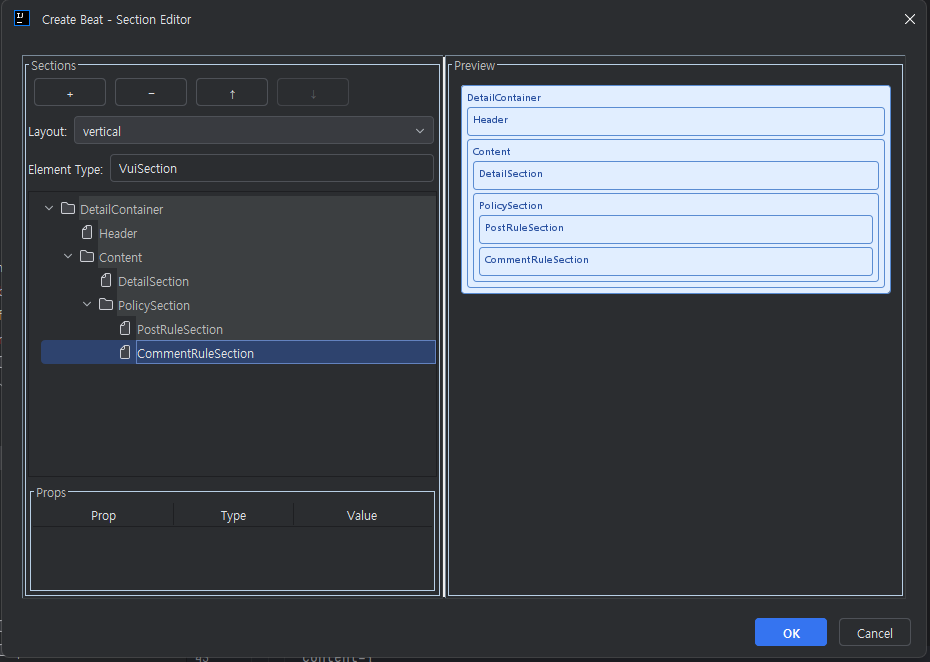
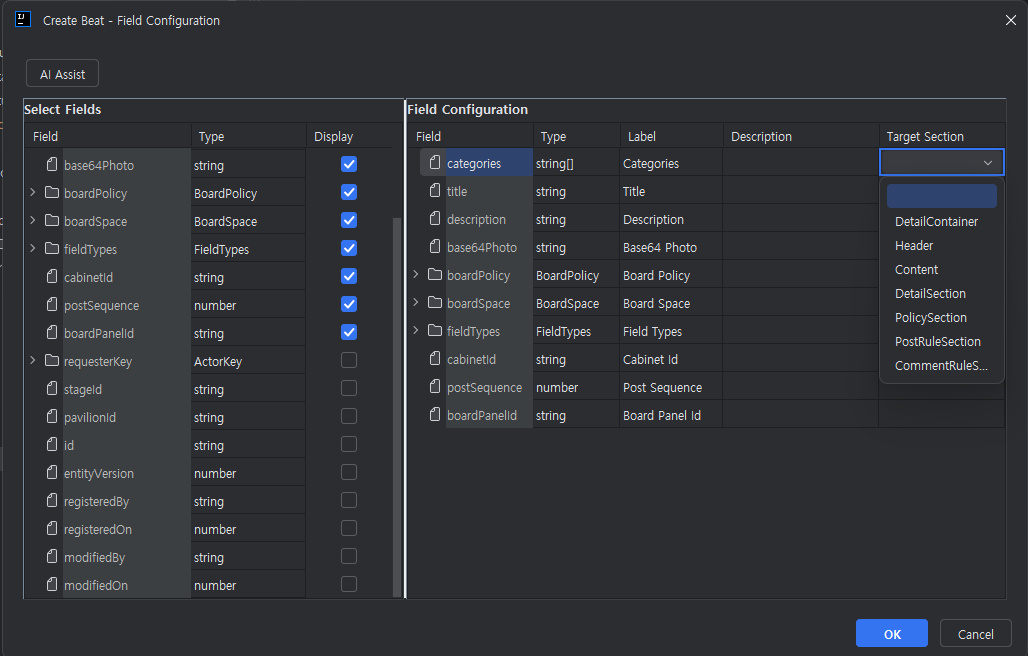
The user had to first set up the section structure and then move to the next dialog to place the fields.
I had to remember the previous settings in this process, and if modifications were necessary, I had to return to the previous dialog.
Especially when dealing with complex screen structures, users had to repeatedly compare sections and fields, making it difficult to grasp the entire screen structure at once.
This increased the user's fatigue and made the setup process cumbersome.
The second issue was the limitations of the Swing-based wireframe UI.
The existing UI was simply structured based on BoxLayout, and there was a significant visual difference compared to the actual service UI.
For example, while the actual components had various styles and alignment structures, they were represented in a simplistic box form in the Swing-based wireframe.
As a result, users often found it difficult to intuitively understand the final results, and there were many cases where they had to revise the outputs after generating them.
The third issue was scalability.
As the project grew, the following functional requirements continuously increased.
-
Field drag and drop
-
Nested Layout Structure
-
Real-time Rendering
-
Change Field Order
-
Responsive Preview
-
Support for various components
However, in the Swing environment, a lot of event handling code and state management code was needed to implement these features.
Especially, as the synchronization of state between components becomes more complex, the difficulty of maintenance has increased dramatically.
Problems also occurred during the UI modification process.
As the layout structure became more complex, even a small modification required adjusting several event logics, and unexpected side effects occurred frequently.
Ultimately, the speed of maintenance cost increase began to outpace the speed of functional expansion, and the need for a new UI architecture became even more pressing.
3. Transition to JCEF-based Architecture
In the new architecture, we actively utilized JCEF (Java Chromium Embedded Framework) provided by IntelliJ.
JCEF is a feature that allows embedding a Chromium browser inside IntelliJ, enabling the execution of web applications even within plugins.
Using this, we converted existing Swing-based dialogs into React-based web applications.
In the new structure, we configured it to launch the browser through JBCefBrowser and run the separately developed vui-editor React application within it.
The biggest advantage of this structure was that it allows for a complete shift to a web frontend approach for UI development.
In existing Swing, various interactions that had to be implemented directly can now be done much more efficiently using React and front-end libraries.
Additionally, by applying a component-based development structure, reusability and maintainability have significantly improved.
In particular, applying a state-based rendering structure has made UI state management much more intuitive.
Previously, it was necessary to manually synchronize the states of multiple components based on events, but in a React-based structure, it was possible to configure the screen to automatically refresh according to state changes.
In the new structure, we aimed to achieve the following goals.
-
Providing a single dialog-based UX
-
Real-time preview support
-
Rich interaction provided
-
Improving Frontend Development Productivity
-
Ensuring Future Scalability for Features
-
Establishing a maintenance system based on web technologies
This structural transition was not just a simple UI change task, but rather akin to redesigning the IntelliJ plugin UI architecture itself.
4. Communication between Java and JavaScript
The first issue that needed to be addressed while transitioning to a JCEF-based structure was the data exchange between Java and JavaScript.
Inside the plugin, there were already data such as ComponentElement, DataModel, and lists of fields managed in the form of Java objects.
This data needed to be conveyed as the initial state of the React application, and conversely, a structure was also needed to send the results edited by the user back to the Java side.
The initial data transfer was implemented using evaluateJavaScript().
After the dialog load is complete, the window.initEditor() function is called to pass JSON data to the React application.
In the React application, we designed it to configure the initial state based on the received data and render the screen.
Conversely, we handled the save request using window.cefQuery().
When the user presses the save button, the React application sends the current state in JSON format, and the Java JBCefJSQuery handler receives it to update the internal state.
During the implementation process, several timing issues also occurred.
For example, if initEditor() is called before the browser is fully loaded, there was an issue where the JavaScript function was not ready, resulting in a failure to initialize.
To resolve this, we changed it so that the initial data is injected only after the DOM load complete event.
In addition, the save callback is configured to wait for a response for a certain period of time using CountDownLatch, and it is designed to time out after a maximum of 2 seconds.
During this process, exception handling and browser state verification logic were also added to enhance stability.
5. Solving Packaging and CORS Issues
One of the more challenging aspects in a JCEF-based architecture was the deployment environment.
The React application is generated as static resources after the build process, and ultimately packaged and distributed within the IntelliJ plugin JAR.
The issue was that when loading the React app via the file:// protocol in JCEF, some features did not work properly due to the browser's CORS policies.
There were blocking issues, especially during fetch API calls or dynamic resource loading processes.
Initially, we approached it simply by loading local files directly, but in actual production environments, various constraints occurred.
To solve this, I extracted the internal resources of the JAR to a temporary directory and changed the structure to serve the resources based on localhost by running a simple local HTTP server.
I used com.sun.net.httpserver.HttpServer to implement the HTTP server.
From the browser's perspective, it came to recognize a typical HTTP request environment, and as a result, it resolved the CORS issue.
In addition, the development environment was configured to allow direct connection to the Vite development server (localhost:5173) for development.
This allowed us to leverage the hot reload environment as it is, significantly improving front-end development productivity.
In particular, since we could immediately check the changes without rebuilding the IntelliJ plugin when modifying the UI, the speed of iterative development increased dramatically.
As a result, we were able to configure both the development and production environments stably, and we can naturally utilize our web-based UI development experience within the IntelliJ plugin.
6. Results and Improvement Effects
The most significantly improved aspect since transitioning to a JCEF-based architecture has been the user experience.
[New Screen]
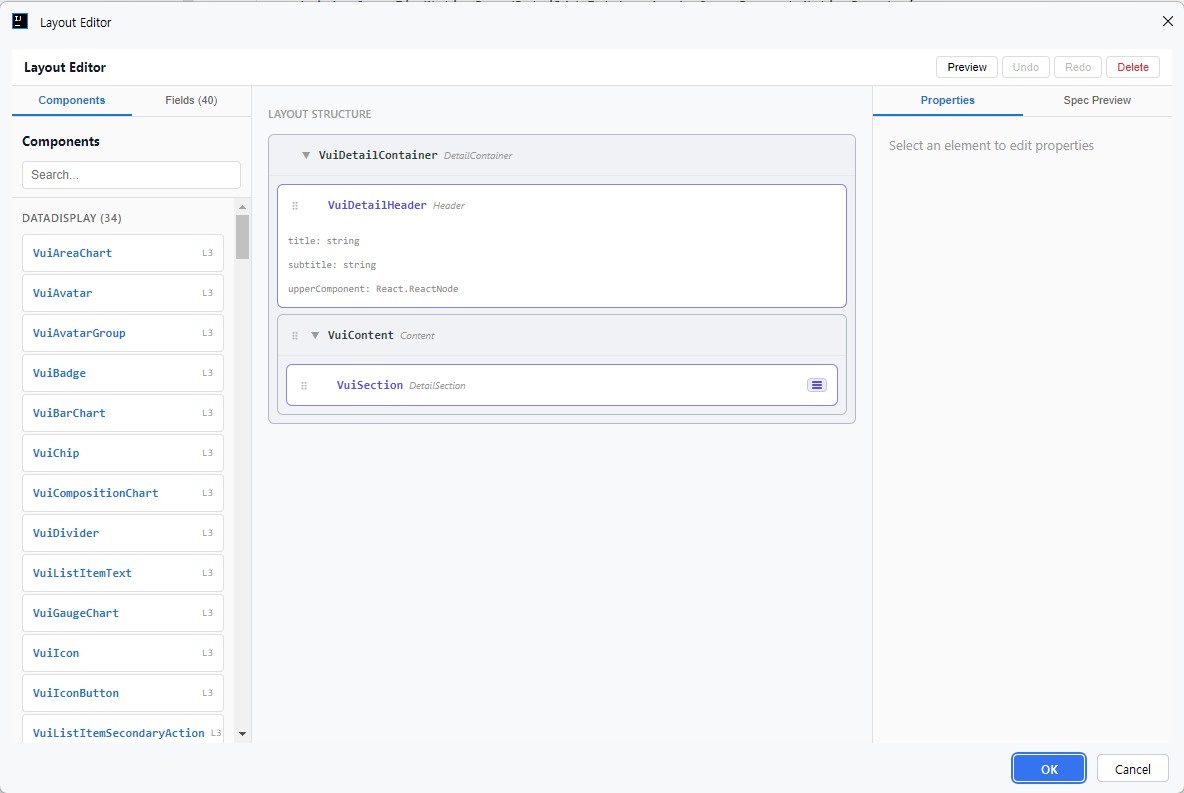
The flow, which was previously separated into two stages, has been consolidated into a single dialogue, allowing users to see the entire screen structure and field configuration simultaneously.
Now users can perform all the following tasks within a single screen.
-
Create section structure
-
Field layout
-
Reorder
-
Drag and drop
-
Real-time Preview
-
Layout Check
Thanks to the real-time rendering feature, users can instantly see the results of the screen they are currently editing, making it much easier to predict the final results.
There have also been significant improvements in terms of UI/UX.
By switching to a React-based structure, we were able to utilize various frontend libraries and state management patterns, making animation and interaction implementation much more natural.
There have also been positive changes in terms of the development organization.
Previously, UI modifications had to be handled entirely within the IntelliJ plugin code, but now it is possible to separate frontend and backend work independently.
Frontend developers could focus on working with the React application, while plugin developers could concentrate on Java-based business logic.
Thanks to this, the two developers were able to work in parallel, and the development speed and maintenance efficiency have greatly improved.
Through this project, I was able to confirm the possibility of actively using web technologies in IntelliJ plugin development as well.
I realized that if a tool requires particularly complex interactions and a rich user experience, a JCEF-based architecture can be a very effective choice.
DEVKC