
-When the last four digits of a phone number become the password-
1. Background: The Convenience of Link Login and Its Hidden Risk
The project I worked on was an electronic patient questionnaire system for a large general hospital. Before their appointment, patients complete a questionnaire sent by the hospital on their mobile devices, and medical staff use the results during consultations. The system consists of Keycloak-based authentication, a Java/Spring microservices backend, and a React frontend. I joined the system, which was already in operation, to handle defect fixes and operational support. This article begins with an issue I encountered while working on those maintenance tasks.
The core entry path for this system is "link login." Patients open the questionnaire link sent by the hospital via Alimtalk and can immediately complete the questionnaire by entering only the last four digits of their phone number, without signing up or entering a password.
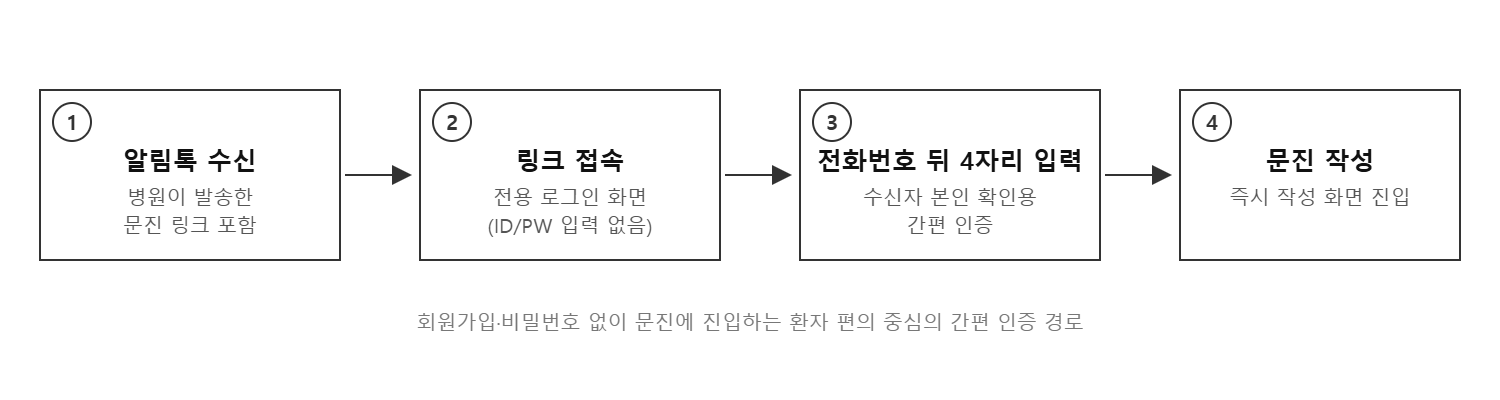
Figure 1. Link login entry flow
The issue came to light during a security review by the client. They raised the concern, "If a user who entered through link login is an official member, couldn't they access the entire member area?" When we reproduced the issue, it turned out to be true. If the link recipient was already a registered member who had signed up with an ID and password, Keycloak issued a token for that member account. Because the screens and APIs did not distinguish between login methods at all, a session authenticated with only the last four digits of a phone number could access My Page, notifications, and the complete questionnaire history. For official members, the last four digits effectively became a password. This meant that a third party who could view the text message could access another person's medical-related information using only a four-digit number with 10,000 possible combinations. The client formally submitted a request for remediation.
2. Requirements Definition: "Users Who Enter Through a Link Should Be Treated the Same as Guests"
The simplest solution would have been to block link login for official members, but that would undermine the service's core convenience: "Users can complete a questionnaire simply by clicking a link." After discussions with the client, we decided not to block these users but to downgrade their privileges. In other words, "A link login session must be treated exactly like a non-member (guest) session, even if the account belongs to an official member."
-
A link session provides only the questionnaire screen for the questionnaire sent this time by default.
-
Past questionnaire history can be viewed only after passing identity verification using the [View Past Records] button, which requires the user's name and date of birth.
-
Member-only menus such as My Page and notifications are not displayed. (The kiosk path is excluded.)
Once the requirements were organized this way, the technical challenge narrowed down to one question: ensuring that the system can reliably determine "how this session logged in."
3. Technical Choice: Where Should the Login Method Be Recorded?
We considered three approaches for where to store login method information and how to transmit it.
-
① Frontend state (sessionStorage, etc.): It is easy to implement, but it can be tampered with through developer tools, so it cannot be trusted as a basis for security decisions.
-
② Server session: It does not fit a JWT-based stateless architecture and would create coupling because multiple microservices would each have to query the session store.
-
③ Token claim: This approach places the login method in a token signed by Keycloak, the identity provider. It cannot be tampered with, and both the frontend and backend can determine it without additional lookups.
We chose option ③. We determined that not only "who logged in" but also "how they logged in" is information that the identity provider should guarantee. Although we would initially use it only to restrict screens, it could later be reused as-is if we expanded the approach to block backend APIs.
3-1. Keycloak Implementation: User Session Note and Mapper
This system was already operating a custom Authenticator through the Keycloak SPI for link login. Because the login flow branches into link, kiosk, or standard ID/password login based on the login form parameters, we added code to record a User Session Note only when link login succeeds.
// LoginAuthenticator.java
if (formData.containsKey(FIELD_PHONE_LAST_4)) {
    // [CASE 1] 링크(전화번호 뒤 4자리) 로그인
    user = handlePhoneLogin(context, formData);
    if (user != null) {
        // User Session Note mapper를 통해 토큰 claim으로 발급된다
        context.getAuthenticationSession()
            .setUserSessionNote("login_method", "link");
    }
} else {
    // 키오스크 / 일반 ID/PW 로그인 — note를 기록하지 않는다
    ...
}
A User Session Note exists only within the Keycloak session, so a protocol mapper must be registered in the client's dedicated scope to expose it as a token claim.
# Keycloak 관리 콘솔 — 클라이언트 dedicated scope > Add mapper (By configuration)
Mapper type          : User Session Note
User Session Note    : login_method
Token Claim Name     : login_method
Claim JSON Type      : String
Add to ID token      : On
Add to access token  : On
When comparing the tokens for the two login methods after applying the change, the claim exists only in the link login token; the ID/password token does not contain the claim at all.
// 링크 로그인 토큰 payload (일부)
{
  "preferred_username": "u-93f2...",
  "login_method": "link",   // <- mapper가 발급한 claim
  ...
}

// ID/PW 로그인 토큰 payload (일부) - login_method claim 자체가 없다
{
  "preferred_username": "u-93f2...",
  ...
}
This is an intentional fail-safe design. The detection logic restricts access "only when the claim value is link." Therefore, even if there is a defect in the detection code or token parsing fails, the result always fails open as "do not restrict," meaning the existing flow for official members remains unaffected.
4. Frontend Application: One Detection Utility, Six Gates
On the frontend, we placed a single function for reading the claim in a shared library and had the screen gates reference it.
/** 링크 로그인 세션 여부 — ID/PW 토큰에는 claim 자체가 없다 */
export const isLinkLoginSession = (): boolean => {
  const token = getAccessToken();
  if (!token) return false;
  try {
    return JSON.parse(atob(token.split('.')[1]))?.login_method === 'link';
  } catch {
    return false;   // 파싱 실패 시에도 "제한하지 않음" (fail-safe)
  }
};
Existing screens handled guest mode based on whether the user was a non-member (isGuest). We therefore introduced the integrated concept isRestricted into the authorization-checking hook by adding link sessions, so that screens only need to check this value.
const isGuest = user?.isGuest ?? false;
const isLinkSession = isLinkLoginSession();
const isRestricted = isGuest || isLinkSession;  // 제한 세션
We applied this criterion to six gates: the routing layout, menu hook, initial entry page, patient dashboard, common header, and questionnaire list. For restricted sessions, only the sent questionnaire and [View Past Records] remain. After identity verification is completed, we standardized the flow so that users are taken to the past history page from the home screen, questionnaire tab, or detail-page exit in the same way. The mobile bottom navigation is displayed only after identity verification has been completed.
5. API Layer: Balancing Openness and Protection
Aligning the screens with guest-level access created a problem in the opposite direction. Three APIs called by guest screens—identity verification, the guest questionnaire list, and guest history lookup—were restricted to ROLE_GUEST, so they also needed to be opened to link-session members with ROLE_USER tokens. Since this change broadened permissions, we separately verified its safety. All three APIs derive the target patient from the authenticated subject in the token rather than from client input, and return data only after rechecking the identity-verification-passed flag recorded in Redis (TTL: 30 minutes). As a result, no path to another person's data was created.
Conversely, we decided to exclude "blocking member-only APIs at the backend whenever the session is a link session" from the current scope. These areas had previously been restricted only at the screen level, and the member-only APIs also had their own defenses, so the actual risk was low. However, because the claim is included in the Access Token, the foundation is now in place to extend the system later by having the backend authorization logic read the claim and block access if necessary.
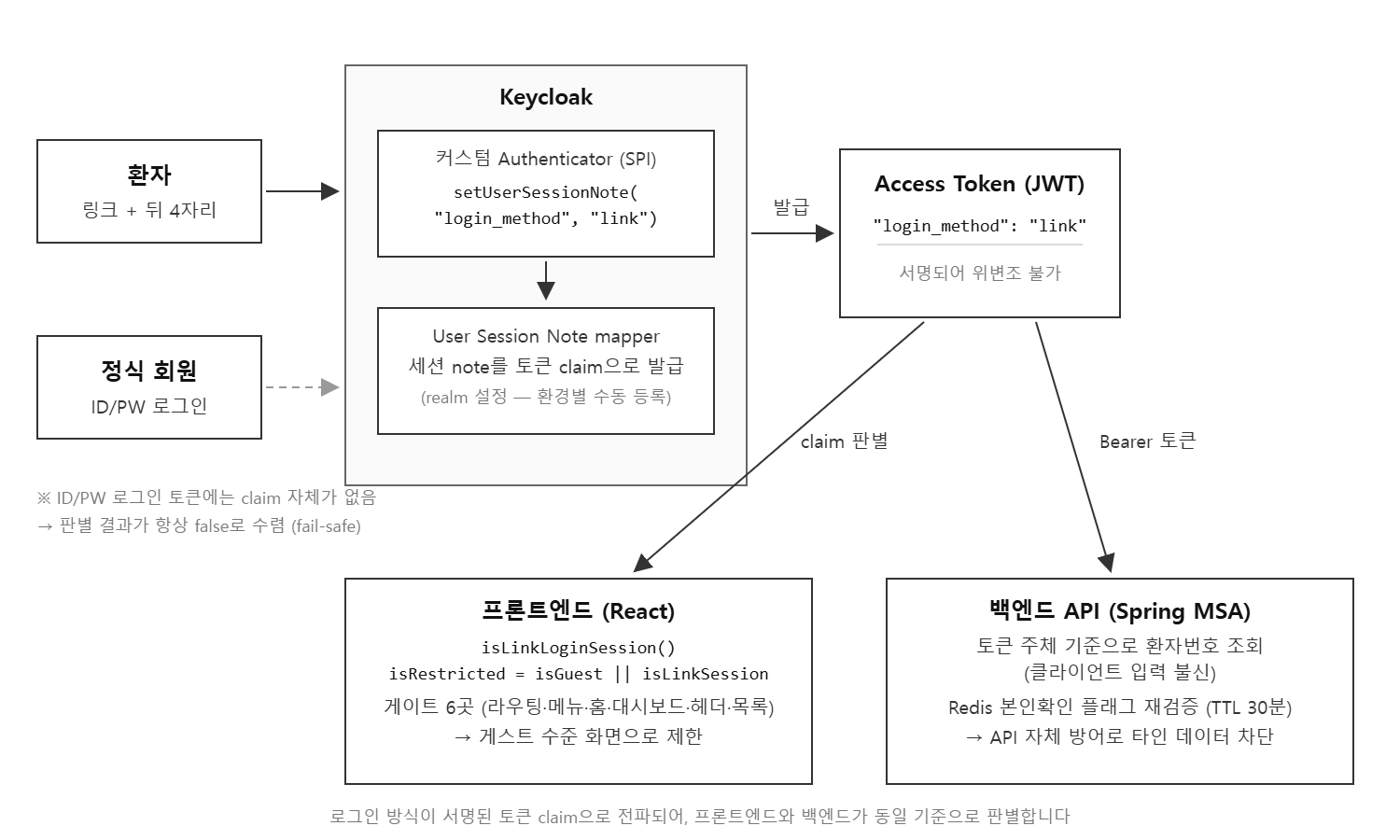
Figure 2. Overall architecture — Propagation of the login method claim and detection points
6. Lessons from the Production Deployment: Configuration That Fails Silently
The biggest lesson came not from the code but from deployment. The Authenticator (SPI) is code and therefore goes through the deployment pipeline, but the mapper is a "configuration" in the Keycloak realm and must be registered manually for each environment through the administration console. The problem is that nothing goes wrong when this configuration is missing. The claim simply is not issued, and because the detection function is designed to fail safe, it quietly returns false. As a result, the screen restrictions disappear while everything appears normal. This kind of "silent failure" is not even likely to be discovered through user reports.
Therefore, we explicitly added the following items to the deployment checklist.
-
Manually register the User Session Note mapper in the Keycloak console when deploying to production (with the same configuration as DEV/STG)
-
Immediately after deployment, cross-check that the login_method claim exists in link login tokens and does not exist in ID/password tokens
-
Perform a final screen-level check that member-only menus are not displayed in link sessions
Since then, we have managed as checklist items any changes that cannot be completed through code deployment alone—especially configurations that fail silently—along with active verification procedures immediately after deployment.
7. Conclusion
What began as defect-fix support ultimately became an effort to improve the authentication architecture. We preserved the convenience of link login while eliminating the vulnerability that allowed access to personal-information screens using only the last four digits of a phone number. I believe the perspective gained through this process is also applicable to other projects.
-
The authentication "method" is also information that the identity provider should guarantee. The pattern of placing the login method in a signed token claim can be applied to any system with multiple authentication paths, such as simplified authentication and social login.
-
The direction of failure must be designed first. Thanks to the structure that restricts access "only when the claim exists," no defect could propagate in a way that broke existing users.
-
Configuration outside the code must be managed with checklists. Configurations that are silently disabled without producing an error when omitted must always be documented together with a verification procedure to be performed immediately after deployment.
eunice