

1. Introduction
In enterprise services, user-specific permission management is one of the most important features. After a user logs in, what menus they can view, what features they can use, and what data they can access are all determined by permission information.
The ongoing service also had a structure where the menus exposed varied according to user permissions. Administrators can set menu permissions by user or role through a separate admin page. When a user logs in, a menu is constructed based on the respective permission information and presented on the screen.
While this permission management feature is essential for service operation, the implementation method can significantly affect system performance and maintainability. Particularly, as the number of users increases and login requests rise, careful consideration of the permission lookup method is necessary.
In this post, I would like to share the issues encountered in managing menu permission information, the background of introducing an in-memory cache using the singleton pattern to solve these issues, the implementation method, and the effects obtained after the introduction.
2. Existing Structure and Issues
The initial system was designed with a relatively simple structure.
When a user logs in, the permission lookup service is called. The service queries the menu permission information for the respective user from the database (DB). Based on the retrieved data, a menu list is generated and returned to the user.
To simply represent the structure, it can be outlined as follows.
1. User Login
2. Call Permission Lookup Service
3. Database Lookup
4. Generate Menu Permission Information
5. Return User Screen
In the early stages of development, the number of users was not high, so this method was sufficient for operation. The data scale was also not large and the number of login requests was low, so there was no noticeable database load.
However, as the service operation period lengthens and the number of users increases, some issues have started to emerge.
Repeated identical data retrieval
The first problem identified was that the same permission information was being retrieved repeatedly.
For example, let's assume there are 1,000 users belonging to the general user group. They all use the same menu permission information. However, in a structure where the database is queried on every login, the same data will be read 1,000 times.
Although permission information rarely changes, access to the database was occurring every time.
Increased database load
Permission information retrieval is a task that must be performed during the login process.
Therefore, as the number of login requests increases, the number of database queries also proportionally increases. In particular, when users log in simultaneously at the start time of a lecture or after system maintenance, permission retrieval SQLs were executed intensively. This could lead to increased database load.
Of course, a single query itself is not very costly. However, when hundreds or thousands of users log in at the same time, unnecessary queries can accumulate and impact the overall performance of the system.
Increased response time
After a user logs in, the first screen must be displayed once the permission information retrieval is completed.
If the database response speed slows down or temporary load occurs, it will directly affect the login response time. Since permission retrieval is a necessary process in the service logic, improving performance during this period was also a key factor in enhancing user experience.
Scalability limitations
Currently, even if the problem is not significant, the number of login requests will also increase as the service scale grows.
A structure where all requests directly query the database could have limitations in terms of scalability in the long run. Therefore, a new structure was needed that could improve query performance while ensuring maintainability.
3. Data Characteristic Analysis
To explore performance improvement measures, we first analyzed the characteristics of the menu permission data. The analysis revealed that the menu permission data has the following features.
First, the frequency of data changes is very low. Permission information can only be modified through the admin page. It is rarely changed during the process of general users using the service.
Second, the frequency of retrieval is very high. Permission information must be retrieved every time a user logs in. In some functions, additional permission validation is also performed.
Third, the same data is shared among multiple users. Users belonging to the same role mostly use the same permission information.
In short, the menu permission data has the characteristic of being "Read-Heavy data with few changes and many reads." This type of data is a typical case where the effect of caching is maximized. Therefore, we considered managing permission information in memory rather than in the database.
4. Why Choose the Singleton Pattern
After deciding to apply caching, there was another concern. It was how to manage the cache object.
Permission information is used in various components, not only in the login service but also in the menu creation service, permission validation service, etc. If a separate cache object is created for each service, the same data could be loaded multiple times into memory. Furthermore, even if the cache is updated in a specific service, it may not reflect in the cache of other services, leading to potential data inconsistency issues.
To solve this, we designed the application to use only one cache object throughout the application. The appropriate pattern for this is the Singleton pattern. The Singleton pattern is a design pattern that creates a single instance of a specific object within the application and allows all components to share that object. By applying the Singleton pattern, the following advantages can be obtained.
Ensuring Data Consistency
Since all services use the same cache object, it is possible to maintain the consistency of permission data.
Minimizing Memory Usage
By loading the permission data into memory only once, it prevents redundant storage.
Fast Data Access
Data is retrieved from memory instead of the database, improving response speed.
Improved maintainability
Since the cache-related logic is concentrated in a single object, it becomes easier to manage. In the Spring Framework environment, the default Bean Scope is Singleton, so this structure can be implemented naturally.
5. Implementation Method
The implementation was carried out with a relatively simple structure.
When the application starts, it retrieves menu permission information from the database and stores it in the cache. Subsequently, when a login request occurs, it returns the cached data without querying the database. When an administrator modifies the permission information, the cache is updated to maintain the latest state.
The implementation flow is as follows.
1. Application startup
2. Retrieve menu permission information
3. Store in cache
4. Login request occurs
5. Return cached data
6. Update cache when modified by administrator
Below is a sample code that simplifies the concept.
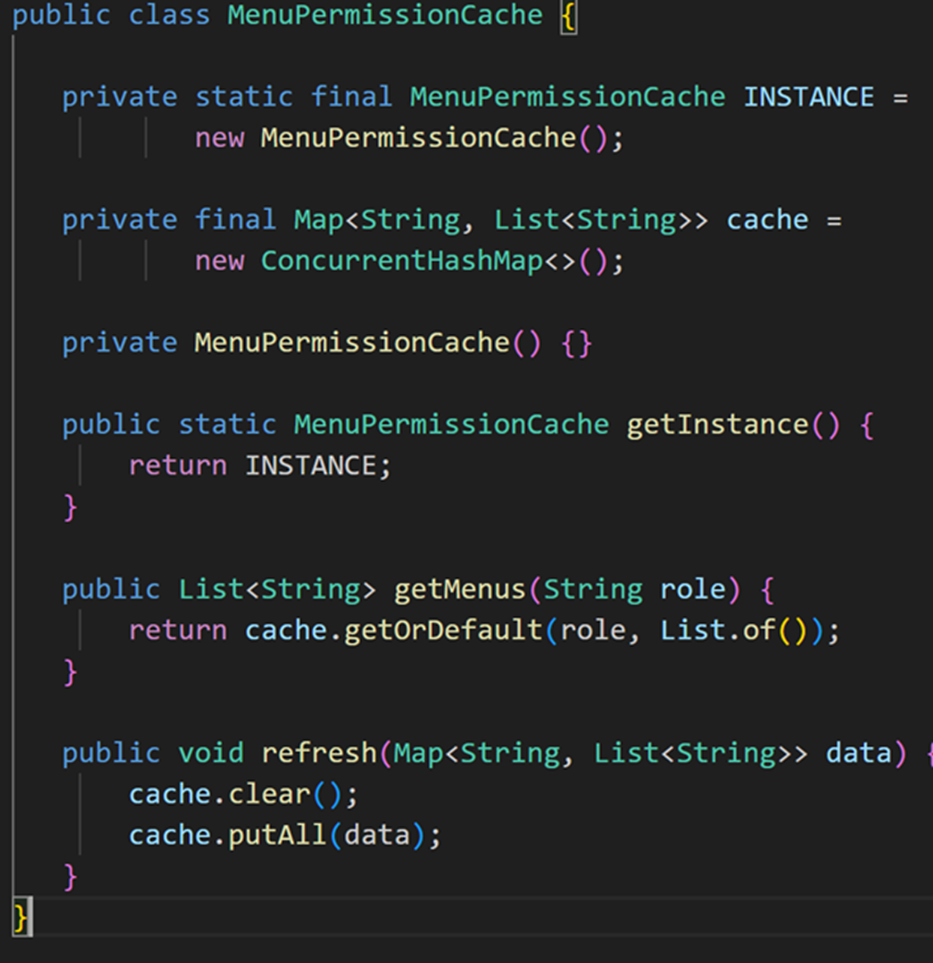
In the above code, only one cache object that stores permission information is created.
During login, cached menu information is retrieved through the getMenus() method, and when permission information is changed on the admin page, the refresh() method is called to reflect the latest data.
In actual operation environments, we added functions such as service layer separation, exception handling, initial loading failure response, and monitoring.
6. Considerations during Operation
The most important aspect considered when applying the cache was cache invalidation. The biggest risk factor in using a cache is the possibility that the actual data and cached data may differ. While permission information is not frequently changed, it is not entirely without the possibility of change. If an administrator modifies a specific menu permission but the cache is not updated, the user will continue to use the permissions that existed prior to the change. To prevent this, we implemented a system to immediately reload the cache when permission modification is completed on the admin page.
We also had to consider concurrency issues. Since permission lookups can be performed simultaneously by multiple users, we used ConcurrentHashMap instead of a regular HashMap to ensure thread safety.
The current structure is designed based on a single server environment. In a single instance, the structure is relatively simple as only the cache stored in the application memory needs to be managed. However, if the service scale increases in the future and expands to a multi-instance environment, there may be issues where each server holds different cached data.
For example, if an administrator modifies a specific menu permission, and only one server's cache is updated while the other servers' caches are not, users may retrieve different permission information. To prevent such issues, we can consider introducing a distributed cache like Redis or implementing a structure that propagates cache refresh events to each server. Currently, we have not applied it as we are in a single server environment, but it has been noted as a point to review for future expansion.
We also considered application restart scenarios. If the server is restarted, all cached data stored in memory will be lost. Therefore, we implemented an initialization logic to automatically load permission information at the start of the application to maintain service availability.
Through this experience, we confirmed that it is much more important to design 'when to refresh' rather than just 'how to store' the cache.
7. Introduction Results
After applying an in-memory cache based on the singleton pattern, we achieved several positive effects.
First, the number of SQL execution occurrences for permission queries during login significantly decreased. Previously, the database was queried every time a user logged in, but after applying the cache, most requests were handled in memory.
Second, the load on the database decreased. With the reduction in the number of connections used for permission queries, we were able to use database resources more efficiently.
Third, response speed improved. Memory access is much faster than database access, resulting in enhanced performance during the login process.
Fourth, maintainability improved. Since permission information is managed within a single object, it became easier to understand the structure. During failure analysis or feature improvement, we were able to quickly grasp related logic.
Fifth, a foundation for future expansion has been established. Currently, we are using in-memory caching, but we have secured a structural foundation that can be transitioned to distributed caching solutions like Redis as the scale of the system expands in the future.
8. Conclusion
Data with low modification frequency and high query frequency, such as menu permission information, is an area where the effect of caching is very significant. By managing the necessary menu permission information after user login through a singleton pattern-based in-memory cache, we were able to reduce database load and improve response performance.
In particular, through this application, we were able to reaffirm that analyzing the characteristics of the data and selecting the appropriate design pattern is more important than simply using a cache. The singleton pattern is a relatively simple structure but can be a very effective choice in situations where globally shared data must be managed.
In the future, we plan to continuously review caching strategies and architectural improvements suited to the characteristics of the service in order to build a more stable and efficient system.
dwmoon