

These days, the term “IaC (Infrastructure as Code)” is very familiar when discussing infrastructure. Creating cloud resources with Terraform, automating server configuration with Ansible, and managing application deployment with Kubernetes and GitOps have become less a specialized technology than a basic part of operations.
However, when you actually build an operational environment, IaC does not end at simply “creating infrastructure with code.” Rather, the important questions begin after that.
-
What should Terraform be responsible for?
-
What should Ansible be responsible for?
-
Where is the boundary between what a Managed Service provides and what we need to operate ourselves?
-
When a change occurs during operations, how can we expand the environment while safely preserving existing resources?
-
Have backup and recovery been verified not merely as “configured,” but as “actually recoverable”?
This article is a firsthand account of building an operational shared platform in a Naver Cloud environment based on managed services. Rather than discarding the existing VM-based architecture, we kept the necessary parts, moved Kubernetes and PostgreSQL to managed services, and combined Terraform, Ansible, and some API-based automation to build an operable structure.
We did not create a perfect structure from the start. Instead, as the work progressed, we repeatedly encountered issues such as “This responsibility should not be here,” “This setting is too broad,” and “The recovery procedure exists only in documentation and has not been practically verified.” Each time, we refined the structure little by little. This article records the current structure and our thinking, including those trials and errors.
Why did we build a new managed platform?
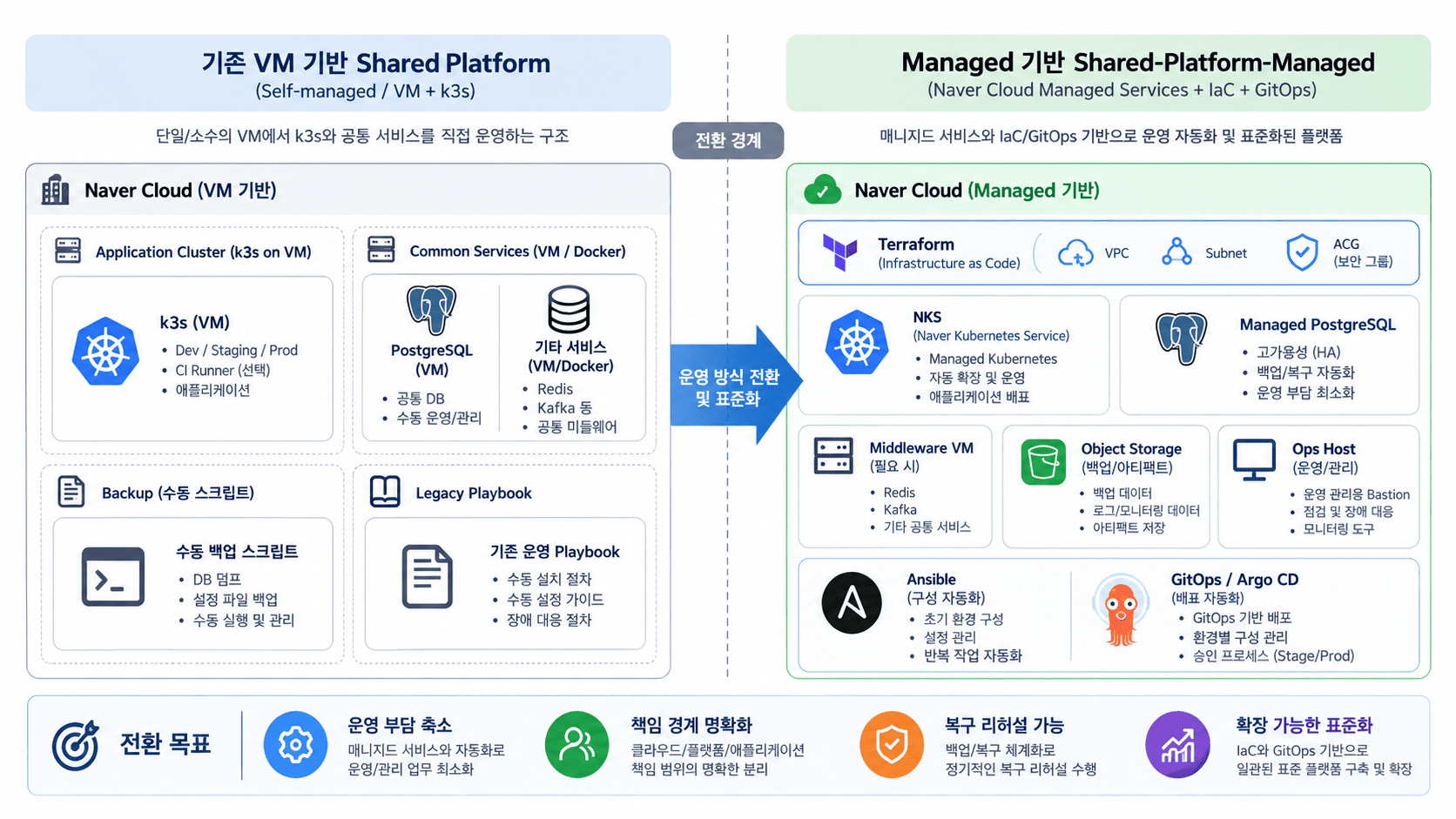
Previously, Kubernetes and PostgreSQL were configured and operated directly on VMs. This approach has the advantage of providing broad control and familiarity. We could log directly into a VM to inspect its configuration, manage roles and databases with privileges close to those of a PostgreSQL superuser, and write the necessary backup scripts relatively simply.
However, as the operational environment grows, the areas that must be operated directly become increasingly burdensome.
-
The burden of operating the Kubernetes control plane
-
Responsibility for PostgreSQL VM patching, failures, backups, and recovery
-
The problem of relying on manual judgment for node expansion and network configuration
-
The complexity of operator access, permissions, and audit trails
-
A structure that makes it difficult to repeatedly conduct recovery rehearsals
Therefore, we shifted our direction toward a managed-centered approach.
-
Kubernetes is Naver Kubernetes Service (NKS)
-
PostgreSQL is Cloud DB for PostgreSQL
-
The common access point is the ops host
-
Middleware such as Redis, Kafka, and OpenBao initially runs on VMs using Docker Compose
-
Infrastructure resources are managed with Terraform stack
-
Operational configuration inside VMs is managed with Ansible playbook
-
Application deployment is separated into a GitOps workflow
The important point was not “Let’s convert everything to managed services.” Rather, our realistic goal was to clearly divide “how far we entrust responsibilities to managed services and from where we take responsibility through our own operational automation.”
The principles we established first
What we revisited most often during the process was not the tools themselves, but the boundaries of responsibility. Terraform, Ansible, GitOps, and Managed Service are all good tools, but when their boundaries become unclear, operations actually become more difficult.
So we established the following principles.
-
Terraform is responsible for the lifecycle of cloud resources.
-
Ansible is responsible for operational configuration inside VMs.
-
GitOps is responsible for Kubernetes application deployment.
-
Within Managed PostgreSQL, database, user, schema, and grant are separated by workload.
-
Backup does not end with configuration; it includes restore and verify.
-
Access permissions are separated by account, and broad policy is minimized.
-
For operational changes, review the plan and diff first, and perform the actual apply only when the intended changes are the only ones remaining.
These principles may look simple, but in practice they were continually put to the test. For example, although it was possible to create DB users in managed PostgreSQL as Terraform resources, when users increased during operations, the provider had a problem in which it planned changes as if the entire set needed to be replaced. In this case, insisting on the principle that “everything must be done with Terraform” would actually be dangerous.
In the end, we managed the databases themselves with Terraform, incrementally created managed PostgreSQL users through the official Naver Cloud API, and divided schema/grant/default privilege management between Ansible and SQL bootstrap. Rather than forcing everything into a single tool simply because it is IaC, it was more important to choose tools suited to the nature of the state and changes involved.
Why we divided the Terraform stack
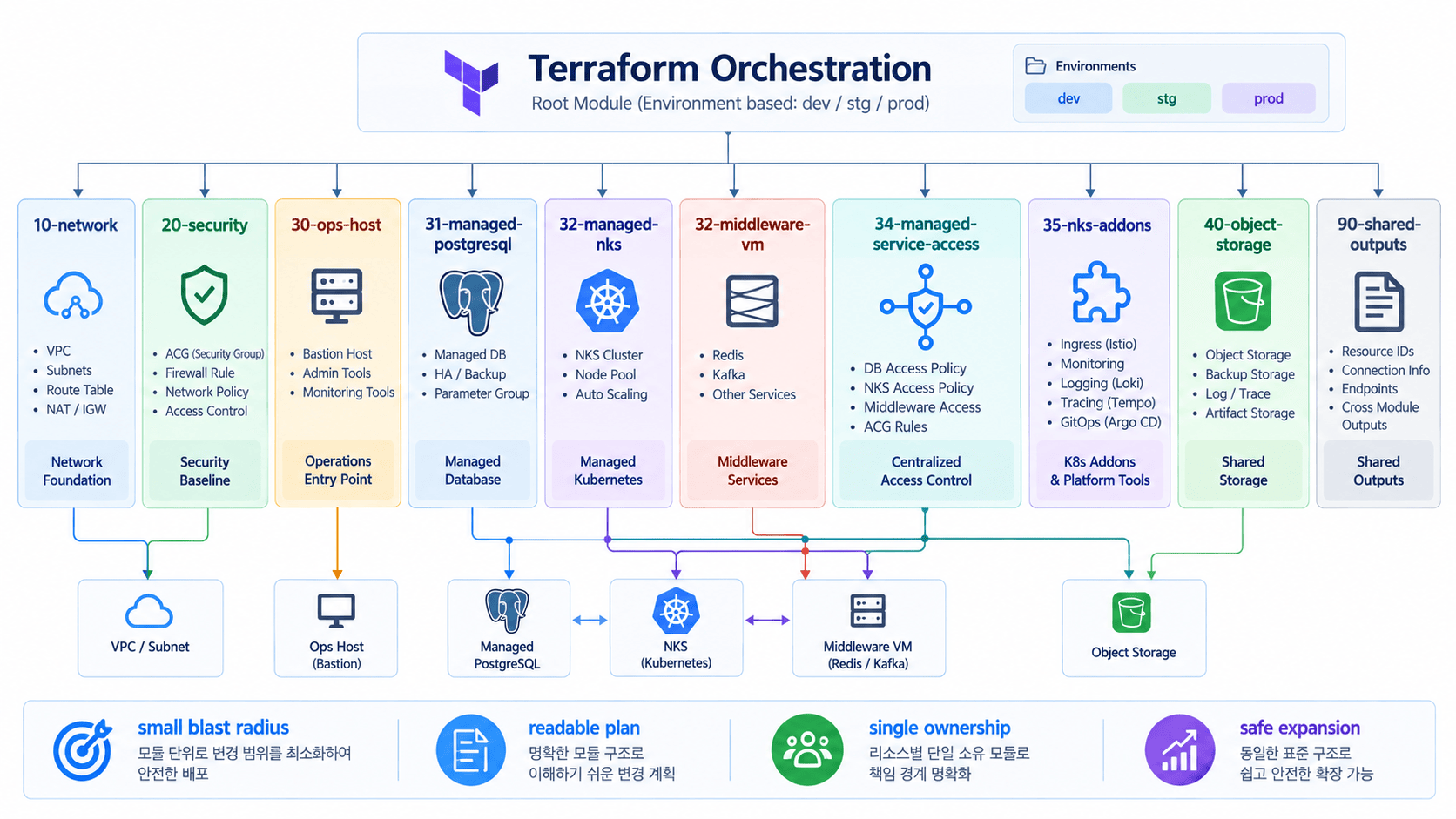
Terraform can manage everything as one huge root module. However, in an operational environment, it was safer to divide the stacks into smaller units.
The current structure is roughly as follows.
shared-platform-managed/
└── terraform/
    ├── 10-network/
    ├── 20-security/
    ├── 30-compute-ops-host/
    ├── 31-managed-postgresql/
    ├── 32-managed-nks/
    ├── 33-compute-middleware-vm/
    ├── 34-managed-service-access/
    ├── 35-nks-addons/
    ├── 40-object-storage/
    └── 90-shared-outputs/
Each stack has different responsibilities.
-
10-network: VPC, subnet, route, NAT gateway
-
20-security: ACG and basic security boundaries
-
30-compute-ops-host: ops host serving as the operational entry point
-
31-managed-postgresql: Cloud DB for PostgreSQL instance
-
32-managed-nks: NKS cluster and node pool
-
33-compute-middleware-vm: middleware VM for Redis, Kafka, OpenBao, and other components
-
34-managed-service-access: access rules between NKS, middleware, and managed DB
-
35-nks-addons: cluster add-ons such as the NKS CSI add-on
-
40-object-storage: buckets for DB backups, observability, OpenBao backups, etc.
-
90-shared-outputs: a summary stack that provides a single place to view outputs from other stacks
Dividing them this way does have the disadvantage of lengthening the application order. However, in the operating environment, the advantages outweighed that disadvantage.
For example, when increasing the number of node pools, it is unsettling if the network or DB is mixed into the plan. If changes to NKS or PostgreSQL appear alongside the addition of a single Object Storage bucket, you need to stop. Splitting the stacks reduces the scope of changes and the burden of reviewing the plan.
Another important point is “single ownership.” For example, 31-managed-postgresql creates the managed PostgreSQL service itself, but the actual ACG rules for service access are organized so that 34-managed-service-access is the sole owner. This is because drift and conflicts can easily arise if the DB and NKS stacks each start modifying the access rules.
Build the network broadly, but keep access narrow
At first, there seemed to be a lot of subnets. Dividing them into public subnets, NAT gateway subnets, LB subnets, k8s subnets, DB subnets, and middleware subnets may feel excessive.
However, in the operating environment, separating names and purposes made things much easier later.
For example, it looked like this.
-
public: ops host, NAT gateway, public LB
-
private: NKS worker node, DB, middleware VM, private LB
-
Zone distribution: subnet separation considering KR-1 and KR-2
Of course, not every subnet is used in a complex HA structure from the beginning. The middleware VM also started with just one instance. However, when expanding OpenBao, Kafka, and Redis to three instances later, or when changing the DB to HA/multi-zone, it is much less risky if the network names and purposes have already been separated.
What I learned here is that if you simplify subnet design too much based only on the present, it becomes difficult to modify later. Conversely, there is no need to over-automate everything from the start. The key was “start with names and boundaries that are simple to use now but can be expanded later.”
Managed NKS: You may not operate it directly, but design responsibility remains
Using NKS reduces the operational burden of the Kubernetes control plane. However, that does not mean Kubernetes operational design disappears.
For the current configuration, we based the design on a KVM-based regional cluster and separated node pools by zone. For example, we divide the zones into shared-a and shared-b and increase worker nodes with the same specifications in a balanced manner.
During operations, questions like these continue to arise.
-
Is the current node memory utilization sufficient?
-
Should the nodes be increased before scaling out the pods?
-
When a node becomes NotReady, do the Terraform state and the console state match?
-
Is the CSI add-on enabled before deploying a workload that requires a PVC?
-
Will changing the LB type or configuring the PROXY protocol affect the existing ingress?
In actual operations, even “adding one node” is not a simple task. You need to verify in the Terraform plan that only node_count is changing and that other resources, such as ACGs or LBs, are not being modified. If the plan differs from the intention, it is right to stop the apply.
Through this experience, I felt that the advantage of IaC is less about “automatically applying changes” and more about “being able to see exactly what will change before applying them.”
What I learned most from Managed PostgreSQL
Managed PostgreSQL was the area where I experienced the most trial and error.
Many tasks that were routine with self-hosted PostgreSQL were not possible with managed PostgreSQL.
-
There is no superuser privilege.
-
pg_authid cannot be queried directly.
-
It is difficult to use a globals dump as-is.
-
The extension owner differs from the service role.
-
The installation method for extensions such as postgis and pgvector follows the provider's policies.
-
Even creating a DB user may require using Naver Cloud's official management path rather than SQL CREATE ROLE.
At first, I thought I could simply bring over the existing VM-based bootstrap SQL. In reality, that was not the case. Database creation, user creation, schema creation, grant assignment, extension verification, and backup/restore had to be separated individually.
Currently, we use the following structure for each workload.
shared-platform-managed/
└── workloads/
    ├── devlime-managed/
    ├── banjang-managed/
    └── spicedb-managed/
Each workload has the following responsibilities.
-
Create the workload database with Terraform
-
Incrementally ensure the required DB users through the official Naver Cloud API
-
Align schemas, grants, and default privileges with Ansible
-
Explicitly define service-specific schema naming and role naming
-
Perform the required extension preflight checks
For example, devlime manages the devlime, vizend, and modlime schema and role families together within a single database, devlime_prd. banjang likewise defines the banjang, vizend, and modlime families separately within banjang_prd.
The advantage of this approach is that “the database is one, but responsibilities can be separated declaratively.” The disadvantage, conversely, is that the initial definitions become somewhat verbose. However, the benefit of being able to clearly identify where to make changes when services are added or role permissions are missing during operations was greater.
PgBouncer and the search_path issue
We also configured PgBouncer while considering the number of connections to the production DB. Instead of services connecting directly to PostgreSQL, the structure shares a connection pool through PgBouncer.
There were unexpected issues during this process as well. Some services specified the schema through currentSchema in the JDBC URL, but PgBouncer was configured not to process the search_path passed as a startup parameter as-is. This was because search_path was included in ignore_startup_parameters.
At first, it seemed that removing the search_path ignore setting from the PgBouncer configuration would solve the problem. However, it could affect connections from all services, and changing the shared PgBouncer configuration during operations was risky.
In the end, the safer approach was to set a database-specific default search_path on the DB role.
-
The service role looks at its own schema first.
-
Include the schema where the extension is installed in search_path on managed PostgreSQL.
-
Even when going through PgBouncer, schema resolution is stabilized through the role defaults.
This experience made me reconsider which of “the settings in the application URL” and “the default settings of the DB role itself” should be used as the operational standard. In operations, settings that remain effective even when the connection path changes—in other words, DB role-level defaults—were often more stable.
A backup is more than a dump file; it includes recoverability.
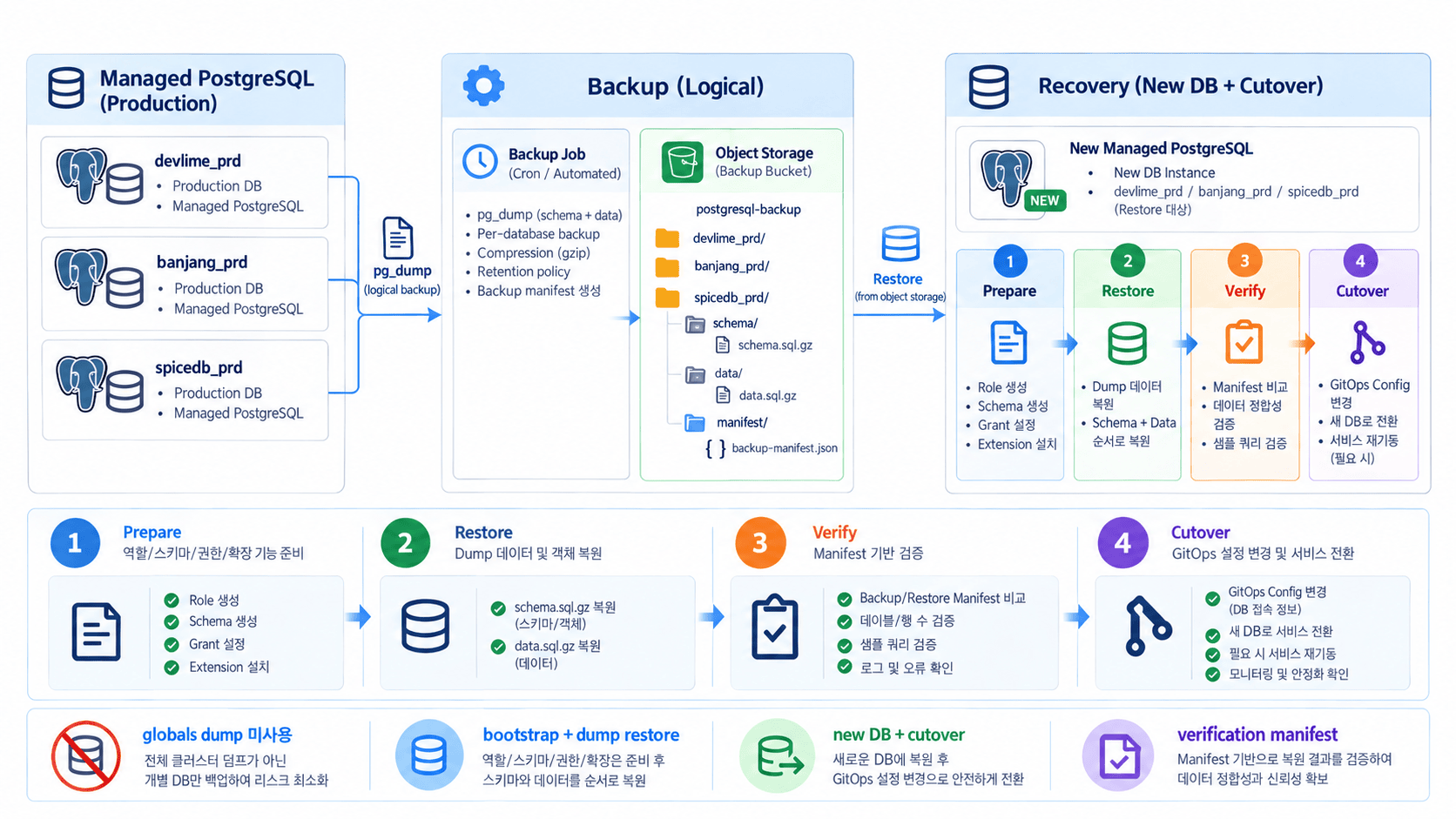
Backups also involved a great deal of trial and error. In particular, because it is difficult to rely on globals dump as-is with managed PostgreSQL, we had to redefine the boundary between backup and recovery.
The current standards are as follows.
-
The managed PostgreSQL instance itself uses Naver Cloud's automated backups.
-
We also perform logical backups separately for each workload DB.
-
globals dump is not used by default.
-
bootstrap is responsible for preparing roles, schemas, grants, and extensions.
-
dump restore is responsible for restoring data and general objects.
-
After restore, we compare schema/table/row counts using a verification manifest.
At first, it is easy to think, “Wouldn't it be enough if the backup file were uploaded to object storage?” However, that is not the case when you actually perform a recovery.
Recovery must be able to answer the following questions.
-
Can a new DB be created?
-
Can user and schema permissions be aligned again?
-
Can the restore be performed without extension conflicts?
-
Do the schema DDL in the dump and the provider-managed schema of the managed DB conflict?
-
Can row counts or schema counts be verified after recovery?
-
Can the cutover be performed so that the actual service uses the new DB?
For this reason, we also separated the recovery stack from the workload.
shared-platform-managed/
└── recovery/
    ├── devlime-managed/
    └── banjang-managed/
It was risky to temporarily insert a recovery DB into the production DB stack. In practice, due to the characteristics of the managed PostgreSQL provider, changes to the database list sometimes appeared as replacements. Therefore, we separated recovery into a separate stack and also defined separate naming rules for the rehearsal DB and incident cutover DB.
The default recovery strategy is new DB + cutover. Rather than cleaning and restoring the production DB directly, it is safer to recover it into a new DB, verify it, and then switch the application connection.
OpenBao backups are more sensitive than PostgreSQL backups.
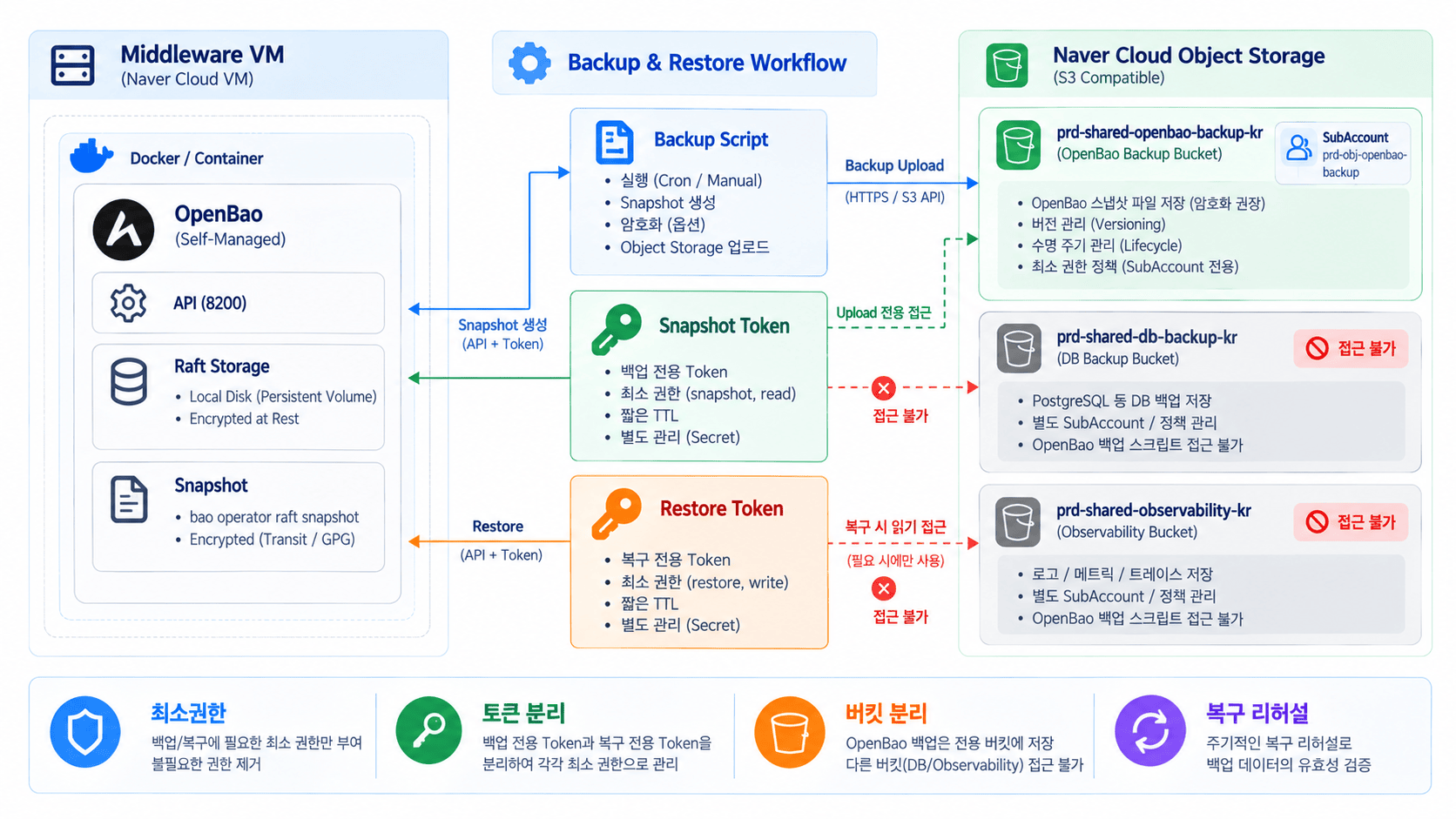
We built a structure in which solutions such as OpenBao, Kafka, and Redis are deployed on the middleware VM using Docker Compose. We are starting with a single-node setup, but we have left the boundaries open so that it can be expanded to three nodes or moved to a managed alternative if its importance increases later.
Among them, OpenBao was particularly important from a backup perspective. OpenBao is not merely an application; it is a secret store. Therefore, it was not appropriate to mix it with PostgreSQL logical backups using the same bucket, the same account, and the same permissions.
The current direction is as follows.
-
Use a dedicated Object Storage bucket for OpenBao raft snapshots
-
Use a dedicated SubAccount for OpenBao backups
-
Separate it from the DB backup account
-
Separate the snapshot token and restore token
-
Keep the restore token empty during normal operations
-
Perform restores in a separate rehearsal or maintenance window rather than directly on the live OpenBao
We also organized access management separately as part of this process. Because the Naver Cloud Terraform provider does not sufficiently cover areas including SubAccount, policy assignment, and access keys, we created a helper script called accessctl.py.
This script manages the following.
-
SubAccount desired state
-
user-created policy
-
bucket scoped permission
-
policy assignment
-
access key creation
-
A plan to remove existing broad policies
There was also an important lesson here. Object Storage bucket policies are not matched simply by bucket name; they require a Resource Manager NRN. Therefore, when a bucket name is provided, we enhanced the process to look up the exact bucket NRN through the Resource Manager API and reflect it in the policy.
Operational permissions are more important to make work only as much as necessary than merely to make them work. In particular, a backup account should not access every bucket; it should access only its own bucket.
Ansible is closer to documenting operational procedures than to “automating server configuration.”
Ansible may appear to be merely a tool for installing packages or copying files. However, in this project, the Ansible playbook served to codify operational procedures.
For example, the ops host prepares the following.
-
kubectl
-
helm
-
ncp-iam-authenticator
-
kubeconfig generation helper
-
managed PostgreSQL connection helper
-
PostgreSQL logical backup service/timer
The middleware VM prepares the following.
-
Docker Engine
-
Docker Compose plugin
-
OpenBao compose/service
-
Kafka compose/service
-
Redis compose/service
-
backup script scaffold
-
OpenBao init/unseal helper
The wrapper script was particularly useful. Depending on the playbook, some tasks must be run in root mode while others must be run in ops mode. Therefore, run-playbook.sh checks the ansible_user in the current inventory and refuses to run if it does not match.
These small guardrails are important in real operations. Running a playbook with the wrong user can result in a half-applied configuration or tangled permissions. Because IaC is automation, it can actually make small mistakes grow rapidly and become large problems. That is why we needed a structure capable of rejecting execution before it starts.
The Relationship Between GitOps and IaC
The presence of Terraform and Ansible does not eliminate the need for GitOps. Rather, their responsibilities are different.
-
Terraform: cloud resource lifecycle
-
Ansible: internal VM operations configuration and bootstrap
-
GitOps: Kubernetes resource desired state
-
workload bootstrap: aligning the internal database structure
For example, increasing application replicas, applying a PgBouncer connection URL, or changing Ingress/LB settings falls within the GitOps domain. Increasing the NKS node pool, on the other hand, falls within the Terraform domain. Aligning managed PostgreSQL users and schema permissions falls within the workload bootstrap domain.
If these boundaries are not clearly defined, it becomes unclear where to make changes when an operational problem occurs. In fact, I reorganized things several times because the boundaries were ambiguous. Moving workloads under shared-platform-managed was one of the reasons for doing so. In the current structure, the fact that workloads depend on the current managed platform is also apparent from the path.
Summarizing the current structure in one sentence
The current structure can be summarized as follows.
Terraform establishes the baseline for cloud resources, Ansible prepares the operational entry points and internal VM configuration, workload-specific bootstrap aligns the internal state of managed PostgreSQL, and GitOps manages the desired state of Kubernetes applications.
In a little more detail:
-
shared-platform-managed/terraform: network, security, NKS, PostgreSQL, middleware VM, Object Storage
-
shared-platform-managed/ansible: ops host, NKS tools, database access/backup, middleware VM configuration
-
shared-platform-managed/workloads: DB/schema/role/grant for devlime, banjang, and spicedb
-
shared-platform-managed/recovery: recovery rehearsals and new DB + cutover preparation
-
shared-platform-managed/access: Object Storage SubAccount and least-privilege policy
-
Separate GitOps repository: actual Kubernetes app/infra manifests
The advantage of this structure is that each stage is relatively clear. The disadvantage is that there appear to be many directories to someone seeing it for the first time. That is why documentation and runbooks have become important as well.
Checkpoints I found particularly important during operations
1. Terraform plan is the “pre-application guide”
plan is not simply a step before apply. For operators, it is a guide to the changes. If changes other than the intended resources appear, you should stop.
There was a case where adding a single Object Storage bucket showed three existing policies as updates. There was no actual difference in permissions; it was a false positive in the comparison caused by the API returning condition: {}. In such cases, the right approach is to fix the comparison logic before running apply.
2. Managed Services do not eliminate responsibility; they change it
Using NKS reduces control plane operations. However, node pool, add-on, ingress, storage class, and resource pressure management are still necessary.
Using Managed PostgreSQL reduces engine operations. However, role, schema, extension, and backup/restore strategies must instead be designed even more explicitly.
3. Backup must always extend through restore and verification
Having a backup file does not mean that recovery is possible. managed PostgreSQL has globals dump limitations, OpenBao uses different snapshot and restore tokens, and Object Storage permissions must also be managed separately.
For PostgreSQL, I have currently established a prepare -> restore -> verify flow, while I am still organizing the raft snapshot backup/restore helper for OpenBao.
4. It is better to start with narrow account and permission scopes than to narrow them later
At first, you may want to connect quickly using broad Object Storage permissions. However, operational backup accounts are particularly sensitive.
The current direction is to separate DB backup, observability, Banjang vault, and OpenBao backup into separate SubAccounts and bucket-scoped policies.
5. Documentation is also part of IaC
Terraform and Ansible code alone make it difficult for operators to understand why things are configured this way. That is why I have continued to enhance the README, recovery guide, cutover guide, and access guide.
Documentation should not be written separately later; it needed to change along with the structure. In practice, I also revised the runbook several times while conducting recovery rehearsals.
Remaining tasks
I do not consider the current structure to be complete. There are clearly still tasks remaining.
-
Establishing criteria for expanding the middleware VM from a single-node setup to an HA architecture
-
Separating the OpenBao restore rehearsal environment
-
Managing Object Storage lifecycle/retention policies as IaC
-
Defining criteria for NKS node autoscaling or scaling out
-
Expanding the scope of PgBouncer adoption and automating validation for each service
-
Individualizing developer/operator access accounts
-
Further organizing the way sensitive information is managed
-
Eliminating drift between the runbook and the actual automation
But at least for now, it has become much clearer than before “where what is managed.” And when a problem occurs, it has become easier to trace which stack, which playbook, and which workload definition to look at.
Conclusion
Working on this project changed my perspective on IaC a little.
At first, it is easy to think of IaC as simply “building infrastructure with Terraform.” But in an operational environment, that alone is not enough.
Ultimately, IaC is closer to the process of structuring operational knowledge.
-
Which resources need to exist
-
Who owns those resources
-
In what order they should be created
-
How far to automate and where approval is required
-
What to use for recovery when a failure occurs
-
How to prove that recovery actually works
IaC becomes operationally viable when the code and documentation that answer these questions exist together.
Terraform created the skeleton of the infrastructure. Ansible made operational configuration inside VMs repeatable. workload bootstrap declaratively aligned the internal state of managed PostgreSQL. GitOps became the standard for continuously reconciling Kubernetes application state. And the backup/recovery runbook became a safety net for verifying “whether we can really recover when a failure occurs.”
There is still much room for improvement. Even so, as we moved from a self-hosted-centric structure to a managed-centric one, I believe we took a step forward—not merely by creating cloud resources, but by dividing operational responsibilities, reducing the blast radius of changes, and building a recoverable structure.
It is closer to a process of continuous refinement than to completion. But the biggest lesson from that process is clear.
Good IaC is not code that applies successfully; it is a structure that allows operators to make changes with confidence.
Andy