
Introduction
We have many servers in our environment. There are not just one or two, but over 100 servers. And universally, Nexus is running on those servers. Instead of downloading external libraries or packages directly from the internet each time, a nearby Nexus acts as an 'intermediate repository' that caches them once and quickly serves them. In an environment where the external network is unstable, this was quite an important device.
The problem is that each of these Nexuses must have the proxy settings done the same way, and there are often cases where repositories are added or several settings are added. If there are dozens of servers, we had to repeat that setting dozens of times regarding which external storage to look at and which repositories to group together. It was a continuous cycle of going into one server to set it up, then going out, and going into the next one to set it up the same way.
The first few servers were manageable. But gradually, as the servers increased, I forgot to configure some servers, typos occurred on some, and some were somehow subtly configured differently without my knowledge. I thought, 'I did it all the same,' but in reality, they were all different.
Then I suddenly had this thought. The configurations of these servers should ultimately all be the same. So, if I write down once what 'it should be configured like this,' wouldn't it be enough for the machine to apply that the same way to all servers? That was the trigger for me to find Ansible.
So what is Ansible?
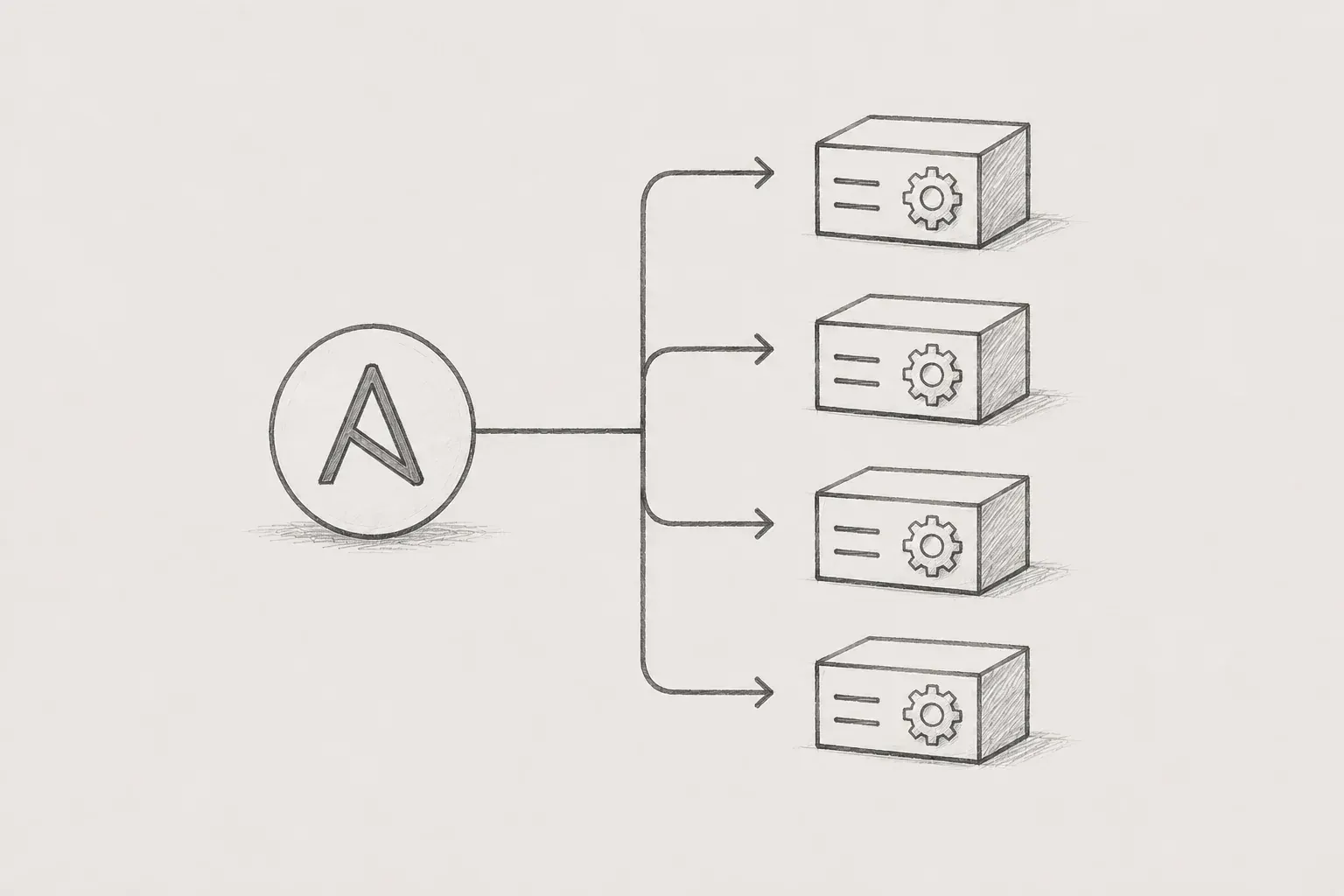
Ansible is, in short, 'an automation tool that performs the same tasks on multiple servers.' If I specify, 'These servers should be in this state,' Ansible connects to each of those servers one by one and makes them that way. Whether it's dozens or hundreds, just one command is needed.
There were several reasons why I was drawn to Ansible. It turned out that the nature of this tool matched our situation very well.
First, there was no need to pre-install anything on the servers.Among automation tools, there are some that require a program called 'agent' to be pre-installed on each managed server. But Ansible only needs SSH access. In a situation like ours, where there are dozens of scattered servers, installing and managing something on all those servers was an effort in itself, and the lack of that burden was significant.
Second, it was safe even if executed multiple times.This was something that didn't initially resonate with me, but as I used it, it became a really important property. Ansible does not touch 'if it's already like this.' For instance, if a certain configuration is already correct on the server, even if it runs again, it does not recreate it but judges that 'it's already right' and just moves on. So there was no need to remember 'whether this server was done or not' individually. If executed once across the whole, only those that were not correct were filled in automatically.
Third, I could write the configurations like text.Ansible's configuration files are in a human-readable format, so even if one doesn't deeply understand programming, the 'what is trying to be done' is clear. It's not grand code, but more like a manual detailing 'make this repository like this' step by step. It's nice that even later, or for colleagues to see, it can be understood.
Basic structure of Ansible
It is much easier to understand how Ansible works when viewed as a diagram. The overall structure is surprisingly simple. In the center is the 'Automation Engine,' and as information about 'what to do' comes in from the left, the tasks spread out to various servers (or devices) on the right.
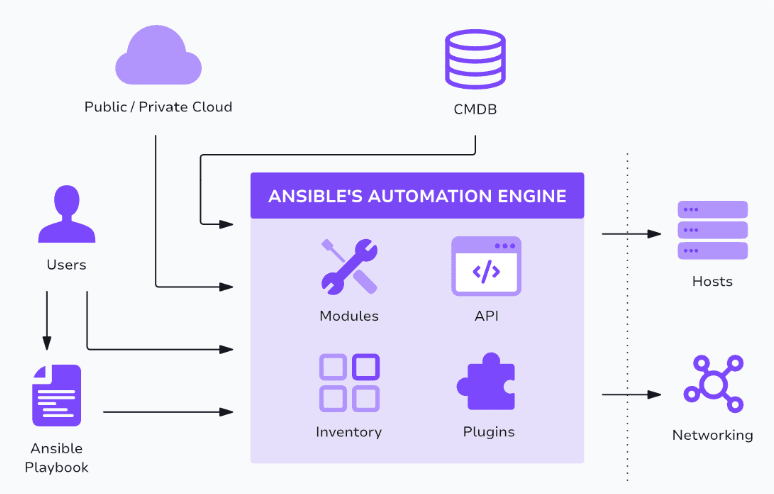
Image source: https://spacelift.io/blog/ansible-architecture
If we take a closer look at each element of the diagram, we find the following. It may look like difficult terminology, but once you know their roles, it's straightforward.
• Automation Engine: This is the core located in the middle of the diagram. It acts as the 'brain' that actually processes the tasks, usually placed on a workstation or a dedicated management server. This is referred to as the Control Node, where everything begins.
• Playbook: This is the task instruction manual that specifies 'what to do and how to do it.' Written in a human-readable format (YAML), it sequentially details tasks like 'create this repository.' This is where the correct answer is documented once.
• Inventory: This is the list of 'which servers to apply' the tasks to. It is essentially an address book for dozens of Nexus servers in our case. When a new server comes up, you just need to add a line here. In my case, once the tasks were completed, I automatically commented out the server addresses to prevent the tasks from being executed repeatedly.
• Modules: They are small tools that perform actual tasks. They are components that perform tasks like 'copy a file' or 'change settings', which are briefly sent to the target servers when Ansible is needed, executed, and then cleaned up.
• Plugins / API: This part is used to extend Ansible's capabilities or connect with other systems. At first, it is okay to know little about it; it's enough to understand that 'it can be extended in this way'.
• Hosts / Networking: These are the servers or network devices where the tasks are actually applied, shown on the right side of the diagram. In our case, it refers to dozens of servers running Nexus. The key point is that there is no need to pre-install anything on these targets.
The most noteworthy part of this diagram is the direction of the flow. Tasks spread out from the left (the written instructions) → through the middle (the engine) → to the right (dozens of servers) All tasks are executed at once. My job is only to write the 'correct answer' on the left, and the engine takes care of distributing that answer equally to all servers. The repetitive manual process of accessing each server one by one has been organized into this single diagram.
What has changed?
The first thing I felt after applying automation was time. In the past, managing dozens of servers took all day, but now it takes just one command. Even if a new server is added, all I need to do is add one more line to the list and run it again.
But the more fundamental change was 'consistency'. I have come to believe that all servers are configured the same way. The subtle differences that occurred when done manually have disappeared.
And my mind has become much more at ease. In the past, there was always a vague anxiety about 'could there be a missing server', but now I can just execute it once for the entire system. Since already correct servers remain unchanged, only misaligned servers are adjusted automatically. This reassurance of 'filling only what is missing' significantly alleviated the burden of managing dozens of servers.
Of course, automation is not a cure-all. Rather, the power of 'applying to everyone at once' can also become a risk.
When doing it by hand, a mistake on one machine only affected that one machine. However, automation is different. If you write the answer incorrectly, that incorrect setting spreads across “all” servers simultaneously. A mistake in one place can lead to failures on dozens of machines. Therefore, before applying it to the whole, it is absolutely necessary to first test it on one or two machines.
It is also advisable to limit all operations as conservatively as possible. Ultimately, if an issue arises that you haven't anticipated, it can become a problem for everyone.
There are also lessons learned from a security perspective. This tool ultimately operates by “connecting” to multiple servers. That means sensitive values like account information needed for logging in or Nexus admin passwords must be stored somewhere. At first, there was the temptation to simply write it in the configuration file. However, that would be like giving the entire password to anyone who sees that file.
Fortunately, such tools had methods to encrypt sensitive values separately for storage. Passwords were locked away separately from the configuration text to prevent them from being uploaded to the repository. Resisting the urge to “write it down for convenience” was the way to prevent major incidents later. Automation means handling sensitive information all in one place.
In conclusion
Looking back, my introduction of Ansible was not driven by technical learning. It was simply because “it was cumbersome to repeat the same task dozens of times” and “people kept making mistakes.”
However, I gained something unexpected during that process. It wasn't just about saving time; my way of working changed. I went from being someone who “remembers procedures” to someone who “writes down the desired state.” The know-how that existed only in my head became text that anyone could read and modify. And I was able to confirm the fact that “all our servers are the same,” not as a vague expectation but as a reality.
If there is anyone out there facing similar dilemmas in front of dozens of servers, I encourage you to consider this once. Do you really have to do that repetition by hand? The idea of “writing down the answer once and leaving the rest to the machine” changes more than you might think. At least, it did for me. Thank you for reading this insufficient piece.
Bang